
Magento 2 Dependency Injection Explained — The Complete PHP Developer Guide (2026)
Master Magento 2 dependency injection — constructor injection, di.xml, Object Manager rules, Factories, and Proxies with real PHP examples.
Understanding Magento 2 dependency injection is what separates junior Magento developers from seniors. Magento 2 dependency injection is the architectural pattern that powers every class interaction in the entire platform — it determines how objects are created, shared, and substituted at runtime. Once you truly understand Magento 2 dependency injection, every other pattern — plugins, observers, preferences, virtual types — becomes intuitive. This is the guide that makes that click happen.
Magento 2 dependency injection is inspired by modern PHP frameworks like Symfony and Laravel, but implemented in a way unique to the platform: through XML configuration files (di.xml) rather than annotations or autowiring. The result is a DI system that is highly configurable, compile-time verified, and environment-aware — but one that requires understanding its specific conventions.
The core idea behind Magento 2 dependency injection is simple: instead of a class creating its own dependencies with new ClassName(), it declares what it needs as constructor parameters, and the Object Manager injects the correct implementations based on di.xml configuration. This makes classes independently testable and allows implementations to be swapped without touching the class itself.
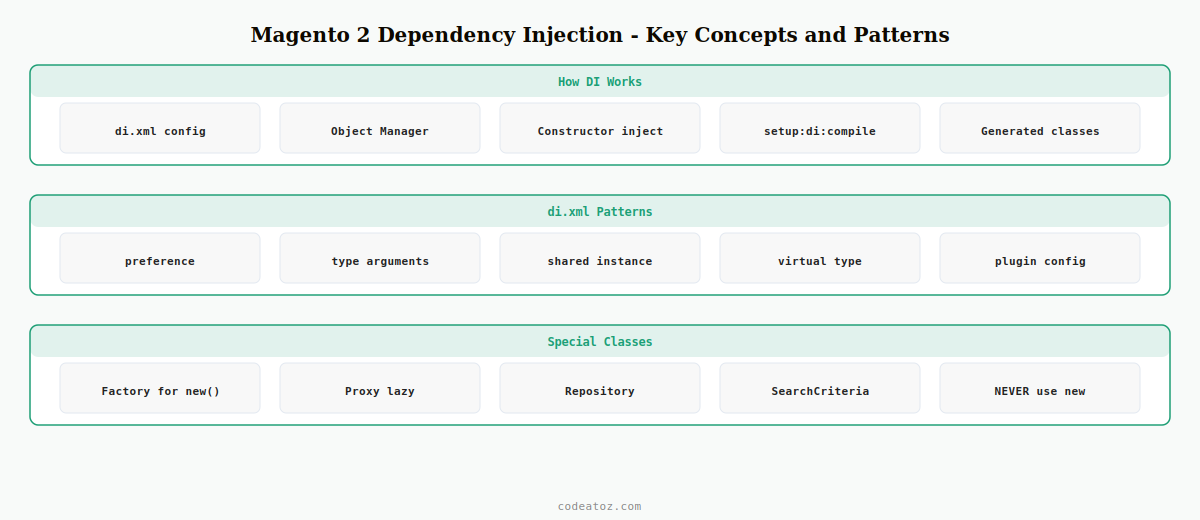
How Magento 2 Dependency Injection Works: Constructor Injection
Constructor injection is the primary form of Magento 2 dependency injection — and it is the only form you should use in your own classes. Declare your dependencies as constructor parameters with type hints pointing to interfaces, and Magento’s Object Manager will inject the correct concrete class as configured in di.xml.
<?php

namespace CodeAtoZExampleModel;

use MagentoCatalogApiProductRepositoryInterface;
use MagentoFrameworkApiSearchCriteriaBuilder;

class ProductFetcher
{
    public function __construct(
        private readonly ProductRepositoryInterface $productRepository,
        private readonly SearchCriteriaBuilder      $searchCriteriaBuilder
    ) {}

    public function getActiveProducts(): array
    {
        $criteria = $this->searchCriteriaBuilder
            ->addFilter( 'status', 1 )
            ->create();

        return $this->productRepository
            ->getList( $criteria )
            ->getItems();
    }
}
Notice that ProductFetcher depends on ProductRepositoryInterface — an interface, not a concrete class. This is the correct way to use Magento 2 dependency injection: type-hint against interfaces, and let di.xml determine which concrete class is injected. This makes your class independent of the specific implementation.
di.xml — The Configuration File Behind Magento 2 Dependency Injection
The etc/di.xml file is the heart of Magento 2 dependency injection configuration. It tells the Object Manager three things: which concrete class satisfies which interface (preferences), what specific values or objects to pass to a constructor (arguments), and whether to create a new instance or reuse a shared singleton.
<?xml version="1.0"?>
<config xmlns:xsi="http://www.w3.org/2001/XMLSchema-instance"
        xsi:noNamespaceSchemaLocation="urn:magento:framework:ObjectManager/etc/config.xsd">

    <!-- Map interface to concrete implementation -->
    <preference for="MagentoCatalogApiProductRepositoryInterface"
                type="MagentoCatalogModelProductRepository"/>

    <!-- Inject a specific scalar argument by constructor parameter name -->
    <type name="CodeAtoZExampleModelProductFetcher">
        <arguments>
            <argument name="batchSize" xsi:type="number">50</argument>
            <argument name="logger" xsi:type="object">PsrLogLoggerInterface</argument>
        </arguments>
    </type>

</config>
The di.xml files are merged across all modules during bin/magento setup:di:compile. This compile step is essential to Magento 2 dependency injection — it reads all di.xml files, resolves the dependency graph, and generates the PHP classes (interceptors, factories, proxies) that make DI work at runtime.
Object Manager — What It Is and the #1 Rule of Magento 2 Dependency Injection
The Object Manager is the service locator behind Magento 2 dependency injection. It instantiates classes, manages shared instances, and injects dependencies. But there is one cardinal rule: never inject or call the Object Manager directly in your own code.
⚠ The Object Manager anti-pattern: If you find yourself writing $this->objectManager->create() or $objectManager->get() in custom code, stop. Refactor to use constructor injection instead. Direct Object Manager usage bypasses Magento 2 dependency injection entirely and makes your code untestable.
The two legitimate uses of the Object Manager — inside generated Factory and Proxy classes — are handled automatically by Magento when you run setup:di:compile. You never write those classes yourself.
Factories in Magento 2 Dependency Injection — Creating Non-Shared Instances
In Magento 2 dependency injection, most dependencies are shared singletons — one instance shared across the request. But sometimes you need a fresh instance of a class on each call. That is what Factories are for. Inject ClassName + Factory in your constructor type hint and Magento auto-generates the factory class during setup:di:compile.
<?php

class OrderProcessor
{
    public function __construct(
        private readonly MagentoSalesModelOrderFactory $orderFactory
    ) {}

    public function createDraftOrder( array $data ): MagentoSalesModelOrder
    {
        // Each call to create() returns a fresh, empty Order object
        return $this->orderFactory->create( ['data' => $data] );
    }
}
Factories are one of the most important auto-generated classes in Magento 2 dependency injection. Always use them instead of new ClassName() — using new bypasses the DI container entirely, making the class impossible to mock in unit tests.
Proxies in Magento 2 Dependency Injection — Lazy Loading Heavy Dependencies
A Proxy is a lazily-instantiated stand-in for an expensive dependency. In Magento 2 dependency injection, if a class has a heavy constructor dependency that is not always needed, injecting the Proxy defers instantiation until the first actual method call. Declare the Proxy in di.xml — Magento generates it automatically.
<type name="CodeAtoZExampleModelReportGenerator">
    <arguments>
        <argument name="expensiveDependency" xsi:type="object">
            MagentoReportsModelResourceModelReportCollectionProxy
        </argument>
    </arguments>
</type>
Running setup:di:compile — When and Why in Magento 2 Dependency Injection
The compile step is what makes Magento 2 dependency injection production-ready. It performs several critical tasks: resolves the full dependency graph from all di.xml files, generates Factory and Proxy classes, creates interceptors for plugins, and validates that every dependency can be satisfied. Always run it after any di.xml change in production.
- Command:
bin/magento setup:di:compile - Run after any change to
di.xml, module structure, or class namespace - In developer mode, Magento 2 dependency injection works without compilation — but it is slower
- Always compile before deploying to staging or production
For the full module structure context, see our Magento 2 module from scratch guide where Magento 2 dependency injection is applied in practice. The Adobe Commerce dependency injection documentation covers virtual types and advanced shared/non-shared configuration. The Magento 2 configuration guide explains the module loading and compilation lifecycle.
Frequently Asked Questions — Magento 2 Dependency Injection
What is Magento 2 dependency injection?
Magento 2 dependency injection is an architectural pattern where classes declare their dependencies as constructor parameters instead of creating them with new. The Object Manager reads di.xml configuration and injects the correct concrete class automatically. This makes classes independently testable and decoupled from specific implementations.
What is di.xml used for in Magento 2 dependency injection?
di.xml configures Magento 2 dependency injection by mapping interfaces to concrete classes (preferences), injecting specific constructor arguments, configuring shared vs non-shared instances, and setting up virtual types. Multiple di.xml files across modules are merged during setup:di:compile.
Should I use the Object Manager directly in Magento 2 dependency injection?
No — never inject or call ObjectManager directly in custom code. Always use constructor injection. The only legitimate uses of Object Manager in Magento 2 dependency injection are inside auto-generated Factory and Proxy classes, which Magento creates automatically via setup:di:compile.
What is a Magento 2 Factory and how does it relate to dependency injection?
A Factory in Magento 2 dependency injection creates a new non-shared instance on each call. Use it when you need multiple fresh instances of the same class at runtime. Magento auto-generates Factory classes — type-hint ClassName followed by Factory in your constructor. Never use new directly.
What is a Proxy in Magento 2 dependency injection?
A Proxy in Magento 2 dependency injection defers instantiation of an expensive class until its first method call — lazy loading. Declare it in di.xml by appending Proxy to the class name. Magento auto-generates the Proxy class during setup:di:compile. Use when a heavy dependency is not always needed.
When do I need to run setup:di:compile for Magento 2 dependency injection?
Run setup:di:compile after any change to di.xml files, module structure, class namespaces, or plugin declarations. This compile step resolves the full Magento 2 dependency injection graph and generates all required classes. In developer mode it is optional but always required before staging or production deployment.
Need Magento 2 Development?
CodeAtoZ builds custom Magento 2 modules and integrations — architected with proper dependency injection from the ground up.




