
APSB26-153 — The Critical Magento Security Patch You Need to Apply Now
On 13 October 2026, Adobe released APSB26-153 — a security update for Adobe Commerce and Magento Open Source that fixes 11 vulnerabilities, including one that scores a perfect 10.0 and lets an attacker run code on your store with no login at all. Here is what it means in plain English, why you must patch, the different ways to do it, and how we can handle it for you.
If you run a store on Adobe Commerce or Magento Open Source, APSB26-153 is a security update you cannot afford to ignore. Released by Adobe on 13 October 2026, APSB26-153 fixes 11 separate security holes — and the most serious one is about as bad as a vulnerability can get: a flaw that lets a complete stranger, with no account and no password, run their own code on your server. This guide explains, in plain language, what APSB26-153 actually protects you from, why applying it quickly matters even though nobody is known to be exploiting it yet, the different ways you can apply the patch, and how our team can apply APSB26-153 to your store safely so you do not have to worry about getting it wrong.
Who this is for: Magento and Adobe Commerce store owners, managers and developers who have seen the October 2026 security advisory and need to understand what to do about it. We keep the jargon to a minimum and focus on what matters for your store. This continues our coverage of the earlier APSB26-92 (August) and APSB26-73 (July) bulletins. The official source is the Adobe Security Bulletin for APSB26-153.
The honest urgency read: Adobe rates APSB26-153 as Priority 2 and says it is not aware of any active attacks using these flaws yet. We are not going to pretend this is a five-alarm fire that is already burning. But one of these vulnerabilities (CVE-2026-103849) scores a perfect 10.0 and needs no login, no permissions and no action from any user to exploit — the single most dangerous profile a web vulnerability can have. History is very clear on what happens next: flaws like this get reverse-engineered from the patch itself and turned into live attacks within days. So the right response is not panic, but it is “this week, not next month.” Patch promptly, test on staging first, and do not leave it sitting.
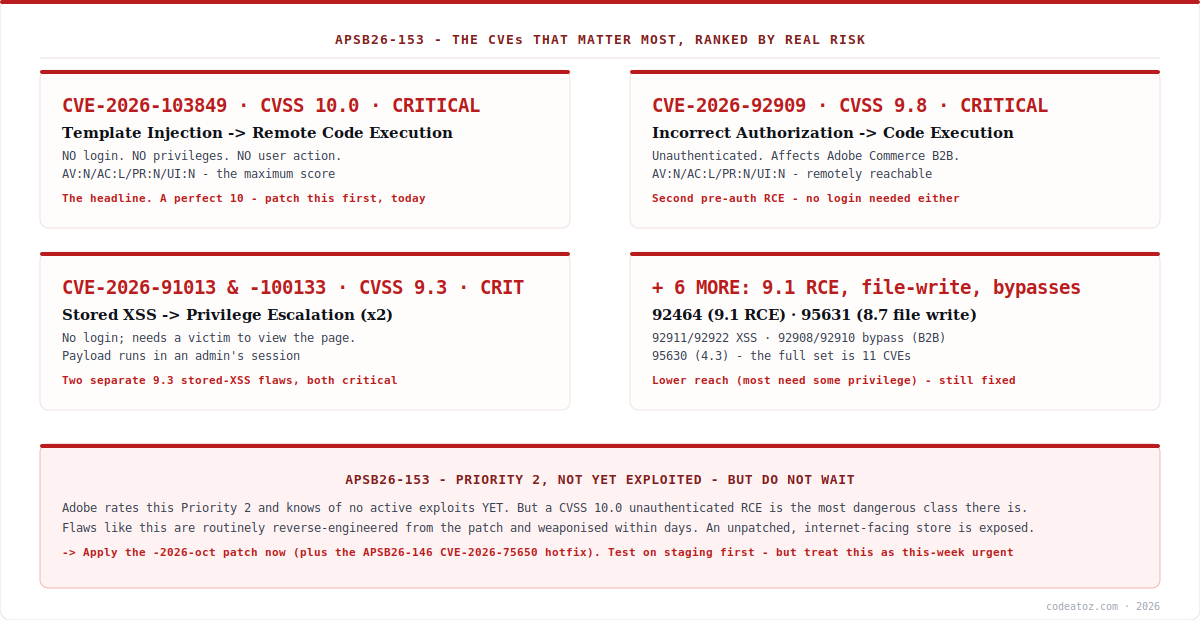
APSB26-153: What Is This Security Threat, in Plain English?
Let us translate the technical language of APSB26-153 into what it actually means for your business. The headline flaw, CVE-2026-103849, is what security people call an “unauthenticated remote code execution” vulnerability — and it carries the maximum possible severity score of 10.0. In everyday terms: a remote attacker, anywhere in the world, with no account on your store and without tricking any of your staff into clicking anything, can send a specially crafted request to your website and make your server run commands of their choosing. That is the digital equivalent of a stranger being able to walk into your back office, sit at your computer, and start typing — without ever needing a key.
Once an attacker can run code on your server, the damage they can do is effectively unlimited, which is why APSB26-153 matters so much. The most common thing criminals do with this kind of access to a store is quietly insert a card skimmer — hidden code on your checkout page that copies your customers’ credit-card details as they type them and sends them to the attacker. Your store keeps working normally, so you may not notice for weeks or months, while every customer who checks out has their payment details stolen. Other outcomes include theft of your entire customer database, planting of backdoors so the attacker can return at will, defacement of your site, or using your server to attack others. The vulnerabilities in APSB26-153 open the door to all of this.
The other flaws in APSB26-153 vary in exactly how they work but point in similar directions. CVE-2026-92909 (score 9.8) is a second unauthenticated code-execution flaw affecting Adobe Commerce B2B. Two separate 9.3-rated flaws (CVE-2026-91013 and CVE-2026-100133) are “stored cross-site scripting” issues that can let an attacker escalate their privileges — for instance, by planting a hidden script that runs inside one of your administrators’ browser sessions, effectively hijacking their admin access. There is also a 9.1-rated code-execution flaw and several more rated “high” or “medium” covering file writes and security-feature bypasses. Eleven in total, five of them critical. You do not need to understand each one — the point of APSB26-153 is that applying it closes all of them at once.
APSB26-153: Why Is This Patch Required?
The most common question we hear about a bulletin like APSB26-153 is: “Adobe says there are no known attacks yet, so can it wait?” The honest answer is no, and the reason is something the security industry calls the patch gap. When Adobe releases APSB26-153, the patch itself is public — and skilled attackers download it, compare it to the previous version, and work backwards to figure out exactly what flaw it fixed and how to exploit it. For a vulnerability as accessible as a 10.0 unauthenticated remote code execution, that reverse-engineering can take a matter of days, sometimes less. “No known exploits today” very often becomes “mass exploitation this week” precisely because the patch was released.
This pattern is especially well-established for Magento and Adobe Commerce, which are high-value targets: they process payments and hold customer data, and automated bots constantly scan the internet for unpatched stores. So the window between APSB26-153 being released and attackers hunting for stores that have not applied it is short and closing. Every day an affected store runs unpatched is a day it is exposed to a flaw whose fix — and therefore whose existence — is now public knowledge.
Beyond the direct attack risk, there is a compliance and trust dimension to APSB26-153. If your store takes card payments, you are subject to PCI DSS, which requires you to apply critical security patches promptly — running a store with a known, unpatched critical vulnerability can put your compliance (and your payment-processing agreement) at risk. And the reputational cost of a breach is severe: customers whose card details are stolen on your site do not easily come back, and disclosure obligations can make the incident public. Applying APSB26-153 is far cheaper and less painful than dealing with any of that. In short, the patch is required because the threat is real, the exposure grows daily, and the cost of inaction dwarfs the cost of patching.
APSB26-153: Am I Affected? Check Your Version
The affected-version list for APSB26-153 is broad, so most stores that have not already applied the October update should assume they are affected until they have confirmed otherwise. Adobe lists every supported release line as vulnerable at its September-2026 patch level and earlier. Check your current version against the table below.
| Product | Affected (this and earlier) | Patched version (October) |
|---|---|---|
| Adobe Commerce | 2.4.4 – 2.4.9 (2026-sep and earlier) | 2.4.4-2026-oct … 2.4.9-2026-oct (and 2.4.10-alpha1) |
| Magento Open Source | 2.4.6 – 2.4.9 (2026-sep and earlier) | 2.4.7-2026-oct … 2.4.9-2026-oct (and 2.4.10-alpha1) |
| Adobe Commerce B2B | 1.3.3 – 1.5.3 (2026-sep and earlier) | 1.3.3-2026-oct … 1.5.3-2026-oct (and 1.5.4-alpha1) |
To find your exact version, you can look in the Magento admin footer, or run a single command on your server. Our Magento CLI commands guide covers this and other useful commands:
php bin/magento --version
If your patch level is 2026-sep or earlier on any of these lines, APSB26-153 applies to you and you should plan to patch now. This is exactly the kind of check that belongs in a routine Magento security process — when you track your version and watch for bulletins, each monthly release becomes a quick, calm “confirm and schedule” rather than a scramble. If you are not sure which version you are on or whether you are affected, that is one of the things we can check for you in minutes.
APSB26-153: The Different Ways to Apply the Patch
There is no single button for APSB26-153 — the right method depends on how your store is hosted and how it was built. Here are the main routes, with an honest view of what each involves. Whichever you choose, the golden rule is the same: never apply a patch straight to a live store. Always test on a staging copy first, then deploy.
1. Update to the patched version (the standard route). The cleanest way to resolve APSB26-153 is to move your store up to the October patch release for your line — for example, 2.4.7-2026-oct. On most stores this is done with Composer, Magento’s dependency manager, by requiring the new version and running the upgrade and deployment steps. The upside is that you get the official fix exactly as Adobe intended; the thing to watch is that updating core can occasionally interact with custom code or third-party extensions, which is precisely why staging testing matters. Our Magento upgrade checklist walks the full process safely.
composer require adobe-commerce/community-edition 2.4.7-2026-oct --no-update
composer update
php bin/magento setup:upgrade
php bin/magento setup:di:compile
php bin/magento setup:static-content:deploy
php bin/magento cache:flush
2. Adobe Commerce on Cloud. If you are on Adobe Commerce on Cloud infrastructure, the update is applied through your project’s Composer configuration and deployed via the usual cloud pipeline, promoting from an integration or staging environment to production. The mechanics differ from a self-hosted store, but the principle — apply the October version, test, deploy — is the same. Cloud stores still need the patch actively applied; it does not happen automatically.
3. Quality patch / quickfix (when a full upgrade needs more planning). Sometimes a store cannot immediately jump to the full October release — perhaps a larger upgrade is mid-planning, or a critical extension needs compatibility work first. In those cases Adobe’s tooling and the Quality Patches mechanism can sometimes allow a more targeted fix so you are not left fully exposed while the bigger upgrade is scheduled. This is a stopgap, not a substitute for staying current, and it needs care to apply correctly — but it can buy safe time when a full version bump is genuinely not immediately possible.
4. The manual / custom-build case. Heavily customised stores, stores with their own deployment pipelines, or stores running a composer-less build sometimes need the fix applied and tested more surgically, with extra attention to how the change interacts with custom modules and themes. This is the most involved route and the one where getting it wrong — breaking checkout, say — does real damage, so it is best handled by someone who does Magento upgrades regularly.
Do not forget the prerequisite. Adobe notes that, separately from APSB26-153, the earlier September critical update (APSB26-146) also requires the “Hotfix for CVE-2026-75650” for Adobe Commerce and Magento Open Source. If you have not already applied that hotfix, apply it alongside the APSB26-153 updates — otherwise you will still be carrying a known critical flaw even after this month’s patch. This is exactly the sort of detail that is easy to miss when patching in a hurry, and exactly why a methodical process matters. The full technical steps are in Adobe’s release notes for APSB26-153.
APSB26-153: Let CodeAtoZ Apply This Patch for You — Securely
Applying APSB26-153 correctly is not just “run a command.” On a real store with real revenue, you want it done without breaking checkout, without losing customisations, and without taking the site down at a bad moment — and you want to be certain afterwards that the fix actually took. That is exactly what we do. If you would rather not risk it, our team will apply APSB26-153 to your Magento or Adobe Commerce store safely, and you can get back to running your business.
How CodeAtoZ applies APSB26-153 safely
1. Full backup first. Before we touch anything, we take a complete backup of your store — files and database — so there is always a clean rollback point. Patching without a backup is the one risk we never take.
2. Test on staging, not on your live store. We apply APSB26-153 (plus the APSB26-146 hotfix) on a staging copy of your site and run through the critical paths — especially checkout, payment, and any custom functionality — to confirm nothing breaks before it ever reaches your customers.
3. Deploy with minimal disruption, then verify. Once staging is clean, we deploy to production carefully, and then we confirm the patch actually took — checking the version, confirming the vulnerabilities are closed, and making sure your store is running normally. You get a clear before-and-after, not a “should be fine.”
4. We check the whole picture. While we are in there, we confirm you are not carrying other missed patches, that the prerequisite hotfix is in place, and that your version is where it should be — so you come out of this genuinely secure, not just patched for one bulletin.
Whether you are on Adobe Commerce Cloud, self-hosted Magento Open Source, or a heavily customised build, we have done this many times and we do it methodically. If you are not even sure whether your store is affected by APSB26-153, we will check that for you first — and if you are, we will get it patched quickly and safely. Contact us and we will get started.
How we handle an urgent Magento security patch
We treat a 10.0 unauthenticated flaw as this-week work, and we say so plainly. We do not inflate every bulletin into a panic — our write-up of the August patch told clients it could be scheduled on cadence. But a perfect-10 pre-auth RCE like the one in APSB26-153 is different, and we are direct with clients that this one should not wait, because the patch gap for flaws this accessible is measured in days.
Backups and staging are non-negotiable, even under time pressure. The temptation with an urgent patch is to push it straight to production to “just get it done.” That is how a security fix becomes an outage. We always back up and test on staging first — the extra hour of safety is worth far more than the risk of breaking a live, revenue-generating checkout.
We check for the missed prerequisite every time. The APSB26-146 CVE-2026-75650 hotfix requirement is exactly the kind of thing a rushed patch skips, leaving a store still exposed after it “patched.” We confirm the full chain of required fixes is in place, because being patched for ten of eleven things is not being secure.
Frequently Asked Questions About APSB26-153
What is APSB26-153?
APSB26-153 is Adobe’s security bulletin released on 13 October 2026 for Adobe Commerce and Magento Open Source. It fixes 11 vulnerabilities, five of them critical, including CVE-2026-103849 — a template-injection flaw scoring the maximum 10.0 that lets an attacker run code on your server with no login required. Applying the October patch closes all 11 at once.
How serious is APSB26-153, really?
Very. While Adobe rates it Priority 2 and reports no active exploitation yet, the headline flaw is an unauthenticated remote code execution scoring a perfect 10.0 — the most dangerous profile a web vulnerability can have, requiring no login, no privileges and no user interaction. Flaws like this are routinely weaponised within days of the patch being released, so it should be treated as urgent.
If there are no known attacks yet, can I wait to patch?
No. Once Adobe releases the patch, the fix is public, and attackers reverse-engineer it to discover and exploit the flaw — often within days, especially for an unauthenticated 10.0. “No known exploits today” frequently becomes “mass scanning this week” precisely because the patch revealed the vulnerability. Magento stores are high-value targets, so the exposure window is short. Patch promptly.
Which Magento versions does APSB26-153 affect?
Broadly all supported lines at their September level and earlier: Adobe Commerce 2.4.4–2.4.9, Magento Open Source 2.4.6–2.4.9, and Adobe Commerce B2B 1.3.3–1.5.3, all “2026-sep and earlier.” If your patch level is 2026-sep or older, you are affected. Check with “php bin/magento –version” and move to the matching 2026-oct release for your line.
How do I apply the APSB26-153 patch?
The standard route is updating to the October patched version for your line (e.g. 2.4.7-2026-oct) via Composer, then running setup:upgrade, compile, static-content deploy and cache flush — tested on staging first. Adobe Commerce Cloud applies it through the cloud pipeline. For stores that cannot upgrade immediately, a targeted quality patch can be a stopgap. Always back up and test before production.
Is there anything else I need to apply besides APSB26-153?
Yes. Adobe notes that the earlier September critical update (APSB26-146) separately requires the “Hotfix for CVE-2026-75650” for Adobe Commerce and Magento Open Source. Apply that hotfix alongside the APSB26-153 October updates — otherwise you remain exposed to a known critical flaw even after this month’s patch. It is an easy step to miss when patching quickly.
What happens if I don’t patch?
You leave your store exposed to flaws whose fixes — and therefore whose existence — are now public. The realistic outcomes of exploitation include card skimmers silently stealing your customers’ payment details at checkout, theft of your customer database, planted backdoors, and site defacement. There are also PCI DSS compliance implications for running a known unpatched critical vulnerability on a store that takes card payments.
Can CodeAtoZ apply the patch for me?
Yes — that is exactly what we do. We back up your store, apply APSB26-153 and the required prerequisite hotfix on a staging copy, test the critical paths including checkout, deploy to production with minimal disruption, and verify the fix actually took. Whether you are on Adobe Commerce Cloud, self-hosted, or a heavily customised build, we will patch your store safely. Contact us to get started.
We’re Ready to Patch Your Store — Securely
APSB26-153 is urgent, but it does not have to be stressful. Our team will apply it safely — backed up, staging-tested, verified — so your store is protected and nothing breaks. Don’t leave a perfect-10 vulnerability open on your store.




