WooCommerce B2B Suite vs Stitching Plugins — Which Actually Costs Less?
Building B2B from separate plugins — one for pricing, one for quotes, one for roles — looks cheaper than a WooCommerce B2B suite. Then they conflict, and you become the unpaid integrator. Here’s the honest trade-off between piecemeal and one suite.
A WooCommerce B2B suite versus a handful of separate plugins is a decision every store adding B2B features eventually faces, and the obvious answer is often the wrong one. Piecemeal looks cheaper: grab a wholesale-pricing plugin, a request-a-quote plugin, a user-roles plugin, maybe a tax plugin, several of them free, and assemble your B2B setup. A WooCommerce B2B suite like B2B Suite for WooCommerce costs money up front by comparison. But the sticker price isn’t the real cost — the real question is what you pay in integration work, conflicts and support over time. This guide lays out that trade-off honestly, so you choose on total cost rather than headline price.
Search intent: comparison/decision — WooCommerce stores choosing between assembling B2B plugins and a single suite. We cover the real question, the integration tax of piecemeal, vendor sprawl, when a suite genuinely wins, and a verdict. It builds on our WooCommerce B2B plugin guide and B2B ecommerce platform guide. The B2B Suite has a free version on WordPress.org.
WooCommerce B2B Suite vs Plugins: The Real Question
The choice between a WooCommerce B2B suite and separate plugins isn’t really about features — most of the individual capabilities exist in both forms. It’s about how those capabilities fit together. B2B functionality is unusually interdependent: your pricing rules need to know about user roles, your quote system needs to respect your pricing, your catalog restrictions need to coordinate with your checkout. When these live in separate plugins from separate authors, nothing guarantees they agree — and that’s the real question a WooCommerce B2B suite answers differently.
To be fair to the piecemeal approach, it has genuine merits, and we’ll give them their due. Individual plugins can be best-of-breed at their one job, you can start with just the one feature you need, and several are free. For a store that needs only a single B2B capability — say, just wholesale pricing — a single plugin is the right call, and a whole WooCommerce B2B suite would be overkill. The piecemeal case is strongest when your B2B needs are narrow and likely to stay that way. The suite case gets stronger the moment they’re not.
WooCommerce B2B Suite vs Plugins: The Integration Tax
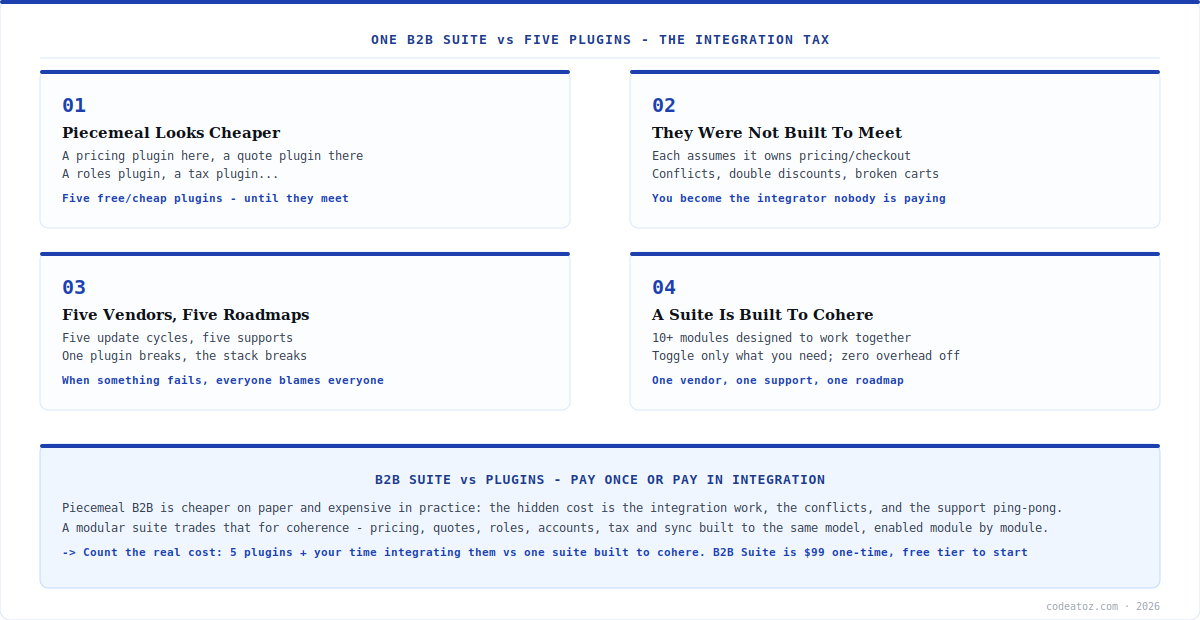
The hidden cost of the piecemeal approach — the one that makes a WooCommerce B2B suite cheaper than it looks — is the integration tax. Separate B2B plugins are each built assuming they own their domain: the pricing plugin assumes it controls prices, the quote plugin assumes it controls the add-to-cart flow, the roles plugin assumes it governs access. Put several together and those assumptions collide — double discounts, a quote button that fights the pricing rule, a catalog restriction that breaks on checkout. Resolving those conflicts is work, and it’s work you do, unpaid, every time one of the plugins updates.
That’s the core argument for a WooCommerce B2B suite: its modules are built by one team to one model, so pricing, quotes, roles, accounts and tax are designed to coordinate rather than compete. B2B Suite ships 10+ modules that share a common foundation, and you toggle on only the ones you need — disabled modules add zero overhead. The difference from piecemeal isn’t that a suite has more features; it’s that the features were built to work together, so you’re not the integrator holding five independent plugins in alignment. With a WooCommerce B2B suite, the integration is the vendor’s job, not yours.
| Factor | Piecemeal plugins | WooCommerce B2B suite |
|---|---|---|
| Upfront cost | Lower (some free) | Higher ($99 one-time) |
| Integration work | Yours, ongoing | The vendor’s |
| Feature conflicts | Likely across authors | Designed to cohere |
| Update risk | Any plugin can break the stack | One coordinated roadmap |
| Support | Multiple vendors, finger-pointing | One vendor, one support |
| Best for | One narrow B2B need | Multiple, interdependent needs |
WooCommerce B2B Suite vs Plugins: Vendor Sprawl
Beyond conflicts, the piecemeal approach creates vendor sprawl — and this is where a WooCommerce B2B suite quietly saves the most. Five plugins means five authors, five update cycles, five support channels and five roadmaps moving independently. When something breaks, you don’t have one place to go; you have a diagnosis problem — which of the five caused it? — and often a support experience where each vendor points at the others. None of them is responsible for how their plugin interacts with the rest, because none of them built the rest.
A WooCommerce B2B suite collapses that to one relationship: one vendor, one support team, one roadmap, one plugin to keep updated. When something needs fixing, there’s no ambiguity about whose problem it is. This matters more over time than at purchase — the piecemeal stack feels fine on day one and accumulates friction with every update and every edge case, while the WooCommerce B2B suite stays coherent because coherence is the thing it’s designed to provide. Vendor sprawl is a cost you pay slowly, which is exactly why it’s easy to underestimate when comparing sticker prices.
Piecemeal is cheaper on paper and expensive in practice. The honest comparison isn’t “$99 suite versus some free plugins” — it’s “$99 suite versus free plugins plus your time integrating them, resolving their conflicts, and managing five vendors.” For one narrow need, piecemeal wins. For multiple interdependent B2B features, a WooCommerce B2B suite usually costs less once you count the integration tax you’d otherwise pay yourself.
WooCommerce B2B Suite vs Plugins: The Verdict
The verdict on WooCommerce B2B suite versus plugins comes down to breadth of need and how much you value your own time. If you need exactly one B2B capability and expect that to stay true, a single focused plugin is the right, lean choice — don’t buy a suite for a single feature. But if you need several B2B features that have to work together — pricing and quotes and roles and accounts, say — then the WooCommerce B2B suite almost always wins on total cost, because the alternative is you personally integrating independent plugins and maintaining that integration forever.
B2B Suite is built for exactly that second case: a WooCommerce B2B suite with 10+ modules (wholesale pricing, catalog mode, RFQ/quotes, registration and approvals, company accounts, net terms, sales reps, CRM/accounting sync, tax compliance) that you enable individually, sharing one foundation and one support relationship. And because it has a free tier, you can start with the core modules and move to Pro ($99 one-time) when you need the advanced ones — so the suite doesn’t even require a bigger upfront commitment than the piecemeal route. The honest bottom line: for narrow needs, pick a plugin; for a real B2B operation, a WooCommerce B2B suite is the cheaper path once the integration tax is counted. Our WooCommerce team can help you scope which you actually need.
How we advise on suite vs piecemeal
We count the client’s time as a real cost, because it is. The piecemeal route always looks cheaper until we add the hours of integrating, testing and re-testing plugins that weren’t built to coexist — plus the hours lost every time an update breaks the stack. When clients price that in honestly, the suite often comes out cheaper, even against free plugins.
We’re genuinely happy to recommend a single plugin when that’s the fit. If a client needs only wholesale pricing and nothing else on the horizon, we tell them to use one focused plugin, not a suite — recommending more than someone needs is how trust is lost. The suite earns its place when the needs are plural and interdependent, not as a default.
The support-sprawl cost is the one clients discover too late. On day one, five plugins feel manageable. The pain arrives months later, when something breaks and the vendors point at each other. We flag this upfront, because the single-vendor accountability of a suite is worth real money the first time a piecemeal stack fails and nobody owns the fix.
Frequently Asked Questions About WooCommerce B2B Suites
Is a WooCommerce B2B suite better than separate plugins?
It depends on how many B2B features you need. For a single narrow need, a focused plugin is better and leaner. For multiple interdependent features — pricing, quotes, roles, accounts — a suite usually wins, because its modules are built to work together, so you avoid the integration work, conflicts and multi-vendor support that come with stitching separate plugins into a B2B setup.
Why do separate B2B plugins conflict?
Because each is built assuming it owns its domain — the pricing plugin assumes it controls prices, the quote plugin the add-to-cart flow, the roles plugin access. Put several together and those assumptions collide: double discounts, broken carts, restrictions that fail at checkout. No plugin is responsible for how it interacts with the others, so resolving conflicts becomes your ongoing job.
Is piecemeal really cheaper than a B2B suite?
Only on the sticker price. Once you count the integration work, the conflict resolution, and the ongoing maintenance across multiple vendors and update cycles, piecemeal is often more expensive in total — you’re paying with your time instead of money. A $99 one-time suite can cost less than “free” plugins once the integration tax you’d pay yourself is included.
When should I choose separate plugins instead?
When you need exactly one B2B capability and expect that to stay true — just wholesale pricing, or just a quote form, with no other interdependent features coming. In that case a single focused plugin is the right, lean choice and a full suite would be overkill. The suite wins when your B2B needs are plural and have to coordinate with each other.
What does the B2B Suite include?
10+ modules sharing one foundation: wholesale pricing, catalog mode and access control, RFQ/quote system, B2B registration and approvals, and analytics in the free version; plus company accounts, net payment terms, sales rep management, CRM and accounting sync, AI features and regional tax compliance in Pro. You enable only the modules you need, and disabled modules add zero overhead.
Can I start small with a B2B suite?
Yes. B2B Suite has a free version on WordPress.org with the core modules (wholesale pricing, catalog mode, quotes, registration, analytics), so you can start with just what you need at no cost. Pro ($99 one-time, single site) adds the advanced modules when you’re ready. So choosing a suite doesn’t require a bigger upfront commitment than the piecemeal route.
One Suite, Built to Cohere
10+ B2B modules designed to work together — pricing, quotes, roles, accounts, net terms, tax and sync — enabled one at a time. Start free, go Pro for $99 one-time, 14-day guarantee.