
The Complete Magento CLI Commands Reference 2026
Magento CLI commands you actually use — cache, indexers, deployment, cron and maintenance, with the canonical deploy sequence and the ordering mistakes that break production.
Magento CLI commands are how the platform is actually operated — every deployment, cache clear, reindex and configuration change runs through the Symfony Console-based bin/magento. There are hundreds available, but a working reference is not a full listing; it is the twenty or so you use weekly plus a clear understanding of the sequences where ordering matters. This Magento CLI commands reference covers cache, indexers, the canonical deploy sequence, module management, cron, maintenance and debugging.
Search intent: reference/procedural — Magento developers looking for the right command and the correct order. We cover cache and static content, indexers, the deploy sequence, module and config commands, cron and maintenance, and debugging. It pairs with our upgrade checklist and CI/CD guide, and mirrors our WP-CLI reference for WooCommerce.
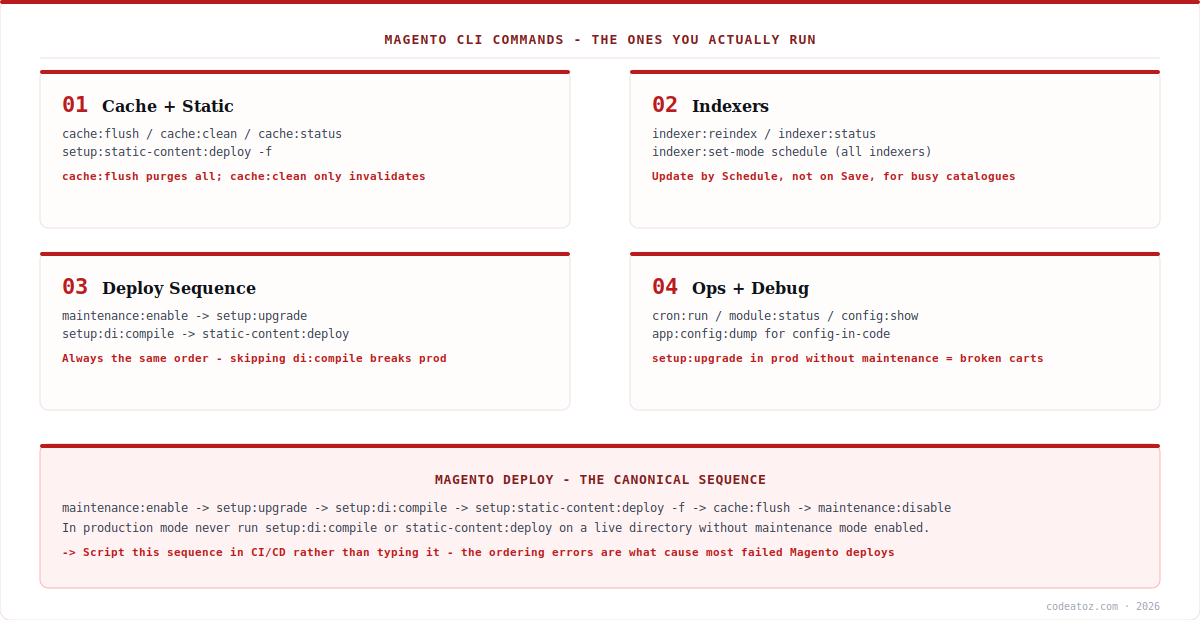
Magento CLI Commands: Cache and Static Content
The most-run Magento CLI commands concern caching, and the first thing to understand is the difference between two similar-sounding operations. cache:clean invalidates cached entries that Magento manages, leaving other data in the cache backend untouched. cache:flush purges the entire cache storage — including entries other applications may share in that Redis database. Use cache:clean for routine work; reach for cache:flush when you need certainty. If sessions share a Redis database with cache, a flush also destroys live customer sessions, which is one reason our Redis configuration guide insists on separate database indices.
bin/magento cache:status                    # what is enabled/disabled
bin/magento cache:clean                     # invalidate Magento entries
bin/magento cache:flush                     # purge entire storage
bin/magento cache:clean config layout       # target specific types
bin/magento cache:disable full_page         # dev only - never in prod

# static content (production mode)
bin/magento setup:static-content:deploy -f
bin/magento setup:static-content:deploy en_GB en_US -f   # specific locales
Magento CLI Commands: Indexers
Indexer Magento CLI commands control how catalogue data is prepared for the storefront. The critical operational setting is indexer mode: Update on Save reindexes synchronously whenever data changes, which blocks admin actions and imports on a busy catalogue, while Update by Schedule queues changes for cron to process. For any store with meaningful catalogue churn, schedule mode is the correct choice.
bin/magento indexer:status                  # check for invalid indexes
bin/magento indexer:reindex                 # rebuild all
bin/magento indexer:reindex catalogsearch_fulltext   # one indexer
bin/magento indexer:show-mode                # realtime vs schedule
bin/magento indexer:set-mode schedule        # all -> update by schedule
bin/magento indexer:reset                    # mark all invalid
When search results look stale or products are missing, indexer:status is the first diagnostic — an index stuck invalid or a search engine that is unreachable both surface here. Pair it with the search engine guide when catalogue search specifically is misbehaving.
Magento CLI Commands: The Canonical Deploy Sequence
Most failed Magento deployments are ordering errors, not code errors. These Magento CLI commands must run in a specific sequence, because each depends on the previous one having completed.
bin/magento maintenance:enable
bin/magento setup:upgrade              # schema + data scripts
bin/magento setup:di:compile           # DI + interceptors
bin/magento setup:static-content:deploy -f
bin/magento indexer:reindex
bin/magento cache:flush
bin/magento maintenance:disable
Never run setup:di:compile or static content deployment on a live production directory without maintenance mode. Both regenerate files the running application depends on, so customers hit missing classes and half-generated assets while the command executes. This is the most damaging ordering mistake in the Magento CLI commands repertoire — and it is entirely avoidable.
The related detail is deployment strategy. Running this sequence directly on production means downtime for its duration; a build-then-swap approach (compile and deploy static content into a fresh release directory, then switch a symlink) reduces the customer-facing window to seconds. That is the pattern our CI/CD guide covers, and it is why these commands belong in a scripted pipeline rather than typed by hand.
Magento CLI Commands: Modules, Config, Cron and Debugging
The remaining Magento CLI commands cover day-to-day operations. Module management handles enabling, disabling and inspecting extensions. Configuration commands read and write settings — useful for scripting environment setup and for keeping configuration in code rather than clicking through the admin. Cron commands verify that scheduled work is actually running, which is a frequent silent failure: no cron means no scheduled reindexing, no queued emails and no cache invalidation.
# modules
bin/magento module:status
bin/magento module:enable Vendor_Module
bin/magento module:disable Vendor_Module

# configuration
bin/magento config:show                       # all current config
bin/magento config:show catalog/search/engine # one path
bin/magento config:set web/secure/use_in_frontend 1
bin/magento app:config:dump                   # config into code

# cron + maintenance
bin/magento cron:run
bin/magento cron:install
bin/magento maintenance:status
bin/magento maintenance:enable --ip=203.0.113.10   # allow your IP

# mode + debugging
bin/magento deploy:mode:show
bin/magento deploy:mode:set developer          # never on production
bin/magento setup:db:status                    # schema up to date?
bin/magento info:currency:list
Two habits make these Magento CLI commands safer in practice. Use maintenance:enable --ip= so your team can verify a deployment while customers still see the maintenance page. And prefer config:set plus app:config:dump over admin clicks for anything that should be reproducible across environments — configuration in version control is configuration you can review and roll back. The Adobe Commerce CLI reference lists the full command set. Our Magento team scripts these into deployment pipelines.
What we have learned running Magento from the command line
Script the deploy sequence — do not type it. Nearly every broken Magento deployment we are called into traces to a skipped or reordered command under time pressure. A scripted pipeline runs the same sequence identically every time, which removes an entire category of incident for very little effort.
cache:flush during business hours is riskier than teams think. On stores where sessions share a Redis database with cache, a routine flush logs customers out mid-checkout. We check the Redis configuration before treating flush as a casual command, and separate the databases so it becomes safe.
Check cron before debugging anything else. A surprising share of “the site is broken” reports — stale prices, unsent emails, indexes never updating — are simply cron not running. It is the first thing we verify, because it explains symptoms that otherwise look like unrelated application bugs.
Frequently Asked Questions About Magento CLI Commands
What is the difference between cache:clean and cache:flush?
cache:clean invalidates the cached entries Magento manages, leaving other data in the backend untouched. cache:flush purges the entire cache storage, including anything else sharing that Redis database. Use clean for routine work and flush when you need certainty — but note flush can destroy sessions if they share a Redis index with cache.
What order should Magento deployment commands run in?
maintenance:enable, then setup:upgrade, setup:di:compile, setup:static-content:deploy -f, then indexer:reindex, cache:flush and maintenance:disable. The order matters because di:compile depends on the schema and module list produced by setup:upgrade, and static content deployment comes after compilation.
Can I run setup:di:compile on a live production site?
Not without maintenance mode. Compilation and static content deployment regenerate files the running application depends on, so customers hit missing classes and half-generated assets while the commands execute. Either enable maintenance mode, or use a build-then-swap deployment that compiles into a fresh directory and switches a symlink.
How do I check whether Magento cron is running?
Run bin/magento cron:run manually and check the cron_schedule table and var/log for execution. Cron failure is a frequent silent problem — without it, scheduled reindexing, queued emails and cache invalidation all stop, producing symptoms that look like unrelated bugs. Verify cron before debugging stale data.
How do I access Magento while it is in maintenance mode?
Use bin/magento maintenance:enable –ip= followed by your address to exempt specific IPs. Your team can then verify the deployment on the live site while customers continue to see the maintenance page — which makes it practical to test properly before reopening rather than rushing the check.
Should Magento indexers use Update on Save or Update by Schedule?
Update by Schedule for any store with meaningful catalogue churn. Update on Save reindexes synchronously whenever data changes, blocking admin actions and product imports. Schedule mode queues changes for cron, keeping the admin responsive. Set it with bin/magento indexer:set-mode schedule.
Want Deployments That Do Not Break?
Our team scripts Magento deployments into CI/CD pipelines — correct sequencing, zero-downtime swaps and rollback.




