
The Complete Shopify Admin API GraphQL Guide 2026
Master the Shopify Admin API GraphQL — authentication, query cost, pagination, mutations, bulk operations, and rate limit handling for production apps.
The Shopify Admin API GraphQL is the primary interface for reading and writing data in a Shopify store — products, orders, customers, inventory, fulfilment, billing, and more. Since Shopify deprecated REST in API version 2025-01, the Shopify Admin API GraphQL is the only officially supported way to interact with Shopify data programmatically. Understanding its query cost system, pagination patterns, and mutation error handling is essential for building production Shopify apps.
The Shopify Admin API GraphQL differs from typical GraphQL APIs in two important ways: it uses a query cost budget system instead of request-count rate limiting, and it provides a Bulk Operations API for handling large datasets without hitting cost limits. This guide covers the full workflow — authentication, writing efficient queries. Use the Shopify Admin API GraphiQL explorer to test queries interactively before writing code., handling paginated data, building mutations, managing rate limits, and running bulk operations. Refer to the Shopify Admin API GraphQL reference for the complete schema.
Shopify Admin API GraphQL: Authentication and Setup
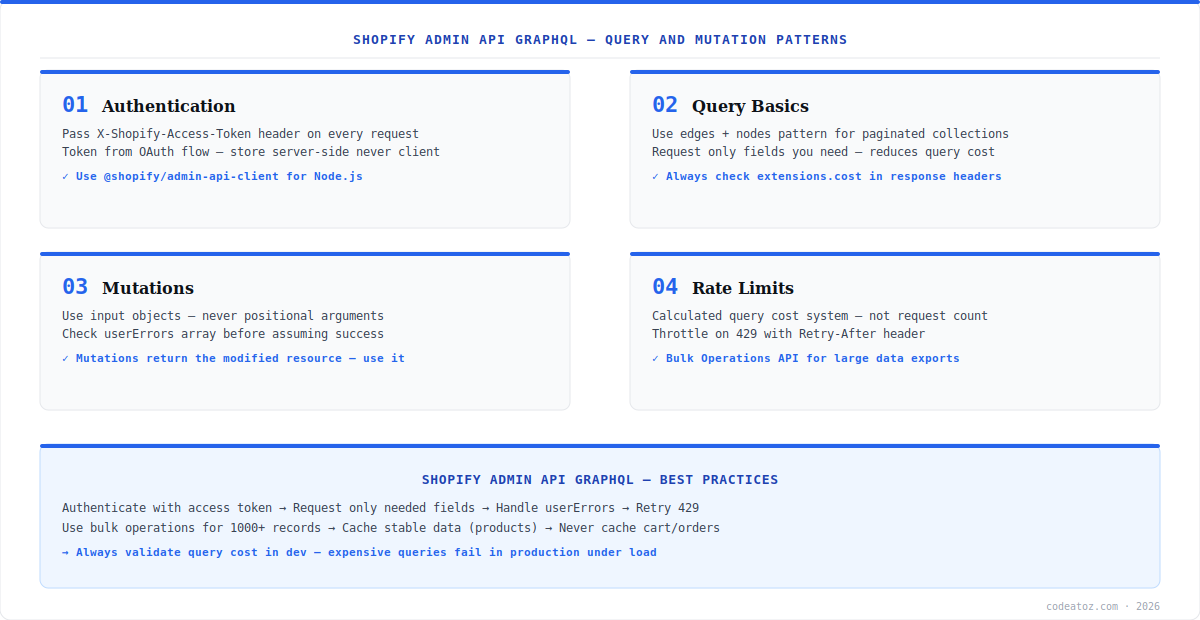
Every Shopify Admin API GraphQL request requires an access token in the X-Shopify-Access-Token header. For installed apps, this token comes from the OAuth flow and must be stored server-side — never expose it to the browser. Use Shopify’s official @shopify/admin-api-client package for Node.js, which handles the correct endpoint URL, headers, and API versioning automatically. The API endpoint is https://{shop}.myshopify.com/admin/api/2025-01/graphql.json.
import {createAdminApiClient} from '@shopify/admin-api-client';
const client = createAdminApiClient({
  storeDomain: process.env.SHOPIFY_STORE_DOMAIN!,
  apiVersion: '2025-01',
  accessToken: process.env.SHOPIFY_ACCESS_TOKEN!,
});
const {data, errors, extensions} = await client.request(`
  query {
    products(first: 10) {
      edges { node { id title handle } }
    }
  }
`);
// Always check extensions.cost.throttleStatus
console.log(extensions?.cost);Shopify Admin API GraphQL: Query Cost and Rate Limits
The Shopify Admin API GraphQL uses a cost-based rate limiting system, not a request count limit. Each field and connection in your query has a cost value — the total query cost is checked against your store’s available budget. The response extensions.cost field shows the query cost, your current budget, and throttle status. If a query exceeds the budget, Shopify returns a 429 — retry after the number of seconds in the Retry-After header. The best defence is requesting only the fields you need. Over-fetching is the most common cause of expensive queries in the Shopify Admin API GraphQL. See the Shopify rate limits documentation for the full cost model.
Never paginate through all pages of a large collection synchronously in the Shopify Admin API GraphQL. Fetching 1,000 products with first: 10 in a loop will exhaust your query budget quickly. For bulk data exports, use the Bulk Operations API — it runs as an async job and has no query cost limit.
Shopify Admin API GraphQL: Pagination and Mutations
The Shopify Admin API GraphQL uses cursor-based pagination via edges and nodes with pageInfo. Always request pageInfo { hasNextPage endCursor } and use after: $cursor to page forward. Mutations follow a consistent pattern — pass an input object, check userErrors in the response before assuming success, and use the returned resource for optimistic UI updates. Every mutation returns the modified object — there is no need for a follow-up query. Our Shopify development team builds apps on the Shopify Admin API GraphQL daily, and our Shopify app development guide covers the full architecture.
# Paginated query
query GetProducts($cursor: String) {
  products(first: 50, after: $cursor) {
    pageInfo { hasNextPage endCursor }
    edges { node { id title } }
  }
}
# Mutation with error handling
mutation UpdateProduct($id: ID!, $input: ProductInput!) {
  productUpdate(id: $id, input: $input) {
    product { id title }
    userErrors { field message code }
  }
}Frequently Asked Questions About Shopify Admin API GraphQL
What is the Shopify Admin API GraphQL?
The Shopify Admin API GraphQL is Shopify’s primary API for reading and writing store data — products, orders, customers, inventory, fulfilment, billing, and more. It uses GraphQL with a cost-based rate limiting system. REST was deprecated in API version 2025-01, making GraphQL the only supported approach for new Shopify app development.
How do I authenticate with the Shopify Admin API GraphQL?
Authenticate with the Shopify Admin API GraphQL by including the X-Shopify-Access-Token header with every request. The access token comes from the OAuth installation flow and must be stored server-side. Use Shopify’s @shopify/admin-api-client package for Node.js which configures headers, endpoint URL, and API version automatically.
How does the Shopify Admin API GraphQL rate limiting work?
The Shopify Admin API GraphQL uses a query cost system — each field and connection has a cost value, and your total available budget replenishes over time. The extensions.cost field in every response shows the query cost and current budget. If throttled, Shopify returns HTTP 429 with a Retry-After header. Request only needed fields to minimise query cost.
How do I paginate with the Shopify Admin API GraphQL?
Paginate the Shopify Admin API GraphQL using cursor-based pagination. Add pageInfo {{ hasNextPage endCursor }} to your connection query. Pass the endCursor as the after argument on subsequent queries. Never use offset-based pagination — the Admin API GraphQL does not support it. Use the Bulk Operations API for exporting complete datasets.
How do I handle errors in Shopify Admin API GraphQL mutations?
Check the userErrors array in every Shopify Admin API GraphQL mutation response before assuming success. UserErrors contain field-level validation errors from Shopify. Also check the top-level errors array for authentication or structural errors. A successful HTTP 200 response does not guarantee the mutation succeeded — always validate userErrors first.
What is the Shopify Admin API GraphQL Bulk Operations API?
The Shopify Admin API GraphQL Bulk Operations API runs large data exports as asynchronous background jobs with no query cost limit. Call bulkOperationRunQuery to start a job, poll with currentBulkOperation to check status, then download the JSONL result file from the URL in the completed response. Use for exports of 1,000+ records.
Building with the Shopify Admin API GraphQL?
Our team builds production Shopify apps — Admin API, bulk operations, webhooks, and App Store compliance.




