
The Complete Shopify Hydrogen Storefront Guide — React Framework 2026
Build a Shopify Hydrogen storefront — Storefront API integration, React Server Components, cache strategies, cart management, and Oxygen deployment.
The Shopify Hydrogen storefront framework is Shopify’s official React-based solution for building headless commerce storefronts. A Shopify Hydrogen storefront connects to the Shopify Storefront API via a typed GraphQL client, renders with React Server Components for minimal client-side JavaScript, and deploys to Oxygen — Shopify’s globally distributed edge hosting built on V8 isolates. If your project is Shopify-only headless, building a Shopify Hydrogen storefront is faster and simpler than building a custom Next.js stack from scratch.
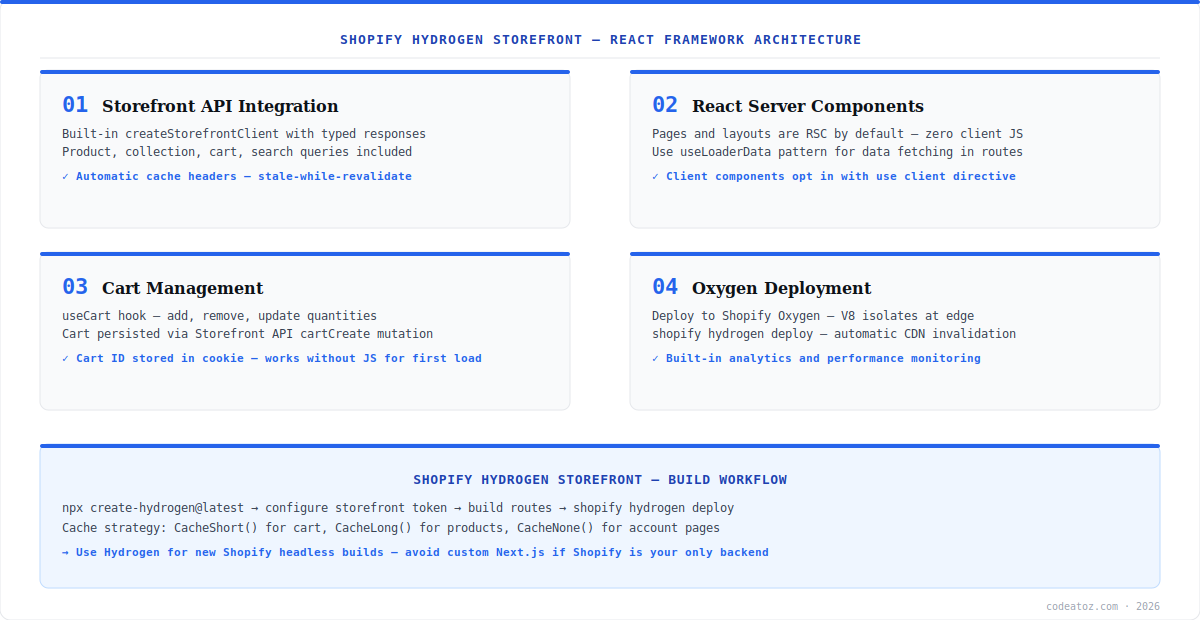
The Shopify Hydrogen storefront framework is built on Remix and Vite, with Shopify-specific utilities layered on top — createStorefrontClient for typed Storefront API calls, built-in cache headers with stale-while-revalidate semantics, useCart for cart state, and an integrated analytics system. This guide covers the complete Shopify Hydrogen storefront architecture from initial setup to Oxygen deployment, including the cache strategy decisions that most affect performance. Our full headless commerce architecture guide covers when to choose Hydrogen over a custom stack.
Shopify Hydrogen Storefront: Storefront API and Data Fetching
The Shopify Hydrogen storefront uses createStorefrontClient to create a typed GraphQL client connected to the Shopify Storefront API. Data fetching happens in Remix loaders — server-side functions that run before the component renders. The framework automatically attaches the correct Cache-Control headers based on the cache strategy you set, enabling CDN caching at Oxygen’s edge without any manual header management.
// app/routes/products.$handle.tsx
import {json} from '@shopify/remix-oxygen';
import {useLoaderData} from '@remix-run/react';

export async function loader({params, context}: LoaderArgs) {
  const {product} = await context.storefront.query(PRODUCT_QUERY, {
    variables: {handle: params.handle},
    cache: context.storefront.CacheLong(), // cache for 1hr, SWR 24hr
  });
  if (!product) throw new Response('Not found', {status: 404});
  return json({product});
}

const PRODUCT_QUERY = `#graphql
  query Product($handle: String!) {
    product(handle: $handle) {
      title handle priceRange {minVariantPrice {amount currencyCode}}
      images(first: 6) {nodes {url altText width height}}
      variants(first: 100) {nodes {id title availableForSale selectedOptions {name value}}}
    }
}`;Shopify Hydrogen Storefront: Cache Strategy
Cache strategy is the most performance-critical decision in a Shopify Hydrogen storefront. Hydrogen provides four built-in strategies: CacheNone() for real-time data (cart, account), CacheShort() for data that changes frequently (inventory, pricing — 1 min TTL, 10 min SWR), CacheLong() for slow-changing data (product descriptions, images — 1hr TTL, 24hr SWR), and CacheCustom() for explicit control. Every Remix loader that calls the Storefront API should explicitly set a cache strategy. Product pages use CacheLong(), collection pages use CacheShort(), and anything cart-related uses CacheNone(). The Hydrogen caching documentation covers the full strategy API.
Never use CacheNone() on product or collection pages in a Shopify Hydrogen storefront. Every uncached request hits the Shopify Storefront API, counts against your rate limit, and adds 200-500ms latency. Use CacheLong() for product content and handle real-time data (prices, stock) separately via client-side AJAX if needed.
Shopify Hydrogen Storefront: Cart and Oxygen Deployment
The Shopify Hydrogen storefront cart is managed via the Storefront API cartCreate, cartLinesAdd, and cartLinesUpdate mutations, with cart ID persisted in a cookie. Hydrogen provides the CartProvider and useCart hook to manage cart state client-side. Deploy to Oxygen with shopify hydrogen deploy — Shopify hosts the Shopify Hydrogen storefront on its global CDN via V8 isolates, with automatic SSL, domain management, and performance monitoring included. Alternatively, deploy to Vercel, Netlify, or Cloudflare Workers if you need more infrastructure control. Our headless commerce team builds and deploys Hydrogen storefronts. See the Remix documentation for the full routing and loader API for Shopify merchants needing custom checkout and performance optimisation. See also the official Hydrogen documentation.
Frequently Asked Questions About Shopify Hydrogen Storefront
What is a Shopify Hydrogen storefront?
A Shopify Hydrogen storefront is a headless React storefront built with Shopify’s official Hydrogen framework. It connects to the Shopify Storefront API via a typed GraphQL client, uses React Server Components and Remix for routing and data fetching, and deploys to Oxygen — Shopify’s edge hosting platform. It is the recommended approach for headless Shopify builds in 2026.
How does a Shopify Hydrogen storefront differ from a Next.js + Shopify setup?
A Shopify Hydrogen storefront uses the Remix framework with Shopify-specific utilities (createStorefrontClient, cache strategies, useCart) and deploys to Oxygen. A custom Next.js setup gives more flexibility for multi-backend architectures but requires more configuration. Hydrogen is faster to set up for Shopify-only projects; Next.js is preferable when combining multiple backends or needing non-Shopify CMS integration.
What is Oxygen in the context of a Shopify Hydrogen storefront?
Oxygen is Shopify’s managed edge hosting for Hydrogen storefronts, built on V8 isolates deployed globally. It provides CDN delivery, automatic SSL, domain management, and performance monitoring. Deploy using shopify hydrogen deploy. Oxygen is included with Shopify plans — there is no additional hosting cost for the Shopify Hydrogen storefront on Oxygen.
What cache strategy should I use for a Shopify Hydrogen storefront?
Use CacheLong() for product and collection pages (1hr TTL, 24hr stale-while-revalidate), CacheShort() for frequently-changing data like pricing (1min TTL), and CacheNone() for cart, account, and real-time data. Every Storefront API call in a Remix loader should explicitly set a cache strategy. Never leave cache strategy undefined — it defaults to CacheNone() which bypasses CDN caching entirely.
How does cart work in a Shopify Hydrogen storefront?
Cart in a Shopify Hydrogen storefront is managed via Storefront API mutations — cartCreate, cartLinesAdd, cartLinesUpdate, cartLinesRemove. The cart ID is stored in a cookie and sent with each request. Hydrogen’s CartProvider and useCart hook manage client-side cart state and optimistic updates. Checkout redirects to Shopify’s hosted checkout via the cart’s checkoutUrl.
Can I use a custom domain with a Shopify Hydrogen storefront?
Yes. Connect a custom domain to a Shopify Hydrogen storefront via the Oxygen settings in the Shopify Partner Dashboard. Oxygen handles SSL certificate provisioning automatically. If you deploy to Vercel or Cloudflare Workers instead of Oxygen, configure your custom domain through the respective platform. The Shopify Hydrogen storefront itself has no domain restrictions.
Building a Shopify Hydrogen Storefront?
Our team designs and builds Hydrogen storefronts — Storefront API, RSC, Oxygen, and custom checkout. Fixed-price scoping available.




