
The Complete Shopify Metafields API Guide — Metaobjects 2026
Master the Shopify metafields API — namespaces, types, owners, GraphQL queries, Metaobjects for structured data, and Storefront API exposure.
The Shopify metafields API is how apps and merchants store custom data on Shopify resources — products, variants, orders, customers, and collections. The Shopify metafields API supports over 20 typed value formats and namespacing to prevent collisions between apps. With Metaobjects, introduced as a first-class feature in 2023 and now fully mature, the Shopify metafields API supports structured, repeatable data schemas that eliminate the JSON-blob antipattern and make custom data queryable via the Storefront API.
Every non-trivial Shopify app eventually needs the Shopify metafields API — for custom product specifications, loyalty points on customers, supplier data on variants, or fulfilment metadata on orders. This guide covers the full architecture: metafield structure, owners, types, reading and writing via GraphQL Admin API, building Metaobjects for complex schemas, and exposing metafields to the Storefront API for headless storefronts.
Shopify Metafields API: Structure and Owners
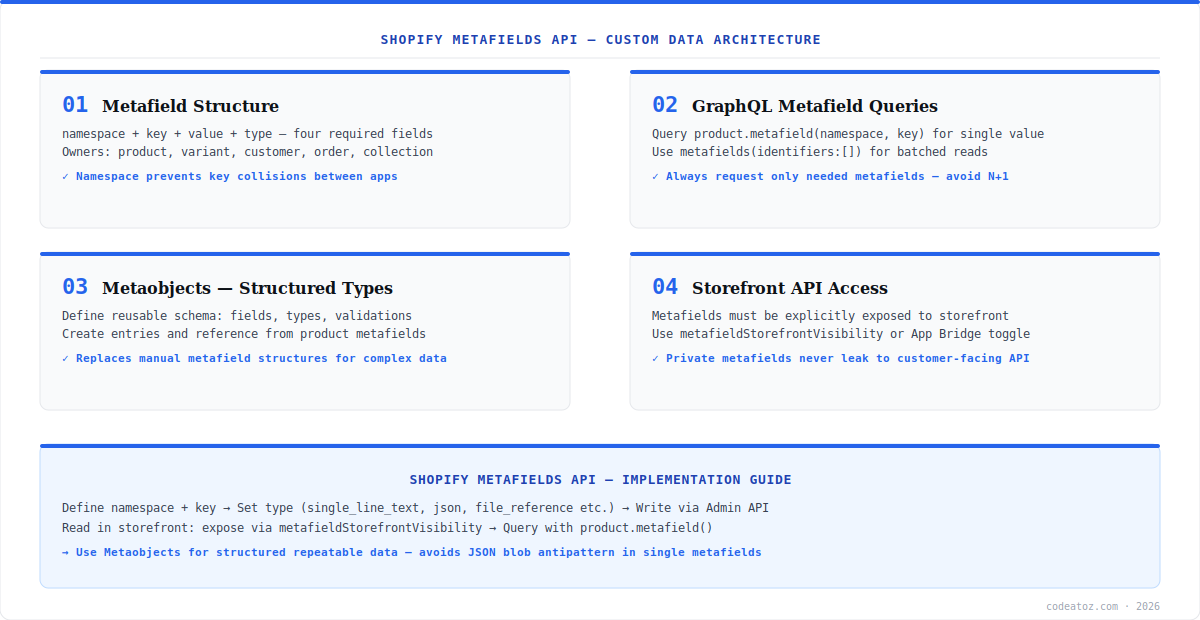
Every Shopify metafields API entry has four required fields: namespace (groups your metafields, e.g. my_app), key (the field name within the namespace), value (the stored data), and type (the value format — single_line_text_field, json, boolean, integer, file_reference, and 15+ more). Metafields can be attached to seven resource owners: Product, ProductVariant, Customer, Order, Collection, Blog, and Page. The namespace must match your app’s allowed namespace list — apps are restricted to their own namespaces to prevent data conflicts. Refer to the Shopify metafields API reference for the full type list.
metafieldsSet(metafields: [{
  ownerId: "gid://shopify/Product/1234567890"
  namespace: "my_app"
  key: "supplier_code"
  value: "SUP-UK-001"
  type: "single_line_text_field"
}]) {
  metafields { id namespace key value }
  userErrors { field message }
}Shopify Metafields API: Reading Metafields via GraphQL
Reading the Shopify metafields API via GraphQL Admin API uses the metafield(namespace, key) field on any supported resource. For multiple metafields, use metafields(identifiers: [...]) to batch reads in a single query — never loop individual queries for each metafield on a list page. On the Storefront API, metafields must be explicitly exposed before they appear in queries.
query GetProductMetafields($id: ID!) {
  product(id: $id) {
    title
    supplier: metafield(namespace: "my_app", key: "supplier_code") { value }
    certifications: metafield(namespace: "my_app", key: "certifications") { value }
    # Batch multiple fields in one query:
    metafields(identifiers: [
      {namespace: "my_app", key: "care_instructions"},
      {namespace: "my_app", key: "country_of_origin"}
    ]) { namespace key value type }
  }
}Always namespace your Shopify metafields API entries with your app handle — e.g. my-app-handle. This prevents collisions when multiple apps write to the same resource. When you submit your app to the Shopify App Store, Shopify locks your app to its reserved namespace so no other app can overwrite your data.
Shopify Metafields API: Metaobjects for Structured Data
Metaobjects extend the Shopify metafields API to support structured, repeatable schemas — think of them as custom content types. Define a Metaobject definition with named fields and types (e.g. a specification_table type with label, value, and unit fields), then create entries and reference them from product metafields as a metaobject_reference. This replaces the fragile JSON-blob pattern where structured data was jammed into a single json metafield. The Shopify Metaobjects documentation covers definition creation and entry management via GraphQL.
Metaobjects are also directly queryable via the Storefront API, making them ideal for headless storefronts that need rich structured product content — spec tables, size guides, material certifications, or any repeatable content block. Our Shopify development team uses Metaobjects extensively for complex product data architectures. See our Shopify custom app development guide for how metafields fit into the wider app architecture. For Storefront API access, check the Shopify Storefront API documentation.
Frequently Asked Questions About the Shopify Metafields API
What is the Shopify metafields API?
The Shopify metafields API lets apps and merchants store custom data on Shopify resources — products, variants, customers, orders, collections, blogs, and pages. Each metafield has a namespace, key, value, and type. Over 20 value types are supported including text, integer, boolean, JSON, file references, and metaobject references.
What is the difference between metafields and Metaobjects in the Shopify metafields API?
In the Shopify metafields API, metafields store individual values on a resource — a single text field, number, or file reference. Metaobjects are structured content types with multiple named fields, like a custom content type in a CMS. Use Metaobjects when you need repeatable structured data such as spec tables, size guides, or material information that is too complex for individual metafields.
How do I read metafields via the Shopify metafields API?
Read individual metafields via the Shopify metafields API using the metafield(namespace, key) field on any supported resource in the GraphQL Admin API. For multiple metafields, use metafields(identifiers: […]) to batch reads in one query. On the Storefront API, metafields must be explicitly exposed to the storefront before they are queryable by unauthenticated requests.
What types does the Shopify metafields API support?
The Shopify metafields API supports over 20 types including single_line_text_field, multi_line_text_field, rich_text_field, integer, decimal, boolean, date, date_time, url, json, color, weight, dimension, volume, file_reference, product_reference, variant_reference, page_reference, collection_reference, and metaobject_reference.
How do I expose metafields to the Storefront API?
To expose Shopify metafields API data to the Storefront API, either use the metafieldStorefrontVisibility mutation in the Admin API or enable the storefront access toggle in the Shopify admin under Custom Data. Once exposed, the metafield is queryable by unauthenticated Storefront API requests. Only expose metafields that are safe for public access — never expose private or sensitive data.
What namespace should I use for the Shopify metafields API?
Use your app handle as the namespace for the Shopify metafields API — e.g. my-app-handle or my_company_app. This prevents conflicts with other apps writing to the same resource. When publishing to the Shopify App Store, declare your reserved namespace in your app configuration so Shopify locks it to your app exclusively.
Building with the Shopify Metafields API?
Our team builds custom data architectures with metafields and Metaobjects for complex product catalogues and app integrations.




