
Hyvä Theme Alpine.js Components — Build Custom UI (2026)
Build Hyvä theme Alpine.js components from scratch — x-data patterns, $dispatch events, Alpine.data() reusable components, private-content sections, and cart interaction.
Hyvä theme Alpine.js components are the building blocks of every interactive element on a Hyvä Magento 2 store — dropdowns, accordions, tabs, product galleries, add-to-cart buttons, and mini-cart drawers. Understanding Hyvä theme Alpine.js component patterns means you can build any custom UI without a performance regression. This guide covers the complete Hyvä theme Alpine.js components toolkit: inline x-data components, reusable Alpine.data() components, cross-component communication with $dispatch, private content sections for logged-in data, and the cart interaction API.
Alpine.js in Hyvä theme Magento 2 is not a separate build system — it is loaded as a standard script tag in the page head and available globally on every page. You write Alpine.js component code directly in your phtml templates using x-data, x-show, x-if, @click, and other directives. There is no compilation step, no npm required for basic components, and no separate JS file needed for simple inline components.
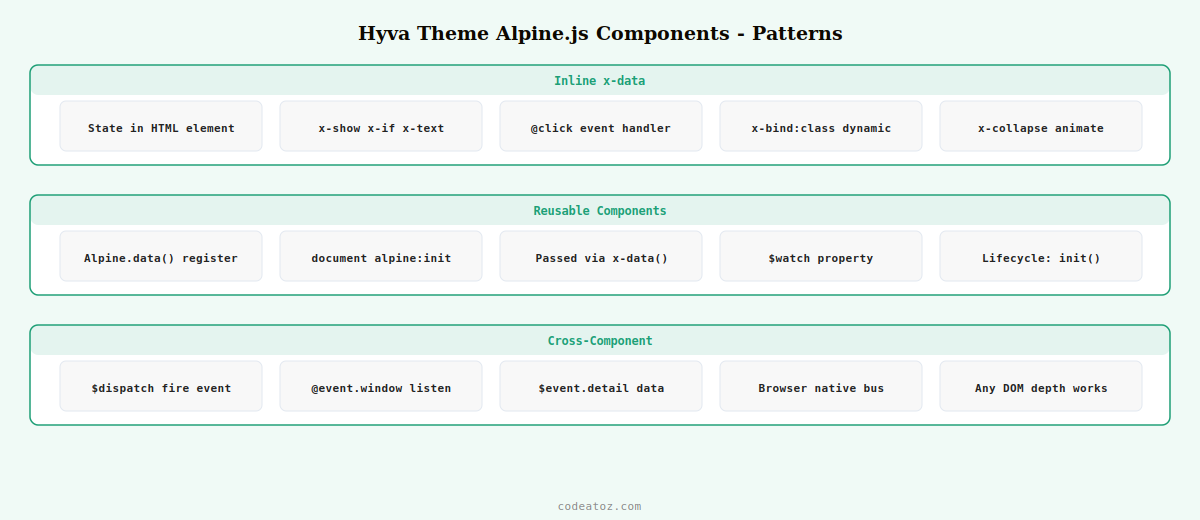
Hyvä Theme Alpine.js Components: Inline x-data Pattern
The simplest Hyvä theme Alpine.js component is an inline x-data object on a single element. Use this pattern for self-contained UI state that doesn’t need to be shared or reused across multiple templates.
<!-- Hyvä theme Alpine.js component: accordion -->
<div x-data="{ open: false }" class="border-b border-gray-200 py-4">
    <button @click="open = !open"
            class="flex w-full items-center justify-between text-left font-semibold text-gray-900"
            :aria-expanded="open">
        <span>Product Specification Details</span>
        <svg x-bind:class="{ 'rotate-180': open }"
             class="h-5 w-5 transition-transform duration-200"
             fill="none" viewBox="0 0 24 24" stroke="currentColor">
            <path stroke-linecap="round" stroke-linejoin="round" stroke-width="2" d="M19 9l-7 7-7-7"/>
        </svg>
    </button>
    <!-- Hyvä theme Alpine.js x-collapse for smooth animation -->
    <div x-show="open" x-collapse class="pt-4 text-gray-600">
        <?= $block->getChildHtml('spec_content') ?>
    </div>
</div>
Hyvä Theme Alpine.js Components: Reusable Alpine.data() Pattern
When the same Hyvä theme Alpine.js component logic needs to be used on multiple pages or in multiple templates, extract it into an Alpine.data() registration. In Hyvä, these are typically defined in a <script> tag within a dedicated phtml template and loaded via layout XML.
<!-- Hyvä theme Alpine.js reusable component definition -->
<script>
    function productTabs() {
        return {
            activeTab: 'description',

            init() {
                // Hyvä theme Alpine.js lifecycle hook
                this.$watch('activeTab', (tab) => {
                    this.$dispatch('tab-changed', { tab });
                });
            },

            setTab(tab) {
                this.activeTab = tab;
            },

            isActive(tab) {
                return this.activeTab === tab;
            }
        };
    }
    // Register as reusable Hyvä theme Alpine.js component
    document.addEventListener('alpine:init', () => {
        Alpine.data('productTabs', productTabs);
    });
</script>

<!-- Use the registered Hyvä theme Alpine.js component anywhere -->
<div x-data="productTabs()">
    <nav class="flex border-b border-gray-200">
        <button @click="setTab('description')"
                :class="isActive('description') ? 'border-b-2 border-primary text-primary' : 'text-gray-500'"
                class="px-6 py-3 font-medium text-sm">Description</button>
        <button @click="setTab('specs')"
                :class="isActive('specs') ? 'border-b-2 border-primary text-primary' : 'text-gray-500'"
                class="px-6 py-3 font-medium text-sm">Specifications</button>
    </nav>
    <div x-show="isActive('description')" class="py-6">...</div>
    <div x-show="isActive('specs')"       class="py-6">...</div>
</div>
Hyvä Theme Alpine.js Components: $dispatch Events for Cross-Component Communication
When two Hyvä theme Alpine.js components on the same page need to communicate — such as a product option selector telling the add-to-cart button which variation is selected — use $dispatch to send custom browser events and @eventname.window to listen for them globally.
<!-- Component A: dispatches the event (Hyvä theme Alpine.js sender) -->
<div x-data="{ selectedSize: '' }">
    <select x-model="selectedSize"
            @change="$dispatch('size-selected', { size: selectedSize })"
            class="border rounded px-3 py-2">
        <option value="">Select size</option>
        <option value="S">Small</option>
        <option value="M">Medium</option>
        <option value="L">Large</option>
    </select>
</div>

<!-- Component B: listens on window (Hyvä theme Alpine.js receiver) -->
<div x-data="{ size: '', inStock: true }"
     @size-selected.window="size = $event.detail.size; checkStock(size)">
    <button :disabled="!inStock || !size"
            class="bg-primary text-white px-6 py-3 rounded disabled:opacity-50">
        <span x-text="inStock && size ? 'Add ' + size + ' to Cart' : 'Select a size'"></span>
    </button>
</div>
Hyvä Theme Alpine.js Components: Private Content & Customer Data
Customer-specific data in Hyvä theme Magento 2 — logged-in name, cart item count, wishlist — is loaded via Magento’s private content mechanism to prevent page caching from serving one customer’s data to another. Use the window.hyva.getCookie and section reload API to access this data in your Alpine.js components.
<!-- Hyvä theme Alpine.js component: customer greeting from private content -->
<div x-data="{
    customerName: '',
    cartCount: 0,
    init() {
        // Load private content in Hyvä theme Alpine.js
        this.$watch('$store.cart', cart => {
            this.cartCount = cart.summary_count || 0;
        });
        const sections = hyva.getPrivateContentData(['customer', 'cart']);
        if (sections.customer && sections.customer.fullname) {
            this.customerName = sections.customer.fullname;
        }
    }
}">
    <span x-show="customerName" x-text="'Welcome, ' + customerName"
          class="text-sm text-gray-700"></span>
    <span class="cart-count text-xs font-bold bg-primary text-white rounded-full px-2"
          x-text="cartCount" x-show="cartCount > 0"></span>
</div>
💡 Hyvä theme Alpine.js components that need customer data should always use Hyvä’s private content API rather than making direct AJAX calls to Magento’s customer or cart endpoints. The private content mechanism handles cache invalidation correctly — direct AJAX calls can cause customer data to appear in FPC-cached responses for subsequent visitors, a critical security bug.
The Hyvä JavaScript functions documentation covers all built-in helpers used in Hyvä theme Alpine.js components. The Alpine.js $dispatch documentation covers the cross-component communication pattern used extensively in Hyvä theme Alpine.js. See our Hyvä theme developer guide for the architecture overview, and our Hyvä Tailwind CSS guide for styling your Alpine.js components.
Frequently Asked Questions — Hyvä Theme Alpine.js Components
How do I create an Alpine.js component in Hyvä theme?
Add an x-data attribute to any HTML element with a JavaScript object defining the component’s state and methods. Alpine.js is already loaded globally in Hyvä theme, so no separate script import is needed for inline components. For reusable Hyvä theme Alpine.js components used across multiple templates, register them with Alpine.data() in a script tag within a phtml file loaded via layout XML, and reference them as x-data=”componentName()”.
How do I communicate between two Hyvä theme Alpine.js components?
Use $dispatch() in the sending component to fire a custom browser event. Listen for it in the receiving component using @eventname.window (the .window modifier makes it listen on the window object rather than just the element’s subtree). Pass data in the event detail object. This browser-native event bus works reliably for Hyvä theme Alpine.js components anywhere on the same page regardless of DOM nesting.
Can I use jQuery in Hyvä theme alongside Alpine.js?
jQuery is not loaded by default in Hyvä theme. Some extensions load their own jQuery instance, which works but adds weight. For new development, avoid jQuery entirely and use Alpine.js directives and vanilla JS. The x-data pattern handles all typical use cases that jQuery was previously needed for in Magento — DOM manipulation, event handling, AJAX, and animation. Mixing jQuery with Hyvä theme Alpine.js components creates maintenance complexity and partially negates Hyvä’s performance gains.
How do I animate show/hide in Hyvä theme Alpine.js?
Install the Alpine.js Collapse plugin (already included in Hyvä) and use x-collapse on elements controlled by x-show. For custom transitions, use x-transition with enter/leave classes from Tailwind CSS. For example: x-transition:enter=”transition ease-out duration-200″ x-transition:enter-start=”opacity-0″ x-transition:enter-end=”opacity-100″. These Hyvä theme Alpine.js transition directives use CSS transitions, not JavaScript animation loops.
How do I access Magento cart and customer data in Hyvä Alpine.js?
Use hyva.getPrivateContentData([‘cart’, ‘customer’]) to read private content sections that are loaded separately from cached page content. Watch $store.cart for reactive cart updates when items are added or removed. Never make direct AJAX calls to customer or cart REST endpoints from Hyvä theme Alpine.js components — always use the private content mechanism to avoid serving cached customer data to wrong users.
What Alpine.js plugins are available in Hyvä theme?
Hyvä theme includes Alpine.js Collapse (smooth height animations), Alpine.js Focus (focus trapping for modals and drawers), and Alpine.js Intersect (intersection observer for lazy loading). These are loaded with the Alpine.js bundle in Hyvä’s default theme. Additional Alpine.js plugins can be added by enqueueing them in layout XML before the Alpine.js init script. Check the Hyvä theme Alpine.js documentation for the correct script loading order.
Need Custom Hyvä Alpine.js Components Built?
CodeAtoZ builds custom Hyvä theme Alpine.js components — product configurators, custom checkout steps, interactive category filters, and complex UI elements.




