
Magento 2 Cache Types — Complete Management & Custom Cache Guide (2026)
Every Magento 2 cache type explained — when to flush vs clean, Redis configuration, Varnish full_page cache, custom cache type creation, and selective invalidation from PHP.
Understanding Magento 2 cache types is essential for both performance and debugging. Magento 2 ships with 15 built-in Magento 2 cache types — from configuration and layout to compiled code and full-page cache — each storing different categories of computed data. Knowing which Magento 2 cache types to flush when, which to flush selectively versus globally, and how to create a custom cache type for your module data prevents the two most common performance anti-patterns: flushing everything on every deploy (slow) and never flushing the right type (stale data bugs).
Magento 2 cache types fall into three tiers: backend caches stored in Redis or files (configuration, layout, block HTML), the full-page cache served by Varnish or Magento’s built-in FPC, and opcode cache managed by PHP-FPM. Understanding which tier a cache type belongs to determines both where its data is stored and how to invalidate it correctly.
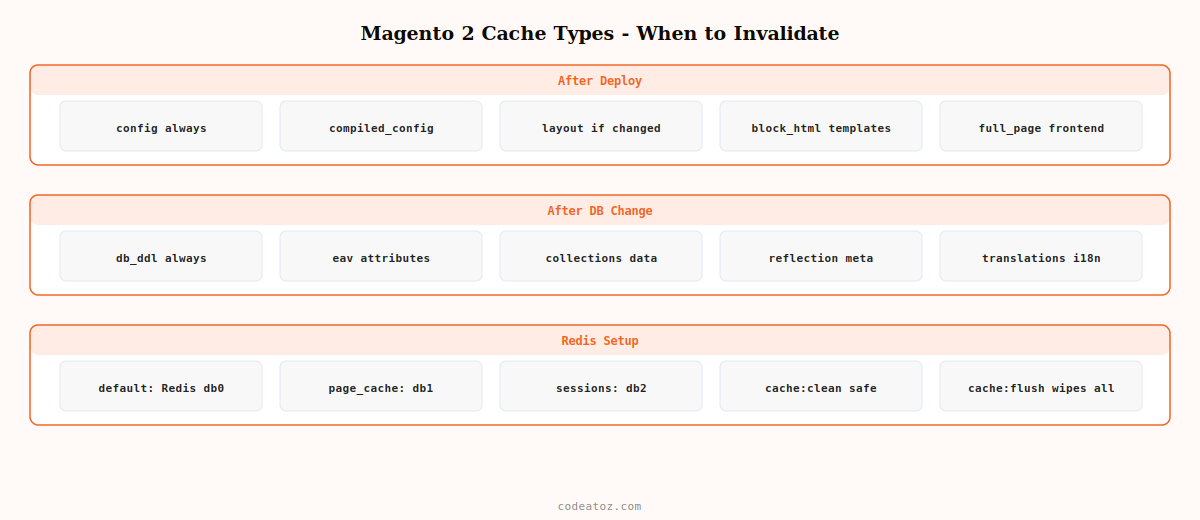
Magento 2 Cache Types: Complete Reference Table
Every Magento 2 cache type has a specific scope, storage location, and correct invalidation trigger. Understanding this prevents unnecessary full-flush deployments.
| Cache type | CLI name | What it stores | When to flush |
|---|---|---|---|
| Configuration | config | Merged config XML, system.xml, env.php | After any config change or deploy |
| Layouts | layout | Compiled page layout XML trees | After layout XML changes |
| Blocks HTML output | block_html | Rendered block HTML fragments | After template or CMS changes |
| Collections data | collections | Database collection query results | After product/category data changes |
| Reflection data | reflection | API interface reflection metadata | After module adds/removes |
| DB DDL operations | db_ddl | Database schema descriptions | After schema changes (setup:upgrade) |
| Compiled config | compiled_config | DI compilation output | After setup:di:compile |
| EAV types/attributes | eav | Entity attribute metadata | After attribute creation/modification |
| Customer notification | customer_notification | Customer inbox messages | Rarely — automatic |
| Config integration API | config_integration_api | Integration API token metadata | After integration changes |
| Config integration | config_integration | Integration configuration | After integration changes |
| Google Product Cache | google_product | Google Shopping product feeds | After product data changes |
| Full-page cache | full_page | Complete rendered HTML pages | After any frontend change |
| Vertex tax data | vertex | Vertex tax calculation data | After tax config changes |
| Translations | translate | Compiled i18n translation files | After translate.csv changes |
Magento 2 Cache Types: Flush vs Clean — The Critical Difference
Magento 2 offers two cache clearing commands and they behave differently. Understanding this distinction prevents accidental over-clearing in production:
# cache:clean — cleans ONLY Magento's registered cache types
# Safe for production — does not touch third-party cache storage
bin/magento cache:clean config layout block_html

# cache:flush — flushes the entire cache STORAGE (Redis/file)
# Clears ALL data including third-party caches sharing the same storage
# Use for deployments, not routine cache management
bin/magento cache:flush

# Flush only specific Magento 2 cache types by name
bin/magento cache:clean full_page collections eav

# Disable/enable specific Magento 2 cache types
bin/magento cache:disable block_html full_page
bin/magento cache:enable block_html full_page

# Check status of all Magento 2 cache types
bin/magento cache:status
Magento 2 Cache Types: Create a Custom Cache Type
Custom Magento 2 cache types let your module store computed data that is expensive to regenerate. Register your cache type in etc/cache.xml and use the cache frontend API in your PHP service class.
<?xml version="1.0"?>
<config xmlns:xsi="http://www.w3.org/2001/XMLSchema-instance"
        xsi:noNamespaceSchemaLocation="urn:magento:framework:Cache/etc/cache.xsd">
    <type name="vendor_custom_data"
          translate="label,description"
          instance="VendorModuleModelCacheTypeCustomData">
        <label>Vendor Custom Data</label>
        <description>Custom computed data for Vendor module</description>
    </type>
</config><?php
namespace VendorModuleModel;
use MagentoFrameworkAppCacheInterface;
use MagentoFrameworkSerializeSerializerInterface;
class ProductDataService
{
private const CACHE_TYPE = 'vendor_custom_data';
private const CACHE_TTL = 3600; // 1 hour
public function __construct(
private readonly CacheInterface $cache,
private readonly SerializerInterface $serializer
) {}
public function getExpensiveData( int $productId ): array
{
$cacheKey = 'vendor_product_data_' . $productId;
$cached = $this->cache->load( $cacheKey );
if ( $cached ) {
return $this->serializer->unserialize( $cached );
}
// Expensive computation here — only runs on cache miss
$data = $this->computeProductData( $productId );
$this->cache->save(
$this->serializer->serialize( $data ),
$cacheKey,
[self::CACHE_TYPE], // tag for selective invalidation
self::CACHE_TTL
);
return $data;
}
private function computeProductData( int $productId ): array
{
// ... expensive calculation
return [];
}
}💡 Use cache:clean instead of cache:flush in your Magento 2 CI/CD deployment post-deploy scripts. cache:flush wipes the entire Redis storage including session data, which can force all logged-in customers to log back in immediately after a deploy. cache:clean config layout full_page clears only the Magento 2 cache types that actually changed during the deploy without touching sessions.
The Adobe Commerce full page cache documentation covers Varnish configuration for the full_page Magento 2 cache type. The Magento 2 partial cache documentation covers custom cache type creation and the cache tag invalidation API. See our Magento 2 CI/CD deployment guide for how cache commands fit into the deployment pipeline, and our Magento 2 development services for performance-optimised Magento builds.
Frequently Asked Questions — Magento 2 Cache Types
What are the Magento 2 cache types?
Magento 2 ships with 15 built-in cache types: config, layout, block_html, collections, reflection, db_ddl, compiled_config, eav, customer_notification, config_integration_api, config_integration, google_product, full_page, vertex, and translate. Each stores a different category of computed data. The full_page type stores rendered HTML pages and is typically served by Varnish or Magento’s built-in FPC. All others are stored in Redis or the file system.
What is the difference between cache:clean and cache:flush in Magento 2?
cache:clean removes data only from Magento’s registered cache types — it does not touch the underlying cache storage (Redis/files) beyond what Magento manages. cache:flush wipes the entire cache storage, including any third-party caches sharing the same Redis instance and session data. Use cache:clean for routine invalidation and specific type clearing. Use cache:flush only during full deployments when a complete reset is required.
Which Magento 2 cache types should I flush after a deployment?
After a standard code deployment: clean config (always), layout (if any layout XML changed), block_html (if any templates changed), compiled_config (always after di:compile), and full_page (always for frontend changes). After a database schema change (setup:upgrade): also clean db_ddl and eav. You rarely need to flush all Magento 2 cache types at once — selective cleaning is faster and avoids session disruption for logged-in customers.
How do I create a custom Magento 2 cache type?
Declare the cache type in etc/cache.xml with a name, label, and instance class. Create the instance class extending MagentoFrameworkCacheFrontendDecoratorTagScope. In your service classes, inject CacheInterface and use it with the cache type name as the tag when saving data. Use the type name in bin/magento cache:clean calls for selective invalidation of your custom Magento 2 cache type.
How do I configure Redis for Magento 2 cache types?
Add Redis cache backend configuration to app/etc/env.php. Configure two separate Redis instances: one for default and page_cache, another for sessions. Set separate databases (db: 0, 1, 2) within the same Redis instance if running on a single server. Set compress_data to 1 for the page cache to reduce Redis memory usage. Adjust max_concurrency, read_timeout, and retry_reads_on_fail for production Redis Magento 2 cache type reliability.
How do I invalidate a custom Magento 2 cache type programmatically?
Inject MagentoFrameworkAppCacheInterface and call $this->cache->clean([MagentoFrameworkCacheFrontendInterface::CLEANING_MODE_MATCHING_TAG], [‘your_cache_type_name’]). Alternatively inject the cache type class directly and call clean() on it. In event observers, listen to clean_cache_by_tags or clean_cache_after_reindex events to trigger cache invalidation when related data changes in your Magento 2 cache type.
Need Magento 2 Performance Optimisation?
CodeAtoZ optimises Magento 2 cache configuration — Redis setup, Varnish VCL, selective invalidation strategy, and custom cache types for faster store performance.




