
Magento 2 Payment Gateway — Build a Custom Module from Scratch (2026)
Complete Magento 2 payment gateway module guide — gateway model, config.xml, payment.xml, controller actions, capture and void methods, and checkout integration.
Building a Magento 2 payment gateway module gives you complete control over how your store processes transactions — whether you’re integrating a regional payment processor not covered by existing extensions, building a custom instalment system, or wrapping a proprietary payment API. A Magento 2 payment gateway module follows a specific architecture: a gateway model extending AbstractMethod, XML-based method configuration, controller actions for redirect flows, and webhook handlers for asynchronous notifications. This guide covers the complete Magento 2 payment gateway build including PCI-aware design decisions that keep cardholder data off your server.
Magento 2 payment gateway development requires understanding three layers that work together: the payment method model (PHP class defining capabilities), the configuration (XML files declaring the method to Magento), and the UI integration (checkout integration via layout XML and JavaScript component). Get any layer wrong and checkout either silently ignores the payment method or throws cryptic errors during order placement.
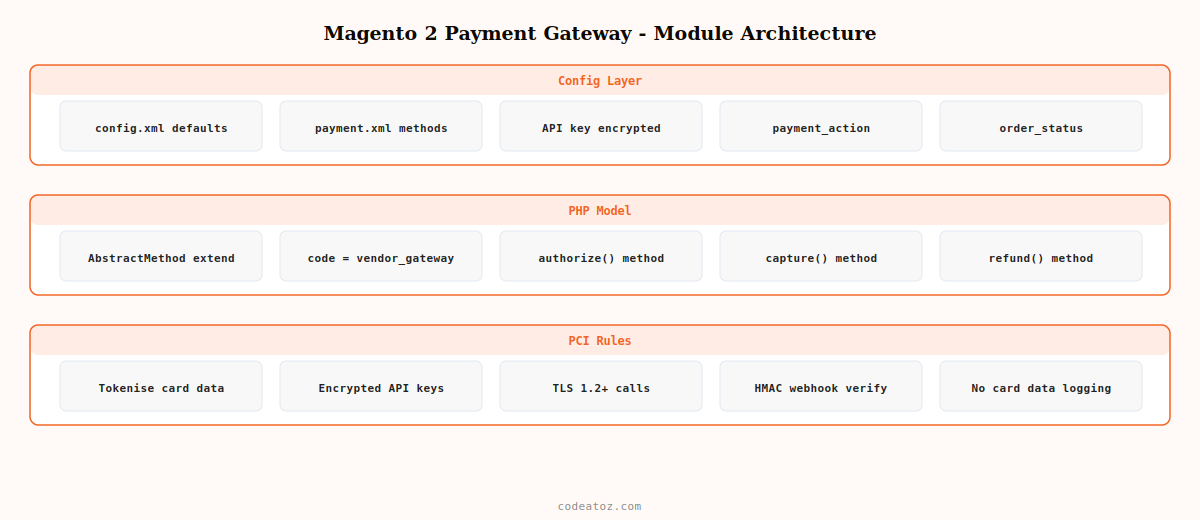
Magento 2 Payment Gateway: Module Structure & Configuration XML
A Magento 2 payment gateway module needs two essential XML configuration files: config.xml to declare default payment method settings, and payment.xml to register method capabilities and group assignment.
<?xml version="1.0"?>
<config xmlns:xsi="http://www.w3.org/2001/XMLSchema-instance"
        xsi:noNamespaceSchemaLocation="urn:magento:module:Magento_Store:etc/config.xsd">
    <default>
        <payment>
            <vendor_gateway>
                <active>0</active>
                <model>VendorGatewayModelMethodCheckout</model>
                <title>Vendor Gateway</title>
                <order_status>pending</order_status>
                <allowspecific>0</allowspecific>
                <can_capture>1</can_capture>
                <can_refund>1</can_refund>
                <can_void>1</can_void>
                <payment_action>authorize_capture</payment_action>
                <api_key backend_model="MagentoConfigModelConfigBackendEncrypted"/>
                <sandbox_mode>1</sandbox_mode>
            </vendor_gateway>
        </payment>
    </default>
</config><?xml version="1.0"?>
<payment xmlns:xsi="http://www.w3.org/2001/XMLSchema-instance"
xsi:noNamespaceSchemaLocation="urn:magento:module:Magento_Payment:etc/payment.xsd">
<groups>
<group id="vendor_gateway_group" translate="label">
<label>Vendor Payment Solutions</label>
</group>
</groups>
<methods>
<method name="vendor_gateway">
<allow_multiple_address>0</allow_multiple_address>
</method>
</methods>
</payment>Magento 2 Payment Gateway: The Gateway Model Class
The payment method model is the PHP heart of every Magento 2 payment gateway. Extend MagentoPaymentModelMethodAbstractMethod and declare the capabilities your gateway supports using class constants. Magento reads these flags to determine which payment operations to expose in the admin.
<?php
namespace VendorGatewayModelMethod;

use MagentoPaymentModelMethodAbstractMethod;
use MagentoFrameworkExceptionLocalizedException;

class Checkout extends AbstractMethod
{
    protected $_code                    = 'vendor_gateway';
    protected $_isGateway               = true;
    protected $_canCapture              = true;
    protected $_canCapturePartial       = true;
    protected $_canRefund               = true;
    protected $_canRefundInvoicePartial = true;
    protected $_canVoid                 = true;
    protected $_canUseInternal          = true;
    protected $_canUseCheckout          = true;

    /**
     * Authorize the Magento 2 payment gateway transaction.
     * Called when payment_action = authorize.
     */
    public function authorize(
        MagentoPaymentModelInfoInterface $payment,
        float $amount
    ): static {
        $order = $payment->getOrder();
        // Call your payment API here — keep card data OFF this server
        $response = $this->callGatewayApi( 'authorize', [
            'amount'      => $amount,
            'currency'    => $order->getBaseCurrencyCode(),
            'customer_id' => $order->getCustomerId(),
            'order_id'    => $order->getIncrementId(),
            'token'       => $payment->getAdditionalInformation('gateway_token'),
        ]);

        if ( ! $response['success'] ) {
            throw new LocalizedException( __( 'Magento 2 payment gateway authorization failed: %1', $response['message'] ) );
        }

        $payment->setTransactionId( $response['transaction_id'] );
        $payment->setIsTransactionClosed( false );

        return $this;
    }

    /**
     * Capture previously authorized Magento 2 payment gateway transaction.
     */
    public function capture(
        MagentoPaymentModelInfoInterface $payment,
        float $amount
    ): static {
        $txId = $payment->getParentTransactionId() ?: $payment->getTransactionId();

        $response = $this->callGatewayApi( 'capture', [
            'transaction_id' => $txId,
            'amount'         => $amount,
        ]);

        if ( ! $response['success'] ) {
            throw new LocalizedException( __( 'Magento 2 payment gateway capture failed: %1', $response['message'] ) );
        }

        $payment->setTransactionId( $response['capture_id'] );
        $payment->setParentTransactionId( $txId );
        $payment->setIsTransactionClosed( true );

        return $this;
    }

    /**
     * Refund via Magento 2 payment gateway — called from credit memo.
     */
    public function refund(
        MagentoPaymentModelInfoInterface $payment,
        float $amount
    ): static {
        $txId = $payment->getParentTransactionId();

        $response = $this->callGatewayApi( 'refund', [
            'transaction_id' => $txId,
            'amount'         => $amount,
        ]);

        if ( ! $response['success'] ) {
            throw new LocalizedException( __( 'Magento 2 payment gateway refund failed: %1', $response['message'] ) );
        }

        $payment->setTransactionId( $response['refund_id'] );
        return $this;
    }

    private function callGatewayApi( string $action, array $data ): array
    {
        // Implement HTTP client call to your payment API here.
        // NEVER log raw card data — Magento 2 payment gateway PCI compliance.
        return [];
    }
}
Magento 2 Payment Gateway: Checkout Layout & JS Component
To appear in the Magento 2 checkout, every payment gateway needs a checkout layout XML file and a Knockout.js payment renderer component. The renderer handles the frontend UI — collecting any additional data your gateway needs (such as a tokenised card reference) before order placement.
<?xml version="1.0"?>
<page xmlns:xsi="http://www.w3.org/2001/XMLSchema-instance"
      xsi:noNamespaceSchemaLocation="urn:magento:framework:View/Layout/etc/page_configuration.xsd">
    <body>
        <referenceBlock name="checkout.root">
            <arguments>
                <argument name="jsLayout" xsi:type="array">
                    <item name="components" xsi:type="array">
                        <item name="checkout" xsi:type="array">
                            <item name="children" xsi:type="array">
                                <item name="steps" xsi:type="array">
                                    <item name="children" xsi:type="array">
                                        <item name="billing-step" xsi:type="array">
                                            <item name="children" xsi:type="array">
                                                <item name="payment" xsi:type="array">
                                                    <item name="children" xsi:type="array">
                                                        <item name="renders" xsi:type="array">
                                                            <item name="children" xsi:type="array">
                                                                <item name="vendor-gateway" xsi:type="array">
                                                                    <item name="component" xsi:type="string">Vendor_Gateway/js/view/payment/vendor-gateway</item>
                                                                    <item name="methods" xsi:type="array">
                                                                        <item name="vendor_gateway" xsi:type="array">
                                                                            <item name="isBillingAddressRequired" xsi:type="boolean">true</item>
                                                                        </item>
                                                                    </item>
                                                                </item>
                                                            </item>
                                                        </item>
                                                    </item>
                                                </item>
                                            </item>
                                        </item>
                                    </item>
                                </item>
                            </item>
                        </item>
                    </item>
                </argument>
            </arguments>
        </referenceBlock>
    </body>
</page>
Magento 2 Payment Gateway: PCI Compliance Design Rules
A Magento 2 payment gateway that handles raw card data directly on your server is a PCI DSS scope expansion that significantly increases compliance burden and risk. The correct pattern is tokenisation: your checkout JavaScript collects card details, passes them to your payment provider’s hosted fields or SDK, and receives a single-use token. Your Magento 2 payment gateway model only ever sees the token — never the card number, CVV, or expiry date.
- Never log payment data: ensure your
callGatewayApimethod strips card fields before any logging or debug output - Encrypt API keys: always use
backend_model="MagentoConfigModelConfigBackendEncrypted"in config.xml for API key fields - HTTPS only: the Magento 2 payment gateway API calls must use TLS 1.2+ — validate the provider certificate, never disable SSL verification
- Scope secrets in environment: for production, store API keys in environment variables or Magento’s
env.php, not in the database - Webhook HMAC verification: always verify the HMAC signature on incoming webhook notifications before processing any order status change
⚠ Never disable cURL SSL verification in your Magento 2 payment gateway HTTP client, even temporarily. CURLOPT_SSL_VERIFYPEER = false in a production payment integration exposes every transaction to man-in-the-middle attacks. Always pass a valid CA bundle or use Magento’s built-in MagentoFrameworkHTTPClientCurl which handles certificate verification correctly.
The Adobe Commerce payment integration documentation covers the full Magento 2 payment gateway module architecture. The PCI Security Standards Council merchant guidance covers tokenisation requirements for payment integrations. See our Magento 2 layout XML guide for the checkout layout XML patterns used in payment gateway integration, and our Magento 2 development services for custom payment gateway builds.
💡 Use Magento’s Payment Gateway Framework (introduced in Magento 2.1) rather than extending AbstractMethod directly for new Magento 2 payment gateway modules. The framework provides a cleaner separation between the gateway model, request builder, response handler, and validator — making unit testing significantly easier and the module more maintainable over Magento upgrades.
Frequently Asked Questions — Magento 2 Payment Gateway
How do I create a custom Magento 2 payment gateway?
Create a module with the standard Magento 2 module structure. Add config.xml declaring default payment method settings including your API key field with Encrypted backend model. Add payment.xml registering the method’s capabilities. Create a PHP model class extending AbstractMethod with the gateway code matching your config.xml node name. Implement authorize(), capture(), and refund() methods calling your payment API. Add checkout layout XML and a Knockout.js payment renderer component for the checkout UI.
What is the difference between authorize and authorize_capture in a Magento 2 payment gateway?
In a Magento 2 payment gateway, authorize reserves funds on the customer’s payment method without settling the transaction. The capture step settles the reserved funds when you invoice the order. Authorize-only is used when you need to verify payment before fulfilment. Authorize-capture (the default for most gateways) reserves and settles in one step at checkout. Set payment_action in config.xml to authorize or authorize_capture depending on your business process.
How do I make a Magento 2 payment gateway PCI compliant?
Use tokenisation: never collect or store raw card data on your Magento server. Use your payment provider’s hosted fields, iFrame, or JavaScript SDK to collect card details in the browser and exchange them for a single-use token. Your Magento 2 payment gateway model receives only the token. Encrypt API credentials with Magento’s Encrypted backend model. Verify webhook HMAC signatures before processing callbacks. Never log payment data. Always use TLS 1.2+ for API calls.
How do I handle redirect-based payment flows in Magento 2?
For redirect-based Magento 2 payment gateways (where the customer is sent to a payment provider page), set $_isInitializeNeeded = true in your model and return a redirect URL from the initialize() method. Create controller actions for success, cancel, and webhook return URLs. On the success callback, retrieve the pending order, verify the transaction with your gateway API, update the payment status, and redirect to the Magento success page. Never trust redirect parameters alone — always verify server-side with a Magento 2 payment gateway API call.
Why is my Magento 2 payment gateway not appearing at checkout?
The most common causes are: the payment method is disabled in Stores > Configuration > Sales > Payment Methods, the module has not been enabled via bin/magento module:enable and setup:upgrade, the checkout layout XML has incorrect component path or method name mismatching the config.xml code, or the JS component file does not exist at the path declared in the layout XML. Enable developer mode and check var/log/debug.log and var/log/exception.log for errors during checkout page load.
Can I build a Magento 2 payment gateway using the Payment Gateway Framework?
Yes — the Magento 2 Payment Gateway Framework is the recommended approach for new payment integrations. It uses a command pattern separating the gateway into distinct classes: a command pool, request builders for each operation, a response validator, a response handler, and a transaction builder. This is more complex to set up than extending AbstractMethod but produces a more testable, maintainable Magento 2 payment gateway module that aligns with Magento’s coding standards.
Need a Custom Magento 2 Payment Gateway?
CodeAtoZ builds custom Magento 2 payment gateway modules for regional payment processors, instalment providers, and proprietary payment APIs — PCI-aware, fully tested, production ready.




