
WooCommerce Unit Testing — PHPUnit Setup & Writing Tests (2026)
WooCommerce unit testing with PHPUnit is the fastest way to catch regressions in custom plugins and theme functions before they reach production. Setting up WooCommerce unit testing correctly means bootstrapping the full WordPress and WooCommerce environment in the test suite so your tests can create real products, orders, and coupons using WooCommerce’s built-in factory helpers. This guide covers complete WooCommerce unit testing setup: Composer dependencies, the test bootstrap file, WC factory helpers for creating test data, writing tests for hooks and filters, mocking external services, and running tests automatically in GitHub Actions CI.
WooCommerce unit testing differs from generic PHP unit testing because your code depends on WordPress functions and WooCommerce’s data layer. You cannot simply instantiate a WC_Product in isolation — it requires a database connection, WordPress option lookups, and WooCommerce’s initialisation sequence. The WooCommerce test suite provides a bootstrap that handles all of this, giving you a clean WordPress + WooCommerce installation for each test run.
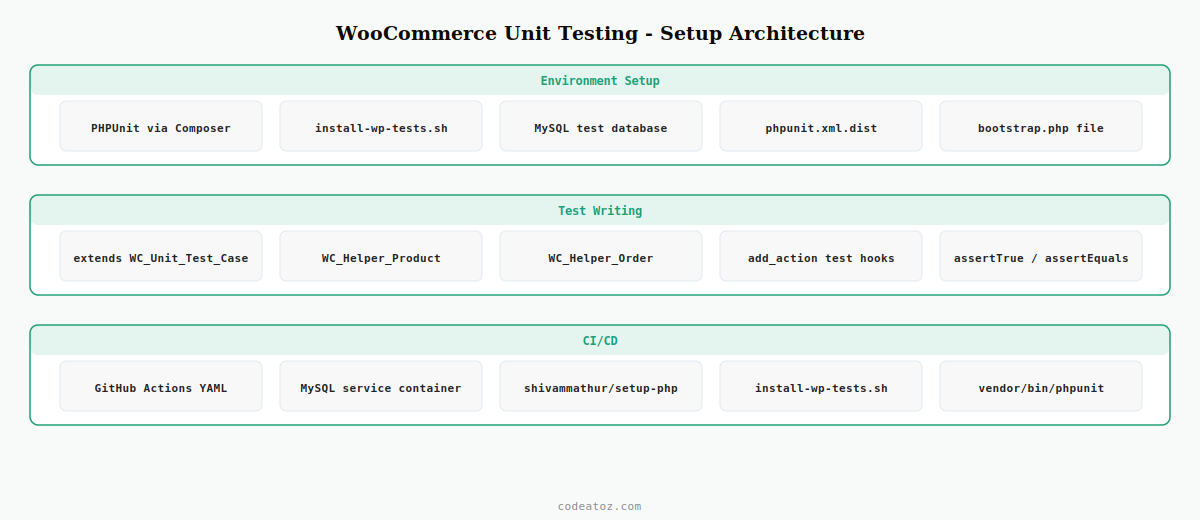
Step 1: Install WooCommerce Unit Testing Dependencies with Composer
The WooCommerce unit testing setup uses Composer to install PHPUnit and the WooCommerce test utilities. Add these to the require-dev section of your plugin’s composer.json.
# Install PHPUnit and WooCommerce test utilities
composer require --dev phpunit/phpunit:^10
composer require --dev yoast/phpunit-polyfills

# Install WordPress test suite (run from plugin root)
# First, set up a local MySQL test database:
# mysql -u root -e "CREATE DATABASE wordpress_test;"

# Download WordPress test utilities:
bash bin/install-wp-tests.sh wordpress_test root '' localhost latest

# phpunit.xml.dist — WooCommerce unit testing configuration
# <?xml version="1.0"?>
# <phpunit bootstrap="tests/bootstrap.php" colors="true">
#   <testsuites>
#     <testsuite name="Plugin Test Suite">
#       <directory>tests/</directory>
#     </testsuite>
#   </testsuites>
# </phpunit>
Step 2: Bootstrap the WooCommerce Unit Testing Environment
The bootstrap file loads WordPress, WooCommerce, and your plugin before any test runs. This is the foundation of the WooCommerce unit testing setup — getting this file right means all tests have access to the full WC API.
<?php
/**
 * WooCommerce unit testing bootstrap
 */
$_tests_dir = getenv( 'WP_TESTS_DIR' )
    ?: rtrim( sys_get_temp_dir(), '/\' ) . '/wordpress-tests-lib';

if ( ! file_exists( $_tests_dir . '/includes/functions.php' ) ) {
    echo "Could not find WP test suite at $_tests_dirn";
    exit( 1 );
}

// Load WP test functions
require_once $_tests_dir . '/includes/functions.php';

// Load WordPress and WooCommerce before WooCommerce unit testing begins
function _manually_load_plugin() {
    // Load WooCommerce first
    require dirname( __DIR__, 3 ) . '/woocommerce/woocommerce.php';
    // Then load your plugin under test
    require dirname( __DIR__ ) . '/my-woocommerce-plugin.php';
}
tests_add_filter( 'muplugins_loaded', '_manually_load_plugin' );

// Boot the WooCommerce unit testing environment
require $_tests_dir . '/includes/bootstrap.php';

// Load WooCommerce test helpers for factory access
require dirname( __DIR__, 3 ) . '/woocommerce/tests/legacy/bootstrap.php';

echo "WooCommerce unit testing environment ready.n";
Step 3: Write WooCommerce Unit Tests with Factory Helpers
WooCommerce’s unit testing factory provides helper methods to create test products, orders, coupons, and customers with a single line of code. This is far cleaner than manually creating WC objects in every test.
<?php
use AutomatticWooCommerceTestingToolsCodeHackerCodeHacker;

class Test_My_WooCommerce_Plugin extends WC_Unit_Test_Case {

    /**
     * WooCommerce unit testing: test a custom price filter
     */
    public function test_wholesale_price_applied_for_wholesale_role(): void {
        // Create a test product using WooCommerce unit testing factory
        $product = WC_Helper_Product::create_simple_product([
            'regular_price' => '100.00',
        ]);
        update_post_meta( $product->get_id(), '_wholesale_price', '75.00' );

        // Create a test user with the wholesale role
        $user_id = $this->factory->user->create([
            'role' => 'wholesale_customer',
        ]);
        wp_set_current_user( $user_id );

        // Re-load the product to trigger the price filter
        $fresh_product = wc_get_product( $product->get_id() );

        // WooCommerce unit testing assertion
        $this->assertEquals( '75.00', $fresh_product->get_price(),
            'Wholesale price filter should apply for wholesale_customer role.' );

        // Cleanup — WooCommerce unit testing should not leave test data
        $product->delete( true );
        wp_delete_user( $user_id );
    }

    /**
     * WooCommerce unit testing: test order status transition hook
     */
    public function test_custom_hook_fires_on_status_change(): void {
        $order    = WC_Helper_Order::create_order();
        $fired    = false;

        add_action( 'woocommerce_order_status_processing', function() use ( &$fired ) {
            $fired = true;
        });

        $order->update_status( 'processing' );

        $this->assertTrue( $fired,
            'WooCommerce unit testing: hook should fire on status change to processing.' );

        $order->delete( true );
    }

    /**
     * WooCommerce unit testing: test cart total calculation
     */
    public function test_cart_calculates_correct_total(): void {
        $product = WC_Helper_Product::create_simple_product([
            'regular_price' => '25.00',
            'price'         => '25.00',
        ]);

        WC()->cart->add_to_cart( $product->get_id(), 3 );
        WC()->cart->calculate_totals();

        $this->assertEquals( 75.00, WC()->cart->get_subtotal(),
            'WooCommerce unit testing: cart total should be 3 x 25.00.' );

        WC()->cart->empty_cart();
        $product->delete( true );
    }
}
Step 4: WooCommerce Unit Testing in GitHub Actions CI
Run WooCommerce unit testing automatically on every push and pull request with GitHub Actions. The workflow installs WordPress, WooCommerce, and the test suite, then runs PHPUnit against a MySQL test database.
name: WooCommerce Unit Testing

on: [push, pull_request]

jobs:
  test:
    runs-on: ubuntu-latest
    services:
      mysql:
        image: mysql:8.0
        env:
          MYSQL_ROOT_PASSWORD: root
          MYSQL_DATABASE: wordpress_test
        options: --health-cmd="mysqladmin ping" --health-timeout=5s

    steps:
      - uses: actions/checkout@v4

      - uses: shivammathur/setup-php@v2
        with:
          php-version: '8.2'
          extensions: mysqli, zip

      - name: Install Composer dependencies for WooCommerce unit testing
        run: composer install --no-progress

      - name: Set up WordPress test suite
        run: bash bin/install-wp-tests.sh wordpress_test root root 127.0.0.1 latest

      - name: Run WooCommerce unit testing
        run: vendor/bin/phpunit --coverage-text
The PHPUnit documentation covers all assertion methods and test configuration for WooCommerce unit testing. The WooCommerce test suite on GitHub shows how WooCommerce itself writes unit tests using the helper factories. The WordPress automated testing handbook covers the WordPress test bootstrap used as the foundation for WooCommerce unit testing. See our WooCommerce plugin build guide for the plugin structure that works best with a WooCommerce unit testing setup.
💡 Extend WC_Unit_Test_Case (from the WooCommerce test suite) rather than PHPUnit’s base TestCase directly. WC_Unit_Test_Case wraps each test in a database transaction that is rolled back after the test completes, so your WooCommerce unit testing creates real database objects without polluting the test database between tests.
Frequently Asked Questions — WooCommerce Unit Testing
How do I set up WooCommerce unit testing with PHPUnit?
Install PHPUnit via Composer. Run the WordPress test suite installer script to create a test database and download WordPress testing utilities. Create a tests/bootstrap.php that loads WordPress, WooCommerce, and your plugin via tests_add_filter(‘muplugins_loaded’). Create a phpunit.xml.dist pointing to the bootstrap file and your tests/ directory. Extend WC_Unit_Test_Case in your test classes to get WooCommerce factory helpers and automatic database rollback after each test.
How do I create test products and orders in WooCommerce unit testing?
Use the WooCommerce factory helpers: WC_Helper_Product::create_simple_product() for products, WC_Helper_Order::create_order() for orders, and WC_Helper_Coupon::create_coupon() for coupons. These helpers create real database records using the WooCommerce API, identical to what a customer or admin would create. Always delete test data in your tearDown() or at the end of each WooCommerce unit testing method to prevent test pollution.
How do I test WooCommerce hooks and filters with PHPUnit?
Use a closure with a reference variable to capture whether a hook fired. Add the closure with add_action() before triggering the action, then assert the reference variable changed. For filters, add a filter that modifies the value, call the function that applies the filter, and assert the modified value. Always remove your test hooks after asserting to prevent them interfering with subsequent WooCommerce unit testing in the same test run.
How do I mock external APIs in WooCommerce unit testing?
Use PHPUnit’s createMock() to create mock objects for service classes. Inject mocks via constructor DI — another reason to write WooCommerce plugins with dependency injection. For wp_remote_post() calls, use the pre_http_request filter to intercept HTTP requests during WooCommerce unit testing and return a simulated response array without making real network requests.
What is the difference between unit tests and integration tests for WooCommerce?
WooCommerce unit testing in the strict sense tests individual functions or methods in isolation with mocked dependencies. WooCommerce integration testing (what most WooCommerce “unit tests” actually are) boots the full WordPress and WooCommerce stack and tests how your code interacts with real WC objects and the database. The WooCommerce test suite is designed for integration testing. True unit tests for WooCommerce code require heavy mocking of WC classes, which is often more effort than the integration test approach.
How do I run WooCommerce unit testing automatically on every commit?
Add a GitHub Actions workflow YAML file with a MySQL service container, PHP setup via shivammathur/setup-php, Composer install, the WordPress test suite installer script, and vendor/bin/phpunit as the final step. The workflow runs on every push and pull request. Failed WooCommerce unit testing blocks merges when you set up branch protection rules requiring the CI check to pass before merging to main.
Want Your WooCommerce Plugin Properly Tested?
CodeAtoZ builds WooCommerce plugins with full PHPUnit test suites — unit testing, integration testing, and GitHub Actions CI from day one.




