
WooCommerce Multisite Setup — Shared Products & Separate Checkouts (2026)
A WooCommerce multisite setup lets you run multiple separate stores on a single WordPress installation — sharing a codebase, plugins, and optionally products, while keeping orders, customers, and settings completely isolated per site. The WooCommerce multisite setup is ideal for franchises, regional storefronts with different currencies, multi-brand retailers, and SaaS store-as-a-service platforms. This guide covers the complete WooCommerce multisite setup: enabling multisite in wp-config.php, activating WooCommerce network-wide, configuring per-site settings, implementing a shared product catalogue, and managing the most common pitfalls.
WordPress Multisite creates a network of sites that share a single database and file system. In a WooCommerce multisite setup, each site in the network has its own WooCommerce settings, orders, customers, and checkout — but all sites share the same installed plugins and themes. Products can be managed per-site or shared from a central catalogue depending on your architecture.
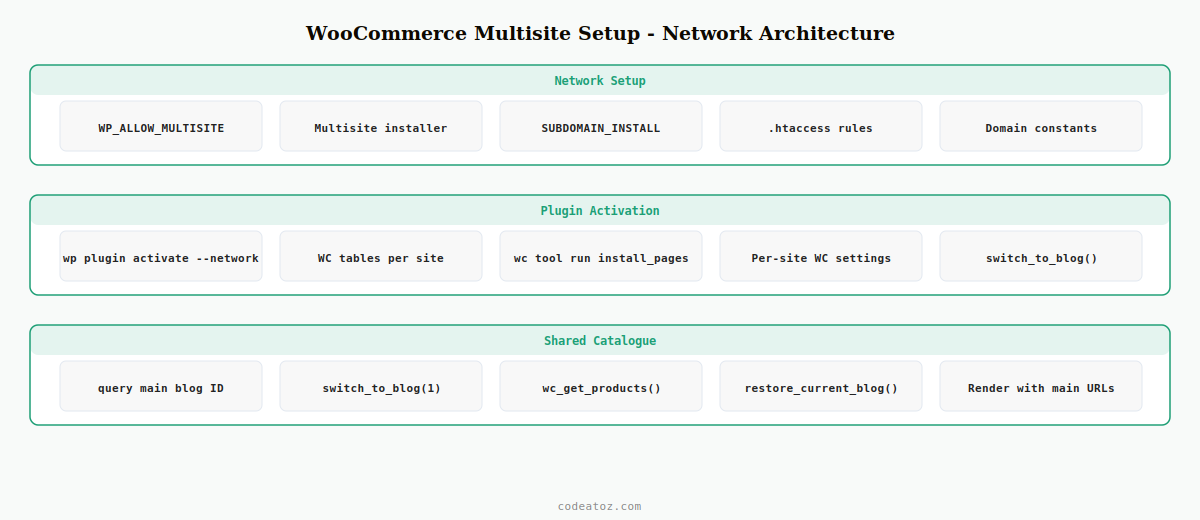
Step 1: Enable WordPress Multisite for WooCommerce Multisite Setup
The WooCommerce multisite setup starts with converting a standard WordPress installation to a multisite network. Add the required constants to wp-config.php before the That’s all, stop editing! line.
// Step 1: Add this BEFORE "That's all, stop editing!" in wp-config.php
define( 'WP_ALLOW_MULTISITE', true );

// After running the multisite installer via WP Admin Network Setup,
// wp-config.php gets these additional constants for your WooCommerce multisite setup:
define( 'MULTISITE',           true );
define( 'SUBDOMAIN_INSTALL',   false );   // false = subdirectory, true = subdomain
define( 'DOMAIN_CURRENT_SITE', 'yourdomain.com' );
define( 'PATH_CURRENT_SITE',   '/' );
define( 'SITE_ID_CURRENT_SITE', 1 );
define( 'BLOG_ID_CURRENT_SITE', 1 );

// Recommended for WooCommerce multisite setup: upload handling
define( 'UPLOADBLOGSDIR', 'wp-content/blogs.dir' );

// .htaccess also needs updating — WP Admin Network Setup provides the exact rules
Step 2: Network-Activate WooCommerce for the Multisite Setup
In a WooCommerce multisite setup, WooCommerce should be network-activated so it is available on every site automatically. Network activation also ensures WooCommerce creates its required database tables (orders, sessions, shipping zones) for every site in the network.
# Network-activate WooCommerce across all sites in the multisite setup
wp plugin activate woocommerce --network

# Verify WooCommerce is active on all sites
wp site list --field=url | xargs -I{} wp --url={} plugin status woocommerce

# Run WooCommerce setup on each subsite for the multisite setup
wp site list --field=url | xargs -I{} wp --url={} wc tool run install_pages
⚠ Not all WooCommerce extensions support network activation in a WooCommerce multisite setup. Payment gateways in particular often require per-site activation and individual API key configuration. Always test each payment gateway on a staging multisite environment before deploying the WooCommerce multisite setup to production.
Step 3: Configure Per-Site WooCommerce Settings in the Multisite Setup
Each site in the WooCommerce multisite setup has its own WooCommerce settings. Currency, tax settings, shipping zones, and payment gateways are all configured independently per site. Switch between sites using switch_to_blog() in custom code to read or write site-specific WooCommerce settings.
<?php
// Get WooCommerce currency for a specific site in the multisite setup
function caz_get_site_currency( int $blog_id ): string {
    switch_to_blog( $blog_id );
    $currency = get_option( 'woocommerce_currency', 'GBP' );
    restore_current_blog();
    return $currency;
}

// Set WooCommerce currency for a specific subsite in the multisite setup
function caz_set_site_currency( int $blog_id, string $currency ): void {
    switch_to_blog( $blog_id );
    update_option( 'woocommerce_currency', $currency );
    restore_current_blog();
}

// Example: configure UK and EU sites in the WooCommerce multisite setup
caz_set_site_currency( 2, 'GBP' );  // UK site
caz_set_site_currency( 3, 'EUR' );  // EU site
caz_set_site_currency( 4, 'USD' );  // US site
Step 4: Share Products Across Sites in the WooCommerce Multisite Setup
The most requested feature in any WooCommerce multisite setup is a shared product catalogue — managing products once and making them available to all subsites. This is achieved by querying the main site’s product posts table from subsites using switch_to_blog() or by creating a cross-site product sync.
function caz_get_network_products( int $main_blog_id = 1, array $args = [] ): array {
    // Switch to main blog to query shared products for the multisite setup
    switch_to_blog( $main_blog_id );

    $products = wc_get_products( array_merge([
        'status'  => 'publish',
        'limit'   => 20,
        'return'  => 'objects',
    ], $args ));

    restore_current_blog();

    return $products;
}

// Display products from the shared catalogue on any subsite
add_shortcode( 'caz_network_products', function( $atts ) {
    $products = caz_get_network_products( 1, [ 'limit' => 12 ] );
    ob_start();
    foreach ( $products as $product ) {
        // Render product card using main site's product data
        echo '<div class="caz-net-product">';
        echo '<a href="' . esc_url( get_site_url( 1 ) . '/product/' . $product->get_slug() ) . '">';
        echo esc_html( $product->get_name() );
        echo '</a></div>';
    }
    return ob_get_clean();
});
The WordPress Multisite developer documentation covers the full network API including switch_to_blog() and network options. The WooCommerce multisite setup documentation covers supported configurations and known limitations. See our WooCommerce performance guide for Redis and caching strategies that are especially important in a high-traffic WooCommerce multisite setup.
WooCommerce Multisite Setup: Common Issues and Fixes
Several issues appear regularly in WooCommerce multisite setups that don’t occur on single-site installations:
- Upload directory conflicts: Set
UPLOADBLOGSDIRtowp-content/blogs.dirto ensure each site in the WooCommerce multisite setup has isolated media uploads - Cookie domain issues: Subsite sessions may collide on subdirectory networks — set
COOKIE_DOMAINper site or use unique cookie names - WooCommerce tables not created on new sites: Run
wp --url=SITE_URL wc tool run install_pagesafter creating each subsite - Payment gateway API keys: Each site needs its own gateway keys — never share production payment credentials across sites in a WooCommerce multisite setup
Frequently Asked Questions — WooCommerce Multisite Setup
Is WooCommerce fully supported on WordPress Multisite?
Yes — WooCommerce officially supports WordPress Multisite. A WooCommerce multisite setup is fully supported with network activation, per-site settings, and per-site order management. Some WooCommerce extensions have limited multisite support, particularly payment gateways and subscription plugins. Always check extension compatibility before committing to a WooCommerce multisite setup for a client project.
Should I use subdomain or subdirectory for a WooCommerce multisite setup?
Subdirectory (e.g. yourdomain.com/uk/, yourdomain.com/eu/) is simpler to configure and works without DNS changes for a WooCommerce multisite setup. Subdomain (uk.yourdomain.com, eu.yourdomain.com) is better for distinct regional branding and SSL management. For a WooCommerce multisite setup with separate country stores, subdomain gives cleaner URLs and makes hreflang international SEO targeting easier.
Can I share a WooCommerce product catalogue across a multisite network?
Yes — use switch_to_blog() to query products from the main site and display them on subsites. Alternatively, run a cron job that duplicates products across all sites on a schedule. For large catalogues, a dedicated central product API is cleaner than switch_to_blog() in a production WooCommerce multisite setup, as it avoids database context switching on every page load.
How do I manage WooCommerce orders across all sites in a multisite setup?
Each site in a WooCommerce multisite setup has its own orders in its own database tables (prefixed per site). To view orders across all sites, build a network-level admin page that iterates over all blog IDs using get_sites(), calls switch_to_blog() for each, queries wc_get_orders(), and aggregates the results. There is no built-in cross-site order dashboard — this is a common custom requirement in WooCommerce multisite setups.
Do all WooCommerce plugins work with a multisite setup?
Most WooCommerce plugins work on individual sites in a multisite network but may not support true network activation. Plugins that use absolute database table names without the blog-specific prefix will only read/write data for the main site. Test every plugin on a staging WooCommerce multisite setup before activating network-wide. Payment gateways and subscription plugins require the most careful testing.
How does WooCommerce handle separate currencies in a multisite setup?
Each site in a WooCommerce multisite setup has its own woocommerce_currency option, so currency is fully independent per site. The UK site can use GBP, the EU site EUR, and the US site USD — all from the same WordPress installation. WooCommerce processes payments in each site’s configured currency using that site’s payment gateway keys. No cross-currency conversion is needed in a properly configured WooCommerce multisite setup.
Need a WooCommerce Multisite Setup Built?
CodeAtoZ designs and builds WooCommerce multisite networks — shared catalogues, per-site checkout, multi-currency, and cross-site reporting.




