
Magento 2 Cron Job Setup — crontab.xml, Groups, and PHP Callback (2026)
Complete Magento 2 cron job setup guide — crontab.xml declaration, cron groups, PHP execute() class, system crontab configuration, and debugging with cron_schedule table.
A correct Magento 2 cron job setup is essential for any background task that needs to run on a schedule — syncing inventory, sending reminder emails, cleaning old data, or triggering third-party integrations. Magento 2 cron job setup involves three files: a crontab.xml that declares the job schedule and callback class, an optional cron_groups.xml for custom execution groups, and the PHP execute class that contains the actual task logic. This guide walks through complete Magento 2 cron job setup from the XML declarations through the PHP class, system crontab configuration, and debugging via the cron_schedule database table.
Magento 2 runs scheduled tasks through its own cron framework, which sits on top of the system crontab. The system crontab fires bin/magento cron:run every minute (the standard recommendation). Magento then checks its internal schedule in the cron_schedule table and runs any jobs whose scheduled time has passed. A Magento 2 cron job setup therefore has two layers: the Magento XML configuration that defines what runs and when, and the server crontab entry that keeps the Magento cron runner ticking.
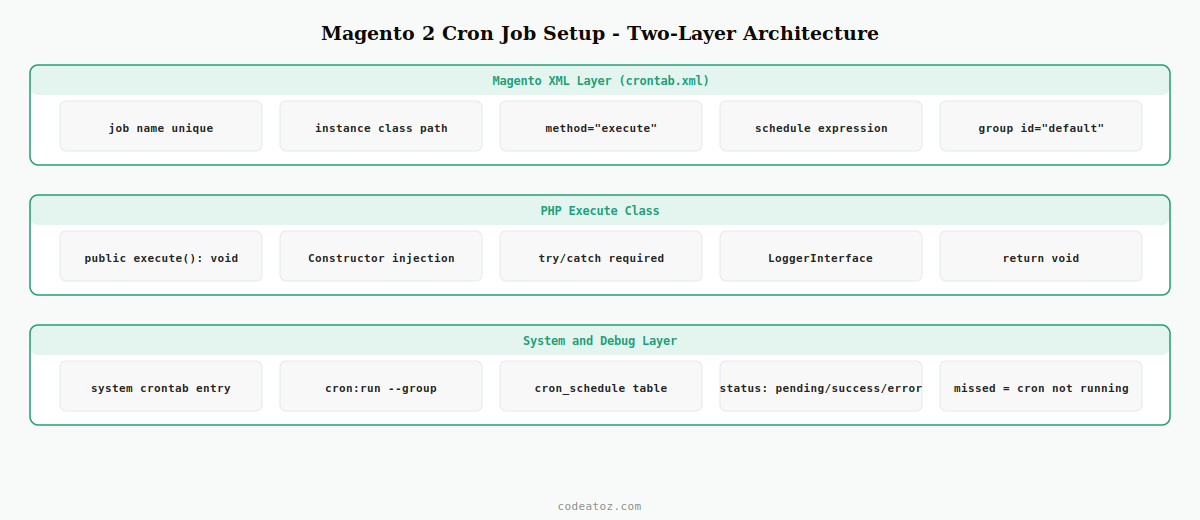
Step 1: Declare the Magento 2 Cron Job in crontab.xml
Every Magento 2 cron job setup starts with etc/crontab.xml in your module. This file declares the job name, the schedule expression, and the PHP class that executes the task. Multiple jobs can be declared in a single file.
<?xml version="1.0"?>
<config xmlns:xsi="http://www.w3.org/2001/XMLSchema-instance"
        xsi:noNamespaceSchemaLocation="urn:magento:module:Magento_Cron:etc/crontab.xsd">

    <group id="default">

        <!-- Magento 2 cron job setup: sync dispatch status every hour -->
        <job name="caz_dispatch_sync"
             instance="CodeAtoZDispatchCronSyncDispatchStatus"
             method="execute">
            <schedule>0 * * * *</schedule>
        </job>

        <!-- Magento 2 cron job setup: clean old records daily at 02:00 -->
        <job name="caz_dispatch_cleanup"
             instance="CodeAtoZDispatchCronCleanupOldRecords"
             method="execute">
            <schedule>0 2 * * *</schedule>
        </job>

    </group>

</config>
The group id determines which cron group runs the job. The default group is the standard choice for most Magento 2 cron job setup tasks. The schedule uses standard cron expression syntax: minute, hour, day-of-month, month, day-of-week. You can also use <config_path>path/to/config</config_path> instead of <schedule> to make the schedule configurable via the admin panel.
Step 2: Create the PHP Execute Class for the Magento 2 Cron Job
The PHP class referenced in crontab.xml must have a public execute() method. This is where the task logic lives for your Magento 2 cron job setup. The class is instantiated by Magento’s object manager, so constructor injection of dependencies is fully supported.
<?php
namespace CodeAtoZDispatchCron;

use PsrLogLoggerInterface;

class SyncDispatchStatus
{
    public function __construct(
        private readonly CodeAtoZDispatchModelDispatchSyncService $syncService,
        private readonly LoggerInterface $logger
    ) {}

    /**
     * Magento 2 cron job setup: execute method called on schedule
     */
    public function execute(): void
    {
        try {
            $this->logger->info( 'Magento 2 cron job: caz_dispatch_sync starting' );
            $synced = $this->syncService->syncAll();
            $this->logger->info( 'Magento 2 cron job: caz_dispatch_sync completed', [
                'synced_count' => $synced,
            ]);
        } catch ( Exception $e ) {
            // Always catch exceptions in a Magento 2 cron job — unhandled exceptions
            // mark the job as ERROR in cron_schedule and prevent future runs
            $this->logger->error( 'Magento 2 cron job caz_dispatch_sync failed: ' . $e->getMessage() );
        }
    }
}
⚠ Always wrap execute() in a try/catch. An uncaught exception in a Magento 2 cron job marks that job as error in the cron_schedule table and may prevent the entire cron group from running subsequent jobs. Log the error and return gracefully.
Step 3: Configure the System Crontab for Magento 2 Cron Job Setup
Magento’s cron framework only works if the system crontab fires bin/magento cron:run regularly. The recommended Magento 2 cron job setup uses two system crontab entries — one for each cron group — running every minute.
# Magento 2 cron job setup: run both cron groups every minute
* * * * * /usr/bin/php /var/www/html/magento/bin/magento cron:run --group=default 2>&1 | tee /var/www/html/magento/var/log/cron-default.log
* * * * * /usr/bin/php /var/www/html/magento/bin/magento cron:run --group=index   2>&1 | tee /var/www/html/magento/var/log/cron-index.log

# For Adobe Commerce Cloud: cron is managed via .magento.app.yaml — no system crontab needed
Step 4: Create a Custom Cron Group (Optional Magento 2 Cron Job Setup)
For long-running or resource-intensive Magento 2 cron job tasks, create a custom cron group with its own timeouts and parallelism settings. This prevents your heavy jobs from blocking the default group’s queue.
<?xml version="1.0"?>
<config xmlns:xsi="http://www.w3.org/2001/XMLSchema-instance"
        xsi:noNamespaceSchemaLocation="urn:magento:module:Magento_Cron:etc/cron_groups.xsd">

    <group id="caz_dispatch">
        <schedule_generate_every>1</schedule_generate_every>
        <schedule_ahead_for>4</schedule_ahead_for>
        <schedule_lifetime>2</schedule_lifetime>
        <history_cleanup_every>10</history_cleanup_every>
        <history_success_lifetime>60</history_success_lifetime>
        <history_failure_lifetime>600</history_failure_lifetime>
        <use_separate_process>1</use_separate_process>
    </group>

</config>
Then reference group id="caz_dispatch" in your crontab.xml and add a corresponding system crontab entry: * * * * * php bin/magento cron:run --group=caz_dispatch. The Adobe Commerce cron job documentation covers all group configuration parameters. The Magento 2 cron reference lists all available crontab.xml attributes. See our Magento 2 DI guide for how constructor injection works inside cron execute classes.
Debugging Magento 2 Cron Job Setup via the cron_schedule Table
The cron_schedule database table is the primary debugging tool for any Magento 2 cron job setup issue. It records every scheduled job, its status, scheduled time, executed time, and any error messages. Query it directly to see what’s happening with your jobs.
-- Check the last 20 runs of your Magento 2 cron job
SELECT job_code, status, scheduled_at, executed_at, finished_at, messages
FROM   cron_schedule
WHERE  job_code = 'caz_dispatch_sync'
ORDER  BY schedule_id DESC
LIMIT  20;

-- Find all error statuses in recent Magento 2 cron job runs
SELECT job_code, status, messages, scheduled_at
FROM   cron_schedule
WHERE  status IN ('error', 'missed')
  AND  scheduled_at > DATE_SUB(NOW(), INTERVAL 24 HOUR)
ORDER  BY scheduled_at DESC;
💡 Status values to know: pending = scheduled but not yet run, running = currently executing, success = completed without error, error = threw an exception, missed = schedule was missed (cron runner was not active). A high count of missed entries means your system crontab is not firing cron:run frequently enough for your Magento 2 cron job setup.
Frequently Asked Questions — Magento 2 Cron Job Setup
How do I create a Magento 2 cron job in a custom module?
Create etc/crontab.xml in your module declaring the job name, schedule expression, and PHP class with method=”execute”. Create the PHP class at the path matching the instance attribute. The execute() method contains your task logic. Run bin/magento cache:clean to register the new Magento 2 cron job setup. Ensure the system crontab runs bin/magento cron:run every minute.
Why is my Magento 2 cron job not running?
Check the cron_schedule table for error or missed statuses. Common causes: the system crontab is not configured or not running as the correct user, the crontab.xml has a syntax error preventing it from loading, the PHP class throws an uncaught exception marking the job as error, or the module is not enabled. Run bin/magento cron:run manually from the command line to test the Magento 2 cron job setup directly and see any output.
What cron schedule expression should I use for my Magento 2 cron job?
Use standard cron syntax: minute hour day month weekday. Common patterns for Magento 2 cron job setup — every hour: 0 * * * *, every 15 minutes: */15 * * * *, daily at 2am: 0 2 * * *, every Monday at 6am: 0 6 * * 1. To make the schedule configurable from the admin, use config_path pointing to a system.xml field instead of a hardcoded schedule value.
Should I use a custom cron group for my Magento 2 cron job setup?
Use a custom cron group when your job is long-running (more than 60 seconds), resource-intensive (heavy DB queries, external API calls), or must not interfere with Magento’s default indexing and system jobs. Create the group in etc/cron_groups.xml with use_separate_process set to 1. Add a dedicated system crontab entry for the custom group. For short, lightweight tasks, the default group is sufficient for Magento 2 cron job setup.
How do I run a Magento 2 cron job manually for testing?
Run bin/magento cron:run –group=default from the Magento root to execute all pending jobs in the default group. To test a specific Magento 2 cron job in isolation, instantiate the execute class directly: bin/magento dev:cron:run –group=your_group. Alternatively, temporarily change the schedule to * * * * * (every minute) and check the cron_schedule table after the next system crontab tick to verify it ran.
How do I make my Magento 2 cron job schedule configurable in the admin?
In crontab.xml, replace the schedule element with config_path pointing to a Stores Configuration path: <config_path>caz_dispatch/cron/schedule</config_path>. Add the corresponding field to etc/adminhtml/system.xml as a text field under the matching section and group. Store owners can then update the Magento 2 cron job setup schedule in Stores Settings Configuration without any code changes.
Need Custom Magento 2 Background Tasks Built?
CodeAtoZ builds Magento 2 cron jobs, queue consumers, and scheduled integrations — properly grouped, logged, and error-handled.




