
The Complete WooCommerce Hooks Reference — 20 Essential Actions & Filters (2026)
The only WooCommerce hooks reference you need — 10 action hooks, 10 filter hooks, real PHP examples, and priority guidance for every project.
Every WooCommerce developer needs a reliable WooCommerce hooks reference. Hooks are the foundation of every upgrade-safe WooCommerce customisation — they let you add behaviour and modify data at precisely the right moment without touching core files. This WooCommerce hooks reference covers the 20 hooks you will use on virtually every project: the 10 action hooks and 10 filter hooks that appear again and again across checkout, orders, products, and emails. Bookmark this WooCommerce hooks reference — you will come back to it.
WooCommerce fires hundreds of hooks across its lifecycle, but in practice 90% of all customisation work touches the same core set. Rather than an exhaustive list that buries the useful hooks under hundreds of rarely-used ones, this guide focuses on the 20 hooks that actually matter — complete with real PHP examples, priority notes, and common use cases for each.
If you are new to hooks, the key distinction is simple: action hooks let you run code at a specific point using add_action(). Filter hooks let you modify a value before WooCommerce uses it, using add_filter(). Every filter must return a value — this is the single most common mistake developers make when first working with this WooCommerce hooks reference.
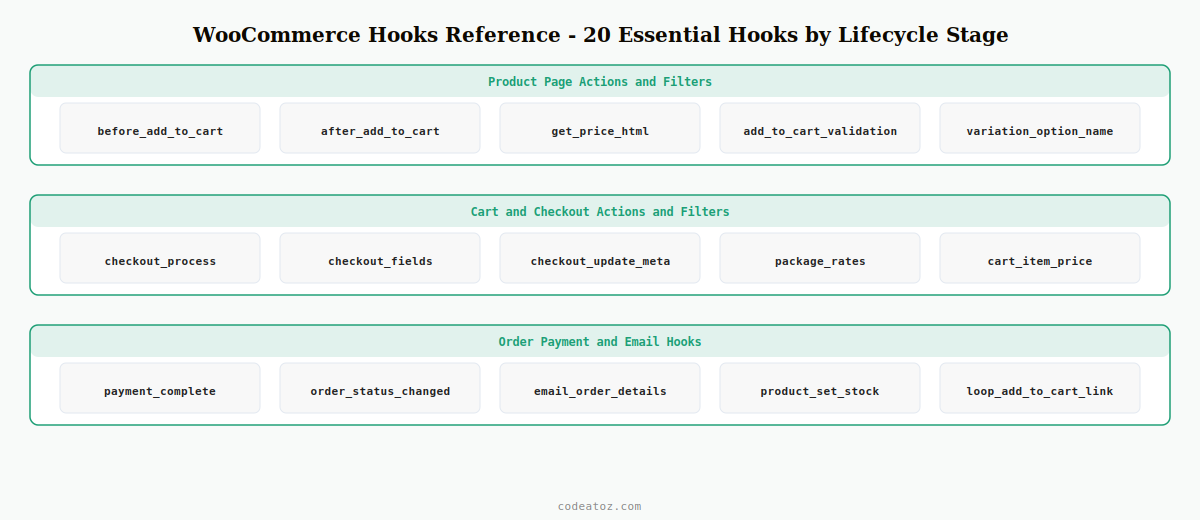
WooCommerce Hooks Reference: The 10 Essential Action Hooks
Action hooks execute code at a specific point in WooCommerce’s execution. You register them with add_action( 'hook_name', 'your_function', priority, accepted_args ). No return value needed.
Fires on the single product page just before the Add to Cart button. Add trust badges, delivery estimates, or login-required notices here.
Fires immediately after the Add to Cart button. Use for upsell nudges, scarcity messaging, or post-button content blocks.
Fires on checkout submission before the order is created. Call wc_add_notice( 'message', 'error' ) here to block with a validation error — the most important checkout action hook in this entire WooCommerce hooks reference.
Fires after the order is created. Receives $order_id. Save custom checkout field values to order meta with update_post_meta(). See our WooCommerce checkout fields guide for the full pattern.
Fires on every order status change. Receives $order_id, $old_status, $new_status, $order. The central hook for fulfilment, notifications, and loyalty logic.
Fires when payment is confirmed. More reliable than status hooks for post-payment logic — generating downloads, firing webhooks, or triggering ERP sync.
Fires when each item is added to a new order. Receives $item_id, $item, $order_id. Attach custom meta to individual order line items.
Fires inside transactional emails below the order table. Add custom content to confirmation, shipping, and processing emails without overriding templates.
Fires when a product stock level changes. Receives the product object. Trigger low-stock alerts or external inventory sync.
Fires when the empty cart message renders. Insert product recommendations or a back-to-shop CTA to recover the abandoned session.
add_action( 'woocommerce_order_status_changed', 'caz_on_order_processing', 10, 4 );

function caz_on_order_processing( $order_id, $old_status, $new_status, $order ) {
    if ( 'processing' !== $new_status ) return;
    foreach ( $order->get_items() as $item ) {
        do_action( 'caz_fulfil_item', $item->get_product_id(), $item->get_quantity(), $order_id );
    }
}
WooCommerce Hooks Reference: The 10 Essential Filter Hooks
Filter hooks modify data before WooCommerce uses it. Register with add_filter() — and always return a value. Forgetting the return statement is the most common error when using this part of the WooCommerce hooks reference.
Filters the entire checkout field array. Add, remove, or reorder billing, shipping, and order fields. One of the most frequently used filters in any WooCommerce hooks reference.
Filters the single product page tab array. Add FAQ, sizing guide, or video tabs — or remove the built-in Description or Reviews tab entirely.
Filters price HTML everywhere WooCommerce displays a product price. Return an empty string to hide price — the exact hook used by our Hide Price Pro plugin.
Filters whether a product can be added to cart. Return false and call wc_add_notice() to block with a message. Use for purchase limits or login-required catalogues.
Filters the displayed price of each cart line item. Use for B2B tiered pricing, member discounts, or custom price display logic.
Filters available shipping rates. Remove paid methods when a free shipping threshold is met, or restrict rates by product category or customer postcode.
Filters the admin new-order email subject. Receives the default subject and WC_Order object — add order total or customer name to improve inbox recognition.
Filters whether a product type requires manual processing. Return false for digital or virtual products to auto-complete orders without manual intervention.
Filters variation option display names. Map internal attribute values to human-readable labels or add colour swatches indicators.
Filters the Add to Cart link HTML in the product catalogue loop. Replace the button for out-of-stock items, variable products, or guest users.
add_filter( 'woocommerce_get_price_html', 'caz_hide_price_guests', 10, 2 );

function caz_hide_price_guests( $price_html, $product ) {
    if ( is_user_logged_in() ) return $price_html;
    return '<a href="' . esc_url( wp_login_url( get_permalink() ) ) . '">Login to see price</a>';
}
How to Find Any WooCommerce Hook Not in This Reference
This WooCommerce hooks reference covers the 20 hooks you will use most often, but WooCommerce has hundreds more. When you need a hook not listed here, here are the fastest ways to find it:
- Query Monitor plugin — shows every action and filter that fired on the current page, with priorities and callback details. Essential for any developer using this WooCommerce hooks reference day-to-day
- WooCommerce GitHub — search
do_action( 'woocommerce_orapply_filters( 'woocommerce_in the WooCommerce GitHub repository with a keyword from the area you are targeting - Official developer docs — the WooCommerce developer hooks reference groups hooks by area
- grep in your IDE —
grep -r "do_action" wp-content/plugins/woocommerce/includes/ | grep keyword
Priority and Ordering in the WooCommerce Hooks Reference
Every hook in this WooCommerce hooks reference accepts a priority parameter — the default is 10. Lower numbers run first: priority 5 runs before 10, which runs before 20. Use a lower priority to run before other plugins, a higher priority to run after them. If a hook from this WooCommerce hooks reference is not firing, check whether another plugin called remove_action() or remove_filter() on the same hook — this is the most common cause of unexplained hook failures.
💡 Best practice: always put WooCommerce hook registrations inside a function hooked to plugins_loaded or init, never at the top level of functions.php — this ensures WooCommerce is loaded before your code runs.
Frequently Asked Questions — WooCommerce Hooks Reference
What is the WooCommerce hooks reference used for?
A WooCommerce hooks reference is used to find the correct action or filter hook to add, modify, or remove behaviour in WooCommerce without editing core files. Every upgrade-safe WooCommerce customisation relies on hooks from this reference rather than direct file modifications.
What is the difference between action hooks and filter hooks in the WooCommerce hooks reference?
Action hooks in this WooCommerce hooks reference let you execute code at a specific point — no return value needed, registered with add_action(). Filter hooks let you modify a value before WooCommerce uses it — you must always return the value, registered with add_filter(). Forgetting to return in a filter is the single most common mistake.
How do I use priority with the WooCommerce hooks reference?
Priority is the third parameter of add_action() and add_filter(). The default is 10. Lower numbers run first — use priority 5 to run before other plugins, priority 20 to run after. When two callbacks share the same priority, they run in the order they were registered.
Where should I put WooCommerce hook code from this reference — functions.php or a plugin?
Always a custom plugin for WooCommerce-specific hook code. Hooks placed in functions.php are lost when you switch themes — and WooCommerce hooks should function independently of the active theme. Use a plugin for anything from this WooCommerce hooks reference that modifies store behaviour.
Can other plugins interfere with hooks from this WooCommerce hooks reference?
Yes — any plugin can call remove_action() or remove_filter() to unhook a callback. Install Query Monitor to see the Hooks panel which shows all registered and removed hooks on any page. If a hook from this WooCommerce hooks reference is not firing, that panel is the first place to investigate.
Are the hooks in this WooCommerce hooks reference stable across WooCommerce updates?
Core woocommerce_ prefixed hooks in this WooCommerce hooks reference are stable across minor versions. Major version upgrades occasionally deprecate or rename hooks — always check the WooCommerce changelog before upgrading a live store. Hooks prefixed with woocommerce_ in the public API are significantly more stable than internal class method hooks.
Need Custom WooCommerce Hook Development?
CodeAtoZ builds hook-based WooCommerce customisations — clean, upgrade-safe, and no template overrides that break on every update.




