
5 AI Tools We Use in Every E-Commerce Project — And What Each One Actually Does
Not a list of tools we’ve heard of. These are in our actual workflow on every project we deliver.
There’s no shortage of AI tools being marketed to developers right now. Most of them are not worth your time. A small number of them have genuinely changed how we work.
These are the five we use on every project — Magento, WooCommerce, Shopify, React, doesn’t matter. They’re in our workflow every day. Here’s what each one actually does and why we kept it.
The 5 Tools — How We Use Each One
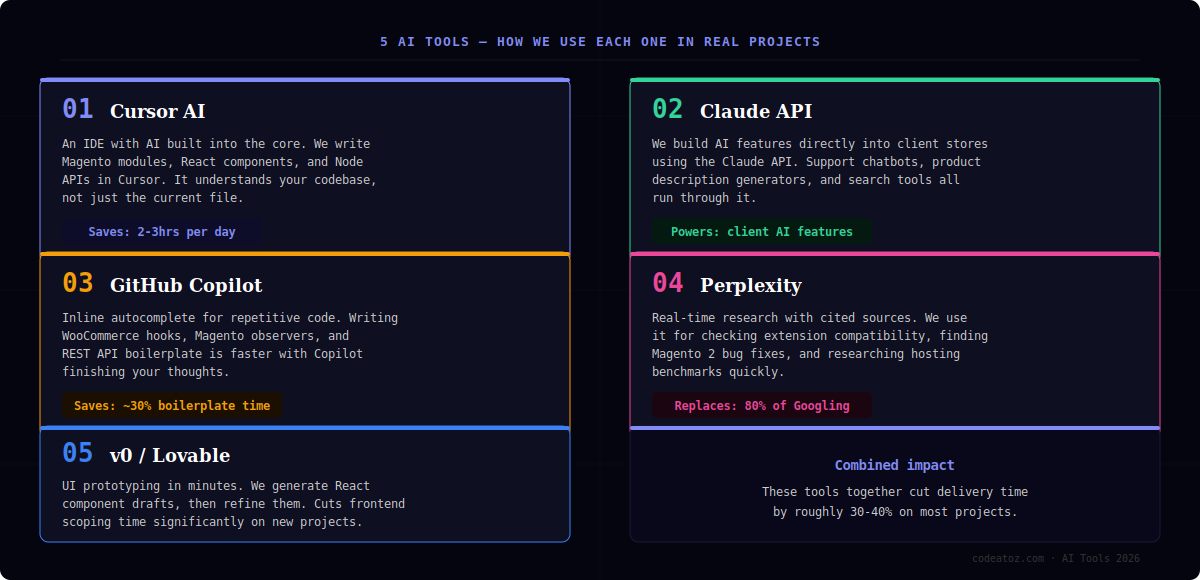
Cursor is an IDE — think VS Code — but with AI woven into the entire editor, not bolted on as an extension. The difference matters. It understands your full codebase, not just the file you have open.
When we’re writing a Magento 2 observer, Cursor knows about your existing module structure, your database schema, and your naming conventions. When we’re building a WooCommerce plugin, it understands how the existing hooks are wired. You describe what you need in plain English, and it writes code that actually fits your project.
The biggest time saving is on refactoring and debugging. Instead of spending 40 minutes tracing a bug through five files, you ask Cursor to find it. It usually does in under 5 minutes.
We use Claude as the AI brain behind features we build directly into client stores. Support chatbots, product description generators, smart search, inquiry handlers — they all run through the Claude API.
The reason we use Claude specifically rather than alternatives is the quality of output on structured tasks. When you give it a product’s attributes and ask it to write a consistent, SEO-optimised description in a specific brand voice, it does it reliably at scale. The chatbot responses are also more natural and less robotic than what we’ve seen from other providers.
For clients who want AI features added to their Magento or WooCommerce store, this is the API we integrate.
Copilot and Cursor overlap in some ways, but they serve different purposes in our workflow. Cursor is for reasoning through complex problems. Copilot is for the repetitive, structural code that needs to be written but doesn’t need thinking about.
WooCommerce hooks, Magento di.xml entries, REST API route registrations, PHPUnit test scaffolding — Copilot finishes these as you type. It’s like having autocomplete that actually understands what you’re building rather than just completing the current word.
The honest assessment: it’s most valuable for developers who write a lot of boilerplate. For senior developers working on complex custom logic, the gain is smaller but still real.
Perplexity is what Google should be. You ask a question, it searches the web in real time, synthesises the results, and gives you a direct answer with sources you can verify. No SEO spam, no ten blue links to sift through.
We use it constantly for: checking whether a Magento extension is compatible with a specific PHP version, finding the current best-practice approach for a particular WooCommerce hook, checking hosting benchmark comparisons, and verifying whether a bug has a known fix in a recent release.
The cited sources are important. We don’t rely on AI output without being able to verify it — Perplexity makes that easy because every claim links back to its original source.
v0 (by Vercel) and Lovable are text-to-UI tools. You describe a component or screen, and they generate working React code. We use them for the prototyping phase of new projects — getting a visual draft in front of clients quickly before committing to full implementation.
What used to take half a day of frontend work to produce a rough prototype now takes 20 minutes. The code isn’t always production-ready and usually needs refinement, but as a starting point for conversations with clients about layout and functionality, it’s dramatically faster than hand-coding from scratch.
We use v0 more for component-level work and Lovable when a client wants to see a full screen layout quickly.
Are These Tools Replacing Developers?
No. And anyone who says otherwise hasn’t used them seriously on real projects.
What they do is change where developer time goes. Less time on boilerplate and research, more time on architecture, business logic, and the decisions that actually require expertise. A developer using these tools delivers better work faster — they don’t get replaced by them.
We still catch AI-generated code making wrong assumptions about how Magento’s dependency injection works, or suggesting WooCommerce hooks that don’t exist. The skill is knowing when to trust the output and when to override it. That still requires experience.
What Does This Mean for Your Store?
If you’re a store owner, this matters for two reasons:
- Faster delivery — projects that used to take 8 weeks can now often be done in 5-6, with the same quality
- AI features are now accessible — the same tools we use internally are available to build AI capabilities directly into your store at a much lower cost than a year ago
The stores that are ahead in 12 months will be the ones that started integrating AI into their operations now — whether that’s a support chatbot, smarter search, or automated content at scale.
Want AI Features on Your Store?
Tell us what problem you want to solve and we’ll tell you which AI integration makes the most sense for your platform and budget.




