
The Complete Magento Core Web Vitals Guide 2026
Magento Core Web Vitals fixed metric by metric — why LCP, INP and CLS fail on Magento specifically, and which change moves which number on Luma and Hyvä.
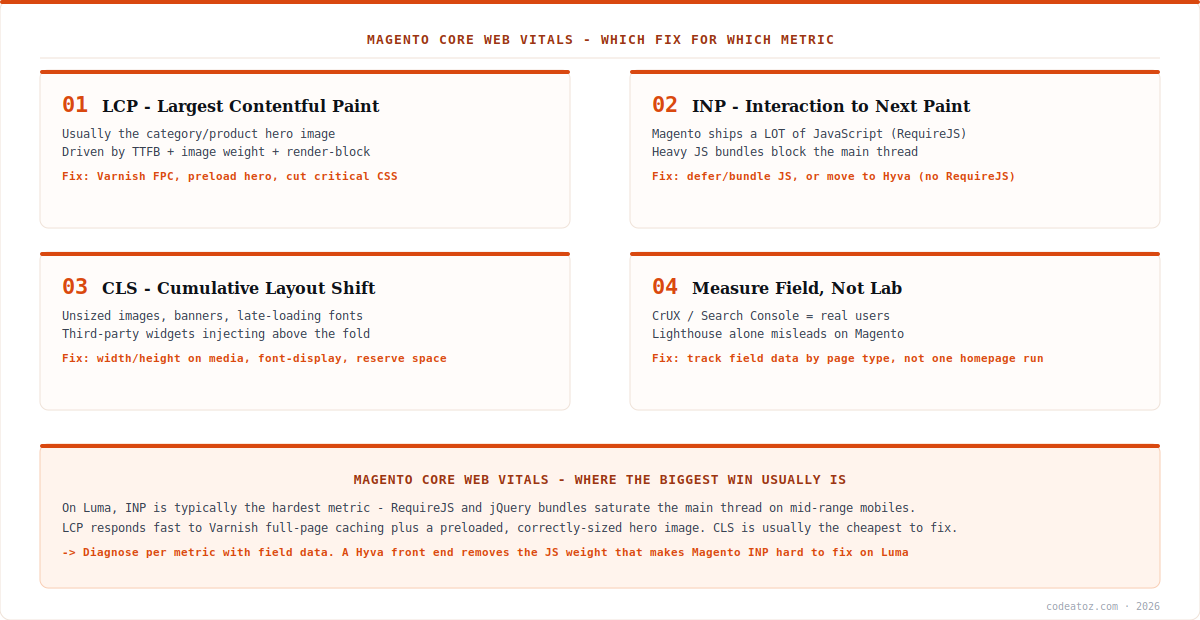
Magento Core Web Vitals are harder to pass than on most platforms, and for a specific reason: the default Luma theme ships a large JavaScript payload built on RequireJS and jQuery, which loads and executes on every page. That weight lands squarely on interactivity metrics. Improving Magento Core Web Vitals therefore means diagnosing per metric rather than chasing a single score — LCP responds to caching and images, INP responds to JavaScript weight, CLS responds to layout discipline. This guide maps each metric to the fixes that actually move it on Magento.
Search intent: informational/procedural — Magento developers and merchants improving Core Web Vitals and page experience. We cover why Magento struggles, per-metric diagnosis and fixes for LCP, INP and CLS, the Hyvä question, and how to measure properly. It builds on our Varnish VCL, Redis and Hyvä vs Luma guides.
Magento Core Web Vitals: LCP and Server Response
Largest Contentful Paint measures when the main content becomes visible — on a Magento category or product page, almost always the hero or first product image. Two things drive LCP, and both are addressable. First, server response time: LCP cannot be fast if the HTML arrives slowly, which makes Varnish full-page caching the highest-leverage single change for Magento Core Web Vitals on anonymous traffic. A Varnish cache hit removes PHP from the request entirely, and the LCP improvement is immediate and large.
Second, the image itself. Serve the LCP image at the correct dimensions in a modern format, preload it so the browser does not discover it late, and do not lazy-load it — lazy-loading the hero image is a common own goal that delays the very element being measured. Magento’s image resizing and the theme’s markup both matter here. Together, caching plus a properly handled hero image resolve most LCP failures in Magento Core Web Vitals assessments.
Magento Core Web Vitals: INP, the Hard One
Interaction to Next Paint replaced First Input Delay as a Core Web Vital, and it is where Magento genuinely struggles. INP measures responsiveness across the whole visit — how quickly the page reacts to taps and clicks — and it punishes main-thread congestion — the Core Web Vitals overview sets out the thresholds. The default Luma theme loads RequireJS, jQuery, Knockout and a substantial set of modules on every page, and on a mid-range mobile device that JavaScript execution saturates the main thread, delaying interaction response. This is the core reason Magento Core Web Vitals are harder to pass than on lighter platforms.
Realistic fixes on Luma: audit and remove unused JS modules, enable JavaScript bundling and minification carefully (badly configured bundling can make things worse by shipping one enormous file), defer non-critical scripts, and — critically — audit third-party tags. Analytics, chat widgets, review scripts and A/B testing tools frequently contribute more main-thread work than Magento itself. Reducing third-party JavaScript is often the fastest INP win available and requires no core changes. The web.dev INP guide explains what the metric actually captures.
The honest answer on INP: there is a ceiling to what you can achieve on Luma without removing RequireJS. Teams that need consistently strong Magento Core Web Vitals often reach it only by moving the front end to Hyvä, which replaces the Luma JavaScript stack with Alpine.js and Tailwind and ships a fraction of the payload. That is a front-end rebuild, not a tweak — but it is why the Hyvä conversation comes up in almost every serious Magento performance project.
Magento Core Web Vitals: CLS and the Cheap Wins
Cumulative Layout Shift measures visual stability, and it is usually the cheapest of the Magento Core Web Vitals to fix because the causes are mechanical. Set explicit width and height (or aspect-ratio) on every image so the browser reserves space before the file loads. Reserve space for banners, promotional bars and cookie notices rather than letting them push content down on arrival. Use font-display: swap with preloaded fonts to avoid late font swaps reflowing text. And watch third-party widgets that inject content above the fold — a review badge or chat launcher appearing late is a classic CLS source on Magento stores.
| Metric | Usual Magento cause | Fix that moves it |
|---|---|---|
| LCP | Slow TTFB, unoptimised hero image | Varnish FPC, preload + size hero, no lazy-load |
| INP | RequireJS/jQuery + third-party tags | Cut JS, defer, audit tags — or move to Hyvä |
| CLS | Unsized media, late banners and fonts | Width/height on media, reserve space, font-display |
| TTFB (input to LCP) | No full-page cache, slow PHP/DB | Varnish, Redis, OPcache, query tuning |
Magento Core Web Vitals: Measure Field Data, Not One Lab Run
The measurement mistake that derails Magento Core Web Vitals work is optimising against a single Lighthouse run on the homepage. Lighthouse is a lab tool on a simulated device; Google’s page experience signals use field data from real Chrome users, and the two frequently disagree. Worse, Magento stores behave very differently by page type — a Varnish-cached category page and an uncached, logged-in checkout have almost nothing in common.
Measure properly: use field data from the Chrome UX Report or Search Console’s Core Web Vitals report to see what real users experience, segment by page template rather than testing one URL, and check mobile separately since INP problems surface on mid-range devices that a desktop test never reveals. Then use Lighthouse for diagnosis — it is excellent at telling you why a metric is poor — while judging success on field data. That combination is what makes Magento Core Web Vitals work measurable rather than anecdotal. Our Magento team runs Core Web Vitals audits with field data segmentation.
What we have learned improving Magento Core Web Vitals
Third-party tags cause more INP damage than Magento does. Before touching core JavaScript we inventory every third-party script — analytics, chat, reviews, personalisation. On several stores, removing or deferring a handful of tags improved INP more than any theme-level work, and it carries none of the regression risk.
Lazy-loading the hero image is the mistake we correct most. Teams apply lazy-loading site-wide as a blanket optimisation, which delays the exact element LCP measures. We identify the real LCP element per template, exclude it from lazy-loading, and preload it — often a same-day improvement.
Be honest with clients about the Luma INP ceiling. There is a limit to what JavaScript trimming achieves while RequireJS remains. We would rather set that expectation early and frame Hyvä as a deliberate investment decision than spend a budget chasing an INP target Luma cannot reliably hit.
Frequently Asked Questions About Magento Core Web Vitals
Why do Magento stores struggle with Core Web Vitals?
Mainly because the default Luma theme ships a large JavaScript payload built on RequireJS, jQuery and Knockout that loads on every page. On mid-range mobile devices that execution saturates the main thread and harms INP. Magento Core Web Vitals also suffer when full-page caching is absent, which inflates TTFB and therefore LCP.
How do I improve LCP on Magento?
Attack server response and the hero image. Varnish full-page caching removes PHP from anonymous requests and is the single highest-leverage change. Then serve the LCP image at correct dimensions in a modern format, preload it, and never lazy-load it — lazy-loading the hero delays the exact element LCP measures.
How do I fix INP on Magento?
Reduce main-thread JavaScript. Audit and remove unused modules, configure bundling and minification carefully, defer non-critical scripts, and above all audit third-party tags — analytics, chat and review widgets often cost more than Magento itself. On Luma there is a ceiling; consistently strong INP usually requires moving to Hyvä.
Does Hyvä improve Magento Core Web Vitals?
Substantially, particularly INP. Hyvä replaces Luma’s RequireJS, jQuery and Knockout stack with Alpine.js and Tailwind, shipping a fraction of the JavaScript. That directly addresses the main-thread congestion that makes INP hard on Luma. It is a front-end rebuild rather than a configuration change, so treat it as a deliberate investment.
Should I use Lighthouse or field data for Magento Core Web Vitals?
Both, for different jobs. Google’s page experience signals use field data from real Chrome users, so judge success on the Chrome UX Report or Search Console. Use Lighthouse for diagnosis — it explains why a metric is poor. Never optimise against a single lab run on the homepage; segment by page template and check mobile separately.
What is the cheapest Core Web Vitals fix on Magento?
CLS is usually cheapest, because the causes are mechanical: set explicit width and height on images, reserve space for banners and cookie notices, use font-display swap with preloaded fonts, and control third-party widgets that inject content above the fold. These are low-risk changes with immediate, measurable effect.
Failing Core Web Vitals on Magento?
Our team runs metric-by-metric Magento audits with real field data — LCP, INP and CLS, Luma or Hyvä.




