
Best WooCommerce Database Optimisation Guide 2026
Speed up your WooCommerce database with the right indexes, HPOS migration, autoload cleanup, slow query logging, and query analysis with EXPLAIN.
WooCommerce database optimisation is the highest-leverage performance intervention for stores with 5,000+ products or 10,000+ orders — where page cache alone is not enough. Poor WooCommerce database optimisation means slow admin pages, AJAX requests timing out, and checkout latency creeping up under load. This guide covers the key WooCommerce database optimisation areas: missing indexes, HPOS migration, autoload bloat, and using the slow query log to find and fix the worst offenders.
WooCommerce stores inherit WordPress’s schema — wp_posts for products and orders, wp_postmeta for all custom fields, and wp_options for configuration. This works fine at small scale but degrades predictably as data grows. WooCommerce database optimisation targets the specific pain points: unindexed meta queries, bloated autoload in wp_options, and the architectural shift to HPOS which moves orders to purpose-built indexed tables. Combined with Query Monitor for real-time diagnosis, this is a complete WooCommerce database optimisation toolkit. See our WooCommerce page speed guide for the full performance context.
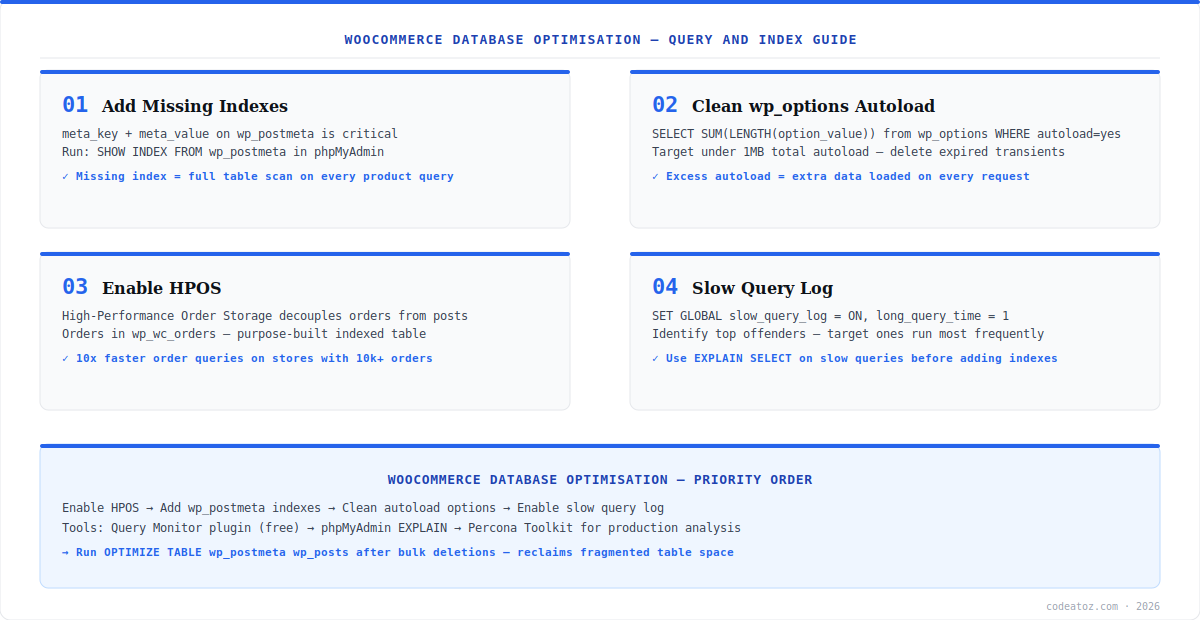
WooCommerce Database Optimisation: Missing Indexes
The single most impactful WooCommerce database optimisation on most stores is adding missing indexes to wp_postmeta. WooCommerce queries like get_posts(meta_query: [...]) perform full table scans without the right composite index on (meta_key, meta_value). For stores with hundreds of thousands of postmeta rows, this is the difference between a 20ms query and a 2,000ms one. Run SHOW INDEX FROM wp_postmeta in phpMyAdmin — if you only see the default meta_id and post_id indexes, add the composite one. Check Google Web.dev for performance benchmarking methodology.
-- Check existing indexes first
SHOW INDEX FROM wp_postmeta;

-- Add composite index if missing (run in phpMyAdmin or via WP-CLI)
ALTER TABLE wp_postmeta ADD INDEX meta_key_value (meta_key(32), meta_value(64));

-- Also useful for product attribute queries:
ALTER TABLE wp_term_relationships ADD INDEX term_order (term_order);

-- Reclaim space after bulk deletions:
OPTIMIZE TABLE wp_postmeta wp_posts wp_options;
WooCommerce Database Optimisation: HPOS Migration
High-Performance Order Storage (HPOS) is the most important structural WooCommerce database optimisation for high-order-volume stores. HPOS moves orders from wp_posts and wp_postmeta into dedicated wp_wc_orders and wp_wc_orders_meta tables with proper indexes designed for order queries. Stores with 10,000+ orders see 10x faster order list pages and admin order searches after HPOS migration. Enable it at WooCommerce → Settings → Advanced → Features → High-Performance Order Storage. Run compatibility mode first — it keeps both tables in sync — then switch to HPOS-only after confirming all plugins are compatible. The WooCommerce HPOS documentation covers the migration process in detail.
Test HPOS compatibility mode on a staging site first. Plugins that read orders directly from wp_posts using raw SQL — rather than WooCommerce’s order API — will break after HPOS migration. Use the WooCommerce built-in compatibility checker at WooCommerce → Status → HPOS compatibility before enabling on production.
WooCommerce Database Optimisation: Autoload Cleanup and Slow Query Log
The wp_options table’s autoload column controls which options are loaded on every single WordPress request. Plugins that store large transients or serialised data with autoload=yes bloat the startup memory footprint. For WooCommerce database optimisation, query your total autoload size — if it exceeds 1MB, you have a problem. Delete expired transients (WP-Optimize or WP-CLI transient delete --all), and set large plugin options to autoload=no where not needed on every page load. Enable the MySQL slow query log to find the most expensive queries across your whole stack — not just WooCommerce — and use EXPLAIN SELECT to analyse them. Use the free Query Monitor plugin to profile live queries. Our WooCommerce performance team runs full database audits as part of site speed projects. See also our WooCommerce caching plugins guide for the complementary caching layer.
-- Total autoload size (should be under 1MB)
SELECT SUM(LENGTH(option_value)) / 1024 / 1024 as autoload_mb
FROM wp_options WHERE autoload = 'yes';

-- Find biggest autoload offenders
SELECT option_name, LENGTH(option_value) as size_bytes
FROM wp_options WHERE autoload = 'yes'
ORDER BY size_bytes DESC LIMIT 20;

-- Enable slow query log (run in MySQL as root)
SET GLOBAL slow_query_log = 'ON';
SET GLOBAL long_query_time = 1;
SET GLOBAL slow_query_log_file = '/var/log/mysql/slow.log';
Frequently Asked Questions About WooCommerce Database Optimisation
What is WooCommerce database optimisation?
WooCommerce database optimisation is the process of improving the speed and efficiency of the MySQL database that powers a WooCommerce store. It includes adding missing indexes to wp_postmeta, migrating orders to HPOS, cleaning up wp_options autoload bloat, enabling slow query logging, and using EXPLAIN to analyse and fix slow queries.
Why is my WooCommerce database slow?
Common causes of a slow WooCommerce database are missing indexes on wp_postmeta (causing full table scans for meta queries), orders stored in wp_posts without HPOS (unindexed order searches), wp_options autoload bloat (large data loaded on every request), and accumulation of expired transients. Use the Query Monitor plugin to identify which queries are taking the most time.
What is HPOS and how does it help WooCommerce database optimisation?
HPOS (High-Performance Order Storage) moves WooCommerce orders from wp_posts and wp_postmeta into dedicated wp_wc_orders tables with optimised indexes for order queries. It is the most impactful structural WooCommerce database optimisation for stores with large order volumes — typically delivering 5-10x faster order list loading and admin searches on stores with 10,000+ orders.
How do I find slow queries for WooCommerce database optimisation?
Enable the MySQL slow query log by setting slow_query_log=ON and long_query_time=1 in MySQL. Then use EXPLAIN SELECT on the slowest queries to see the query plan and identify missing indexes. The free Query Monitor WordPress plugin shows database queries per page load with timing, making WooCommerce database optimisation diagnosis much faster without direct MySQL access.
How do I fix wp_options autoload bloat for WooCommerce database optimisation?
Query SELECT SUM(LENGTH(option_value)) FROM wp_options WHERE autoload=yes to check total autoload size. If over 1MB, delete expired transients using WP-CLI (wp transient delete –all) or WP-Optimize plugin. Identify large autoloaded options with a size query and set non-critical ones to autoload=no with UPDATE wp_options SET autoload=no WHERE option_name=big_option_name.
What indexes should I add for WooCommerce database optimisation?
The most impactful index for WooCommerce database optimisation is a composite index on wp_postmeta (meta_key, meta_value) — this dramatically speeds up WooCommerce meta queries. Also add indexes on wp_term_relationships (term_order) for product category and attribute queries. After any bulk deletion of posts or meta, run OPTIMIZE TABLE to reclaim fragmented table space and update statistics.
Need a WooCommerce Database Audit?
Our performance team runs full database optimisation audits — indexes, HPOS, autoload, and slow query analysis included.




