
Best Shopware 6 Custom Service Guide — Dependency Injection 2026
Build reusable, testable Shopware 6 custom services with dependency injection — service registration, constructor injection, decorators, and event subscribers.
services.xml
Constructor injection
Decorators
Event subscribers
Tagged services
A Shopware 6 custom service is the standard way to encapsulate reusable business logic in a plugin. Instead of putting logic directly in controllers or subscribers, a Shopware 6 custom service is registered in the Symfony DI container, injected wherever needed, and independently testable. Every professional Shopware 6 plugin uses Shopware 6 custom service classes to keep code clean, decoupled, and maintainable.
Shopware 6 uses the Symfony Dependency Injection component, so if you are familiar with Symfony services, Shopware 6 custom service development follows the same patterns. Services are defined in src/Resources/config/services.xml, registered with unique string IDs, and injected into controllers, subscribers, and other services via constructor arguments. This guide covers the full workflow from class creation to registration, decoration, and event subscription.
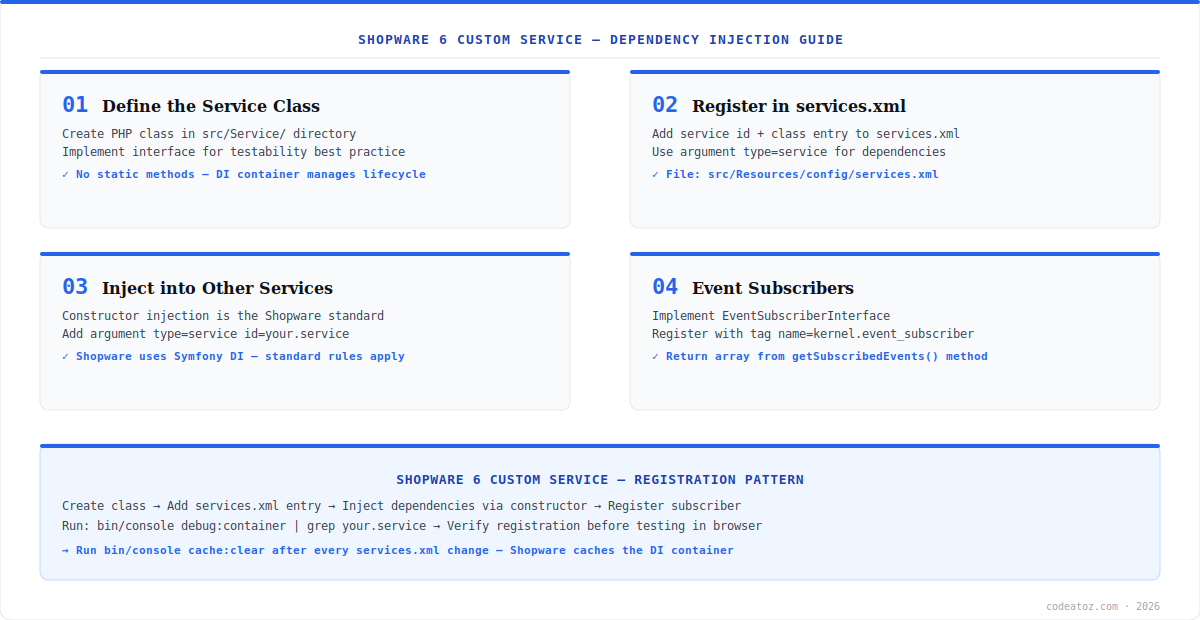
Shopware 6 Custom Service: Creating the Service Class
A Shopware 6 custom service is a plain PHP class placed in src/Service/. Best practice is to extract an interface so the service can be mocked in unit tests and replaced via decoration. The class should have no static methods — all dependencies come through the constructor, managed by the DI container. Refer to the Shopware 6 custom service documentation for the official approach.
<?php declare(strict_types=1);

namespace MyPluginService;

use ShopwareCoreFrameworkContext;
use ShopwareCoreFrameworkDataAbstractionLayerEntityRepository;
use ShopwareCoreFrameworkDataAbstractionLayerSearchCriteria;

class ProductSyncService
{
    public function __construct(
        private readonly EntityRepository $productRepository,
        private readonly LoggerInterface $logger
    ) {}

    public function syncProduct(string $productId, Context $context): void
    {
        $criteria = new Criteria([$productId]);
        $product = $this->productRepository->search($criteria, $context)->first();
        // business logic here
        $this->logger->info('Product synced', ['id' => $productId]);
    }
}Shopware 6 Custom Service: Registration in services.xml
Every Shopware 6 custom service must be registered in src/Resources/config/services.xml. The service ID is typically the fully-qualified class name. Dependencies are declared as constructor arguments referencing other service IDs. Always run bin/console cache:clear after editing services.xml — Shopware caches the DI container and will not pick up changes otherwise.
<?xml version="1.0" ?>
<container xmlns="http://symfony.com/schema/dic/services"
           xmlns:xsi="http://www.w3.org/2001/XMLSchema-instance"
           xsi:schemaLocation="http://symfony.com/schema/dic/services
           http://symfony.com/schema/dic/services/services-1.0.xsd">
    <services>
        <service id="MyPluginServiceProductSyncService" public="false">
            <argument type="service" id="product.repository"/>
            <argument type="service" id="logger"/>
        </service>
    </services>
</container>Shopware 6 Custom Service: Decorators and Event Subscribers
The decorator pattern lets you wrap an existing Shopware 6 custom service or core service without modifying it. Create a decorator class that implements the same interface and accepts the inner service as a constructor argument. Register it in services.xml with a decorates attribute. This is the recommended approach for extending core Shopware services — never edit core files directly. The Shopware 6 developer documentation covers decorator registration in detail.
- Event subscribers: implement
EventSubscriberInterfaceand register withkernel.event_subscribertag - Return
getSubscribedEvents()array mapping event class names to handler method names - Inject your Shopware 6 custom service into the subscriber via constructor DI
- Verify registration:
bin/console debug:container | grep MyPlugin - Check Shopware 6 event subscriber documentation for all available system events
Mark your Shopware 6 custom service as public="false" in services.xml unless it needs to be fetched directly from the container. Private services are optimised out of the compiled container in production, reducing memory usage. Inject them via constructor arguments instead of fetching from the container directly.
Our Shopware development team builds production plugins with full DI architecture, automated tests, and Shopware Extension Store compliance. If you need a Shopware 6 custom service layer for a complex integration, get in touch.
Frequently Asked Questions About Shopware 6 Custom Service
What is a Shopware 6 custom service?
A Shopware 6 custom service is a PHP class registered in the Symfony DI container that encapsulates reusable business logic for a plugin. It is injected into controllers, event subscribers, and other services via constructor arguments. Using custom services keeps plugin code organised, testable, and decoupled from Shopware core classes.
How do I register a Shopware 6 custom service?
Register a Shopware 6 custom service by adding a service entry to src/Resources/config/services.xml in your plugin. Set the id attribute to the fully-qualified class name, and declare constructor dependencies as argument type=service entries. Always run bin/console cache:clear after editing services.xml to reload the compiled DI container.
How do I inject a Shopware 6 custom service into another service?
Add a constructor argument in the receiving class and a corresponding argument type=service entry in services.xml pointing to your Shopware 6 custom service ID. The DI container resolves and injects the dependency automatically. Use constructor injection exclusively — property injection and service locators are not recommended in Shopware 6.
How does the decorator pattern work for a Shopware 6 custom service?
A decorator for a Shopware 6 custom service implements the same interface as the original service and receives it as a constructor argument. In services.xml, add a decorates attribute pointing to the original service ID. Shopware replaces all injections of the original with your decorator, letting you add behaviour without modifying the original class.
How do I use a Shopware 6 custom service in an event subscriber?
Inject the Shopware 6 custom service into the event subscriber via constructor DI, registered in services.xml. The subscriber class must implement EventSubscriberInterface and be tagged with kernel.event_subscriber in services.xml. In getSubscribedEvents(), map the event class name to your handler method. The DI container wires everything together automatically.
Why is my Shopware 6 custom service not being found?
The most common reason a Shopware 6 custom service is not found is a stale DI container cache. Run bin/console cache:clear after every services.xml change. Also verify the service ID in services.xml exactly matches the fully-qualified class name, check that the XML is valid, and confirm the plugin is installed and active. Run bin/console debug:container to inspect registered services.
Building a Shopware 6 Plugin with Custom Services?
Our team delivers production Shopware 6 plugins — DI architecture, event subscribers, Extension Store compliance.




