
WooCommerce WhatsApp Order Confirmation — Setup & Message Templates (2026)
A WooCommerce WhatsApp order confirmation message reaches your customer within seconds of placing their order and achieves a 98% open rate — compared to the 20% your order confirmation email averages. Setting up WooCommerce WhatsApp order confirmation correctly means creating Meta-approved message templates with the right variables (order number, total, customer name, tracking link), connecting directly to Meta’s Cloud API without a BSP, and configuring the trigger for each of the 9 WooCommerce order statuses. This guide covers the complete WooCommerce WhatsApp order confirmation setup from Meta template creation through to your first live message.
The WooCommerce WhatsApp order confirmation architecture is straightforward: when WooCommerce fires an order status change hook, the plugin looks up the customer’s phone number from the order’s billing data, selects the configured template for that status, injects the dynamic variables (order ID, total, product names, tracking URL), and sends the message via Meta’s Cloud API. The entire WooCommerce WhatsApp order confirmation process completes in under 2 seconds and is queued via Action Scheduler so it never delays the checkout response.
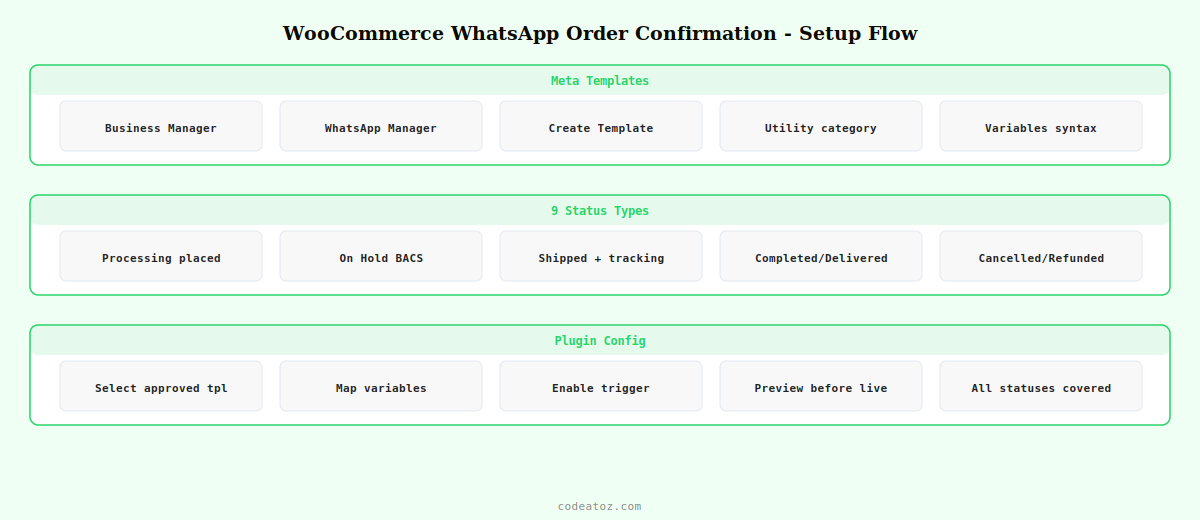
WooCommerce WhatsApp Order Confirmation: Create Meta Templates
Before you can send a WooCommerce WhatsApp order confirmation, Meta requires your message templates to be approved. Templates are pre-approved message formats with variable placeholders — you cannot send free-form messages to customers who haven’t messaged you first. The approval process for utility templates (transactional messages like order confirmations) typically takes under 5 minutes in 2026.
Go to your Meta Business Manager → WhatsApp Manager → Account Tools → Message Templates. Click Create Template. For a WooCommerce WhatsApp order confirmation, choose category Utility (not Marketing — utility templates are cheaper and don’t require a separate opt-in). Name your template (e.g. wc_order_confirmed) and write your message with double-brace variables for dynamic content.
🛍 *Order Confirmed* — {{1}}
Hi {{2}},
Thank you for your order! Here are your details:
📳 Order #{{3}}
💰 Total: {{4}}
📦 Status: Order Confirmed
We’ll send you another message when your order ships.
Questions? Reply to this message anytime.
*{{5}}*
In this WooCommerce WhatsApp order confirmation template, the variables map as follows: {{1}} is your store name, {{2}} is the customer’s first name, {{3}} is the WooCommerce order number, {{4}} is the order total including currency, and {{5}} is your store’s sign-off line. Submit the template and Meta typically approves utility templates within minutes.
WooCommerce WhatsApp Order Confirmation: All 9 Status Templates
A complete WooCommerce WhatsApp order confirmation setup needs a template for each order status your store uses. The most important are order placed (processing), shipped, and delivered — these three alone cover the journey customers care about most.
- Processing (order placed): confirms the order, includes total and order number. First WooCommerce WhatsApp order confirmation the customer receives.
- On Hold: informs the customer their order is awaiting payment confirmation (for BACS/bank transfer orders).
- Shipped: the most-opened WooCommerce WhatsApp order confirmation — includes tracking link and estimated delivery date.
- Completed / Delivered: confirms delivery, optionally includes a review request link.
- Cancelled: notifies the customer with a reason and refund timeline.
- Refunded: confirms refund has been processed with timeline.
- Failed: alerts the customer to retry payment with a direct payment link.
WooCommerce WhatsApp Order Confirmation: Shipping Template with Tracking Link
The shipped WooCommerce WhatsApp order confirmation is the single most-read message in any store’s notification sequence. Including the tracking link directly in the WhatsApp message — not a “click here to see your tracking email” workaround — reduces customer service enquiries by up to 40%.
📦 *Your Order Has Shipped!* — {{1}}
Hi {{2}},
Great news — your order #{{3}} is on its way!
🗺 Track your parcel: {{4}}
🕑 Estimated delivery: {{5}}
If you have any questions about your delivery, just reply here.
Thanks for shopping with us!
*{{6}}*
Variable {{4}} in this WooCommerce WhatsApp order confirmation is the tracking URL. Cloud Messaging for WooCommerce automatically injects the tracking URL from WooCommerce Shipment Tracking or any compatible shipping plugin. If no tracking URL is available, the variable gracefully omits that line rather than showing a broken link.
WooCommerce WhatsApp Order Confirmation: Plugin Configuration
Once your Meta templates are approved, configure each WooCommerce WhatsApp order confirmation trigger in the plugin’s settings panel. For each order status, select the approved template, map the dynamic variables to WooCommerce order data fields, and enable the trigger. The plugin provides a live preview so you can verify the variable mapping before going live.
- Go to WooCommerce → Cloud Messaging → Notifications
- Select the order status (e.g. Processing)
- Choose the approved Meta template from the dropdown (fetched live from your Meta account)
- Map each
{{variable}}to the corresponding WooCommerce field: order ID, billing first name, order total, tracking URL - Enable the WooCommerce WhatsApp order confirmation trigger
- Save — all future orders in that status will trigger the message automatically
The Meta WhatsApp message template documentation covers variable syntax, template categories, and the approval process for WooCommerce WhatsApp order confirmation templates. The Meta Cloud API send message template guide covers the API call structure. The WhatsApp Business pricing page explains utility conversation costs for WooCommerce WhatsApp order confirmation messages. See our complete WooCommerce WhatsApp notifications guide for the full setup overview, and our abandoned cart WhatsApp guide for the highest-ROI follow-on automation.
💡 Use Utility category for WooCommerce WhatsApp order confirmation templates — not Marketing. Utility templates cover transactional messages the customer expects as part of their purchase, are approved faster, cost less per conversation, and do not require a separate marketing opt-in. Marketing templates are for promotional messages like flash sales and discount offers.
Cloud Messaging for WooCommerce — WhatsApp Order Confirmations
Send WooCommerce WhatsApp order confirmation messages for all 9 statuses via direct Meta Cloud API. No BSP. Free version on WordPress.org — Pro adds abandoned cart, COD OTP, and 10 more modules.
Frequently Asked Questions — WooCommerce WhatsApp Order Confirmation
How do I send a WooCommerce WhatsApp order confirmation automatically?
Install Cloud Messaging for WooCommerce, connect your Meta WhatsApp Cloud API credentials, create a utility-category message template in Meta Business Manager with order variables, wait for approval (usually minutes), then configure the template as the WooCommerce WhatsApp order confirmation trigger for the processing status in the plugin settings. Every new order automatically triggers the WhatsApp message with the correct order data injected into the template variables.
How do I get Meta to approve my WooCommerce WhatsApp order confirmation template?
Create the template in Meta Business Manager under WhatsApp Manager Account Tools Message Templates. Choose Utility category, write a clear transactional message with double-brace variables for dynamic content, and submit. Utility templates for WooCommerce WhatsApp order confirmation — especially straightforward order acknowledgements and shipping notifications — typically receive approval within 5 minutes. Avoid promotional language in utility templates as this can delay approval.
Can I include a tracking link in my WooCommerce WhatsApp order confirmation?
Yes — add a {{variable}} placeholder in your Meta template where the tracking URL should appear. In the plugin’s variable mapping, select the tracking URL field from WooCommerce Shipment Tracking or your shipping plugin. The WooCommerce WhatsApp order confirmation will include the live tracking link automatically when the order status changes to shipped. If no tracking URL exists, the variable is omitted cleanly.
Can I send a WooCommerce WhatsApp order confirmation in multiple languages?
Yes — Cloud Messaging Pro includes a multi-language template module. Create templates in each language in Meta Business Manager and configure them in the plugin. The Pro module automatically detects each customer’s language from their WooCommerce account locale and sends the WooCommerce WhatsApp order confirmation in the matching language, falling back to your store default if no match is found.
Does the customer need to have WhatsApp to receive WooCommerce WhatsApp order confirmations?
Yes — the customer must have WhatsApp installed on the phone number they provided at checkout. The phone number must be a mobile number registered with WhatsApp. If the number is not on WhatsApp, the message delivery will fail silently. The Cloud Messaging plugin logs delivery status for every WooCommerce WhatsApp order confirmation so you can see which numbers are not reachable. It is good practice to add a note at checkout asking customers to provide their WhatsApp-registered mobile number.
How much does a WooCommerce WhatsApp order confirmation cost to send?
Meta’s WhatsApp Cloud API charges per conversation, not per message. A conversation window lasts 24 hours from the first message. For utility conversations (order confirmations, shipping updates) the rate varies by country — typically $0.004 to $0.04 per conversation in most markets. Meta provides 1,000 free service conversations per month. A store sending 500 order notifications per month pays nothing. The WooCommerce WhatsApp order confirmation cost is dramatically lower than equivalent SMS notifications.
Start Sending WhatsApp Order Confirmations Today
Cloud Messaging for WooCommerce sends WooCommerce WhatsApp order confirmations for all 9 statuses via direct Meta API. Free to install, free tier covers most stores.




