How to Manage a Website With Claude Through MCP
No dashboard, no page builder. You ask in plain English and Claude edits the real site through the MCP connector.
Every CMS has an interface. WordPress has wp-admin; a headless CMS has an API you wire up. Claude CMS has a conversation. When you manage a website with Claude, you don’t log into a control panel — you tell Claude what you want, and it makes the change on your live site through the Model Context Protocol connector. This guide explains how that works and why it’s genuinely different.
The connector is the key. Model Context Protocol (MCP) is an open standard that lets an AI assistant read and write to real systems through defined tools. Claude CMS exposes your pages, blocks, store and files as MCP tools, so when you manage a website with Claude, Claude is making precise, structured edits — not guessing.
How to Manage a Website With Claude: The MCP Connector
MCP is the plumbing that turns a conversation into real edits. Rather than Claude producing text you then copy somewhere, the connector gives it typed tools that act directly on your Claude CMS site:
- Pages — create, update, publish and lay out pages.
- Blocks — use and configure the reusable component library.
- Store — manage products, collections, stock, warehouses and payment links.
- Files — read and write the underlying site files, with protected system files kept off-limits.
Anthropic introduced MCP as an open standard precisely so assistants could work with real tools safely. When you manage a website with Claude on Claude CMS, that standard is what makes the edits reliable and structured rather than copy-paste.
What You Can Change When You Manage a Website With Claude
Almost everything you’d otherwise do in an admin panel, you do by describing it. A few examples:
| You ask | What happens |
|---|---|
| “Change the homepage headline to …” | The hero block updates and republishes |
| “Add a pricing page with three tiers” | Blocks are assembled into a new published page |
| “Put the Trail Boots on sale at £119” | The product price updates on the storefront |
| “Add our new address to the footer” | The footer setting changes site-wide |
| “Publish the draft blog post” | The page status flips to published |
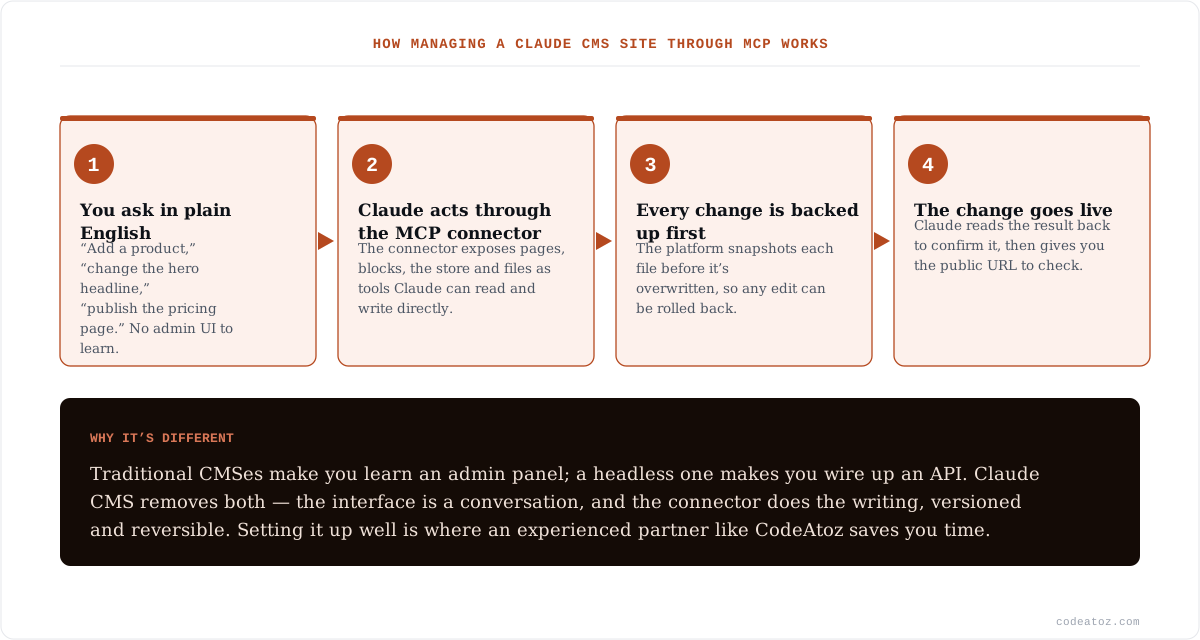
The diagram above shows the loop: you ask, Claude acts through MCP, the change is backed up, and it goes live — with Claude reading the result back to confirm it worked. For the commerce side specifically, see our Claude CMS online store guide.
Is It Safe to Manage a Website With Claude?
Letting an AI edit your live site sounds risky until you see the guardrails. The platform is built so that changes are reversible and system files are protected:
- Backed up before every change. Each file is snapshotted before it’s overwritten, so any edit can be restored.
- Read-back verification. After a change, Claude reads the file back and gives you the public URL to check.
- Protected system files. Core configuration is off-limits to edits, so you can’t accidentally break the platform.
- You stay in control. Claude proposes and makes changes at your request — you review the live result and can roll back.
The combination of automatic backups and read-back is what makes it safe to manage a website with Claude on a live site. It’s closer to version control than to a blind autopilot — every change leaves a trail you can undo. That said, for high-stakes changes it’s still wise to confirm the result, which is where a careful operator or partner helps.
How It Compares to Admin Panels and Headless APIs
The conversational model sits between the two things it replaces, and it’s worth being clear about the trade-offs:
| Approach | How you edit | The catch |
|---|---|---|
| Traditional admin (wp-admin) | Click through menus and forms | You have to learn the panel; tedious for bulk changes |
| Headless CMS + API | Wire up and call an API | Needs developers for every change |
| Claude CMS via MCP | Describe the change in plain English | No panel, no API wiring — new, evolving platform |
Claude CMS is a newer platform; its toolset and conventions are still evolving. Evaluate it against your needs as you would any platform.
For how this compares to the plugin route on an existing CMS, see our Claude WordPress connector write-up, and our headless CMS ecommerce guide for the architecture picture.
Getting the Most From Managing Your Site With Claude
- Be specific in requests — exact text, prices and page names get exact results
- Ask Claude to show you the public URL and check changes on the live site
- Use the block library for consistent, on-brand pages
- Lean on backups — experiment, then roll back what you don’t keep
- Keep a short brief of your site structure so changes stay coherent
- Bring in a partner for the initial setup and design system
The easiest way to manage a website with Claude well is to start from a clean, well-structured site. Our CodeAtoZ team sets up Claude CMS sites with a solid block system and page structure, so your everyday conversational edits stay consistent — and we’re here when you want something custom built. See also our Claude CMS SEO guide.
Frequently Asked Questions
What does it mean to manage a website with Claude?
It means editing your site by talking to Claude instead of using a control panel. On Claude CMS, you describe what you want — change text, add a product, publish a page — and Claude makes the change on your live site through the MCP connector. The interface is a conversation, so there’s no admin panel to learn and no API to wire up yourself.
What is the MCP connector in Claude CMS?
MCP (Model Context Protocol) is an open standard that lets an AI assistant work with real systems through defined tools. The Claude CMS connector exposes your pages, blocks, store and files as MCP tools, so Claude can read and write to your site directly and precisely. It’s what turns your plain-English requests into structured, reliable edits rather than copy-and-paste text.
Is it safe to let Claude edit my live website?
It’s built to be reversible. The platform backs up each file before it’s overwritten, Claude reads changes back to confirm them and gives you the URL to check, and core system files are protected from edits. That combination is closer to version control than blind automation — every change leaves a trail you can roll back — though confirming high-stakes changes is still wise.
Can I undo a change Claude makes to my site?
Yes. Because every file is snapshotted before it’s overwritten, changes can be restored from backup. This is what makes it safe to experiment on a live Claude CMS site — you can try something, look at the result on the real URL, and roll it back if it’s not what you wanted, without losing the previous version.
Do I need a developer to manage a Claude CMS site?
Not for everyday changes — that’s the point, you do those by asking Claude. A developer or agency like CodeAtoZ adds value at the start: setting up a clean site structure, a consistent block and design system, migrations, and any custom functionality. With a solid foundation in place, your ongoing conversational edits stay coherent and on-brand.
How is this different from a headless CMS?
A headless CMS separates content from presentation and exposes it through an API that developers must integrate for every front end and change. Claude CMS keeps the convenience of a hosted, served site but replaces both the admin panel and the API-wiring with a conversation through MCP. You get structured, programmatic edits without having to call an API yourself — Claude does that through the connector.
Want a Claude CMS site set up to manage with ease?
We’ll build you a clean, well-structured Claude CMS site with a consistent block system — so your everyday conversational edits stay fast and on-brand — and handle any custom work you need.