
WooCommerce B2B Wholesale Pricing — Role-Based Prices in PHP (2026)
WooCommerce B2B wholesale pricing requires hiding retail prices from trade customers, showing different prices per buyer type, enforcing minimum order quantities, and applying tax exemptions for VAT-registered businesses. Building WooCommerce B2B wholesale pricing in PHP using custom user roles and WooCommerce’s price filters gives you full control over the pricing logic without a paid plugin. This guide covers the complete WooCommerce B2B wholesale pricing implementation: creating wholesale user roles, storing per-product wholesale prices, applying them via the correct WooCommerce price filters, enforcing minimum quantities at cart validation, and handling B2B tax exemptions.
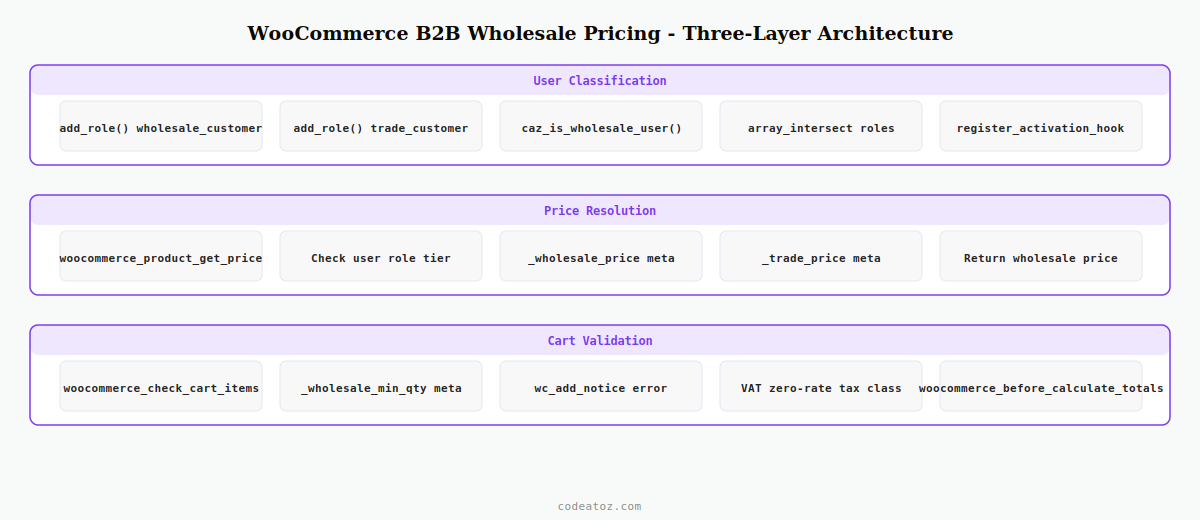
The architecture for WooCommerce B2B wholesale pricing separates concerns into three layers: user classification (which role the buyer has), price resolution (what price to show and charge for that role), and cart validation (minimum quantities, VAT handling). Using WordPress user roles for buyer classification makes the system integrate naturally with the rest of WooCommerce — you can restrict pages, hide products, and conditionally show fields all based on the same role check.
Step 1: Create Wholesale User Roles for WooCommerce B2B Wholesale Pricing
Custom user roles are the foundation of WooCommerce B2B wholesale pricing. Create a wholesale_customer role with the same capabilities as a standard customer, then add higher tiers as needed. Register these on plugin activation so they are only created once.
register_activation_hook( __FILE__, 'caz_register_wholesale_roles' );

function caz_register_wholesale_roles(): void {
    // Tier 1: standard wholesale — WooCommerce B2B wholesale pricing base tier
    add_role( 'wholesale_customer', __( 'Wholesale Customer', 'caz-b2b' ), [
        'read'         => true,
        'edit_posts'   => false,
    ]);

    // Tier 2: premium trade pricing
    add_role( 'trade_customer', __( 'Trade Customer', 'caz-b2b' ), [
        'read'         => true,
        'edit_posts'   => false,
    ]);
}

// Helper: check if current user qualifies for WooCommerce B2B wholesale pricing
function caz_is_wholesale_user(): bool {
    $wholesale_roles = apply_filters( 'caz_wholesale_roles', [
        'wholesale_customer',
        'trade_customer',
        'administrator',  // admins always see wholesale prices in dev
    ]);
    $user = wp_get_current_user();
    return (bool) array_intersect( $wholesale_roles, (array) $user->roles );
}
Step 2: Store and Apply WooCommerce B2B Wholesale Prices
Store per-product wholesale prices as product meta. The cleanest approach for WooCommerce B2B wholesale pricing uses a separate meta key per tier: _wholesale_price and _trade_price. Apply them via the woocommerce_product_get_price filter which fires for both display and cart calculation.
add_filter( 'woocommerce_product_get_price',         'caz_apply_wholesale_price', 10, 2 );
add_filter( 'woocommerce_product_get_regular_price',  'caz_apply_wholesale_price', 10, 2 );
add_filter( 'woocommerce_product_variation_get_price','caz_apply_wholesale_price', 10, 2 );

function caz_apply_wholesale_price( string $price, WC_Product $product ): string {
    // Only apply WooCommerce B2B wholesale pricing for qualifying users
    if ( ! caz_is_wholesale_user() ) return $price;
    if ( is_admin() && ! wp_doing_ajax() ) return $price;

    $user  = wp_get_current_user();
    $roles = (array) $user->roles;

    // Apply tier-specific WooCommerce B2B wholesale price
    if ( in_array( 'trade_customer', $roles, true ) ) {
        $wholesale = $product->get_meta( '_trade_price' );
    } else {
        $wholesale = $product->get_meta( '_wholesale_price' );
    }

    return ( $wholesale !== '' && $wholesale !== null )
        ? (string) $wholesale
        : $price;
}

// Also filter the sale price to prevent confusing "sale" display for wholesale users
add_filter( 'woocommerce_product_get_sale_price', function( $price, $product ) {
    if ( caz_is_wholesale_user() ) return '';
    return $price;
}, 10, 2 );
Step 3: Add Wholesale Price Fields to the Product Edit Screen
Add input fields for wholesale and trade prices directly in the WooCommerce product data metabox so store managers can set WooCommerce B2B wholesale pricing per product without code.
add_action( 'woocommerce_product_options_pricing', 'caz_add_wholesale_price_fields' );

function caz_add_wholesale_price_fields(): void {
    echo '<div class="options_group caz-wholesale-pricing">';
    woocommerce_wp_text_input([
        'id'          => '_wholesale_price',
        'label'       => __( 'Wholesale price (£)', 'caz-b2b' ),
        'placeholder' => __( 'WooCommerce B2B wholesale pricing — enter trade price', 'caz-b2b' ),
        'type'        => 'number',
        'custom_attributes' => [ 'step' => '0.01', 'min' => '0' ],
    ]);
    woocommerce_wp_text_input([
        'id'          => '_trade_price',
        'label'       => __( 'Trade price (£)', 'caz-b2b' ),
        'placeholder' => __( 'Premium trade tier pricing', 'caz-b2b' ),
        'type'        => 'number',
        'custom_attributes' => [ 'step' => '0.01', 'min' => '0' ],
    ]);
    echo '</div>';
}

add_action( 'woocommerce_process_product_meta', 'caz_save_wholesale_price_fields' );

function caz_save_wholesale_price_fields( int $post_id ): void {
    $wholesale = isset( $_POST['_wholesale_price'] ) ? wc_format_decimal( $_POST['_wholesale_price'] ) : '';
    $trade     = isset( $_POST['_trade_price'] )     ? wc_format_decimal( $_POST['_trade_price'] )     : '';
    update_post_meta( $post_id, '_wholesale_price', $wholesale );
    update_post_meta( $post_id, '_trade_price',     $trade );
}
Step 4: Enforce Minimum Order Quantities for WooCommerce B2B Wholesale Pricing
Wholesale buyers typically must purchase a minimum quantity. Enforce this during cart validation so the checkout is blocked until the minimum is met.
add_action( 'woocommerce_check_cart_items', 'caz_enforce_wholesale_minimum_qty' );

function caz_enforce_wholesale_minimum_qty(): void {
    if ( ! caz_is_wholesale_user() ) return;

    foreach ( WC()->cart->get_cart() as $item ) {
        $product  = $item['data'];
        $min_qty  = (int) $product->get_meta( '_wholesale_min_qty' );
        $quantity = (int) $item['quantity'];

        if ( $min_qty > 0 && $quantity < $min_qty ) {
            wc_add_notice( sprintf(
                /* translators: 1: product name, 2: minimum quantity */
                __( 'Minimum order quantity for %1$s is %2$d units for WooCommerce B2B wholesale pricing.', 'caz-b2b' ),
                esc_html( $product->get_name() ),
                $min_qty
            ), 'error' );
        }
    }
}
The WooCommerce pricing documentation covers all available price filters. The WordPress add_role() documentation covers the full role and capability system. See our WooCommerce hooks reference for all price-related filters, and our Hide Price Pro plugin if you need a ready-built solution for hiding prices from non-wholesale users.
💡 Always filter prices on woocommerce_product_get_price AND woocommerce_product_variation_get_price for your WooCommerce B2B wholesale pricing to work on variable products. Filtering only the simple product price leaves variation prices unchanged, which is a common bug in custom wholesale pricing implementations.
Frequently Asked Questions — WooCommerce B2B Wholesale Pricing
How do I add WooCommerce B2B wholesale pricing without a plugin?
Create a custom WordPress user role for wholesale buyers. Store per-product wholesale prices as product meta. Apply them via the woocommerce_product_get_price filter, checking the current user’s role before overriding the price. This WooCommerce B2B wholesale pricing approach requires no paid plugin and gives you complete control over pricing logic, role tiers, and minimum quantity rules.
Which WooCommerce filter should I use for B2B wholesale pricing?
Use woocommerce_product_get_price for simple product prices and woocommerce_product_variation_get_price for variable product variations. Both filters must be hooked for complete WooCommerce B2B wholesale pricing coverage. Also filter woocommerce_product_get_regular_price to prevent the original retail price showing as a strikethrough alongside your wholesale price for authenticated B2B buyers.
How do I hide retail prices from wholesale customers in WooCommerce?
Our Hide Price Pro plugin handles this automatically — it hides retail prices and the add to cart button for non-logged-in visitors and shows wholesale prices only to approved role holders. For a code-only WooCommerce B2B wholesale pricing approach, return an empty string from woocommerce_product_get_price for non-wholesale visitors and use the woocommerce_is_purchasable filter to hide the add to cart button.
How do I handle VAT exemptions in WooCommerce B2B wholesale pricing?
Add a tax class called Zero Rate to WooCommerce and apply it to wholesale user orders by hooking into woocommerce_before_calculate_totals. Check if the user is a verified VAT-registered business, then set the tax class to zero-rate on each cart item. Store the VAT registration number as user meta during the B2B registration process and use it to gate the WooCommerce B2B wholesale pricing tax exemption.
Can I have multiple wholesale price tiers in WooCommerce?
Yes — create one WordPress user role per tier (wholesale_customer, trade_customer, distributor) and store a separate price meta key for each tier on every product. In the woocommerce_product_get_price filter, check the user’s role and return the matching tier price. This scales to as many WooCommerce B2B wholesale pricing tiers as needed without significant performance overhead.
Should I use a plugin or custom PHP for WooCommerce B2B wholesale pricing?
A custom PHP implementation is better when you need specific business logic — unusual tier structures, integration with an ERP or trade portal, or tight coupling with existing user management. Use an established plugin (or our Hide Price Pro) when you need rapid deployment and standard wholesale features without custom development. For complex WooCommerce B2B wholesale pricing with API-driven tier assignments, a custom PHP approach will always be more flexible.
Need WooCommerce B2B Wholesale Pricing Built?
CodeAtoZ builds custom WooCommerce B2B wholesale pricing systems — role-based tiers, VAT exemptions, minimum quantities, and trade portal integration.




