
How to Add a WooCommerce Custom Order Status with PHP — Complete 2026 Guide
Add a WooCommerce custom order status with register_post_status(), hook it into the admin UI, trigger emails, and colour-code it — full PHP code included.
Adding a WooCommerce custom order status is one of the most common requirements in bespoke store builds. The default statuses — pending, processing, completed, refunded — rarely cover real fulfilment workflows. A WooCommerce custom order status lets you track orders through stages like Awaiting Dispatch, At Warehouse, or Partially Fulfilled. This guide covers everything: registering the WooCommerce custom order status, adding it to the admin UI, triggering emails, applying colour coding, and handling bulk actions. Full PHP code included for every step.
WooCommerce stores order statuses as WordPress post statuses, which means you register them with register_post_status() and then tell WooCommerce about them via the wc_order_statuses filter. The full implementation has five parts that work together — skip any one of them and either the status won’t appear in the right places or won’t behave correctly.
All code in this guide goes in a custom plugin — never in functions.php. See our guide on how to build a WooCommerce plugin from scratch for the plugin boilerplate before adding this code.
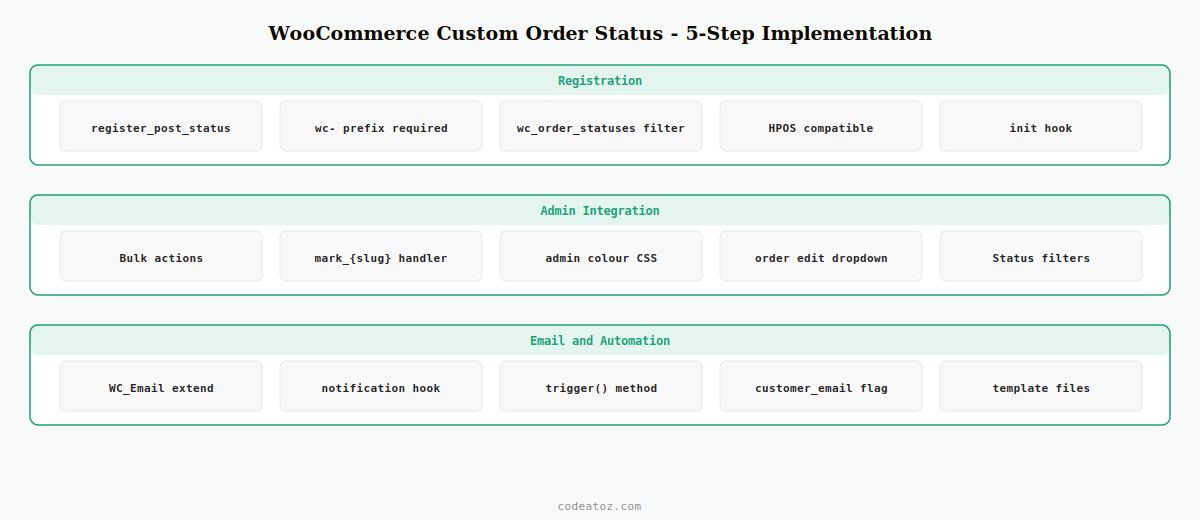
Step 1: Register the WooCommerce Custom Order Status with register_post_status()
WordPress stores WooCommerce order statuses as post statuses. The first step when adding a WooCommerce custom order status is calling register_post_status() hooked on init. The status slug must have the wc- prefix.
add_action( 'init', 'caz_register_awaiting_dispatch_status' );

function caz_register_awaiting_dispatch_status() {
    register_post_status( 'wc-awaiting-dispatch', [
        'label'                     => _x( 'Awaiting Dispatch', 'Order status', 'caz-plugin' ),
        'public'                    => true,
        'exclude_from_search'       => false,
        'show_in_admin_all_list'    => true,
        'show_in_admin_status_list' => true,
        /* translators: %s: number of orders */
        'label_count'               => _n_noop(
            'Awaiting Dispatch (%s)',
            'Awaiting Dispatch (%s)',
            'caz-plugin'
        ),
    ] );
}
The wc- prefix is mandatory — WooCommerce strips it to get the display slug. So wc-awaiting-dispatch becomes awaiting-dispatch when WooCommerce refers to it internally. Use the prefixed version everywhere you register or set the WooCommerce custom order status, and the unprefixed version when filtering with WooCommerce APIs.
Step 2: Add the WooCommerce Custom Order Status to the wc_order_statuses Filter
Registering with WordPress is not enough — you must also tell WooCommerce about the new status via the wc_order_statuses filter. Without this step, the WooCommerce custom order status won’t appear in the order edit dropdown, the order list filters, or the status transition emails.
add_filter( 'wc_order_statuses', 'caz_add_awaiting_dispatch_to_wc' );

function caz_add_awaiting_dispatch_to_wc( array $statuses ): array {
    // Insert after 'processing' in the list
    $new = [];
    foreach ( $statuses as $slug => $label ) {
        $new[ $slug ] = $label;
        if ( 'wc-processing' === $slug ) {
            $new['wc-awaiting-dispatch'] = __( 'Awaiting Dispatch', 'caz-plugin' );
        }
    }
    return $new;
}
Step 3: Add the WooCommerce Custom Order Status to Bulk Actions
By default, your WooCommerce custom order status won’t appear in the bulk action dropdown on the Orders admin list. You need two hooks: one to add the action, one to handle it. This step applies to both the classic WooCommerce orders screen and the HPOS orders screen.
// Add to bulk actions dropdown
add_filter( 'bulk_actions-edit-shop_order', 'caz_add_bulk_action' );
add_filter( 'bulk_actions-woocommerce_page_wc-orders', 'caz_add_bulk_action' );

function caz_add_bulk_action( array $actions ): array {
    $actions['mark_awaiting-dispatch'] = __( 'Mark: Awaiting Dispatch', 'caz-plugin' );
    return $actions;
}

// Handle the bulk action
add_filter( 'handle_bulk_actions-edit-shop_order', 'caz_handle_bulk_action', 10, 3 );
add_filter( 'handle_bulk_actions-woocommerce_page_wc-orders', 'caz_handle_bulk_action', 10, 3 );

function caz_handle_bulk_action( string $redirect, string $action, array $ids ): string {
    if ( 'mark_awaiting-dispatch' !== $action ) return $redirect;
    foreach ( $ids as $id ) {
        $order = wc_get_order( $id );
        if ( $order ) $order->update_status( 'awaiting-dispatch', 'Bulk status update.' );
    }
    return add_query_arg( 'caz_bulk_done', count( $ids ), $redirect );
}
Step 4: Trigger a WooCommerce Custom Email for the Custom Order Status
To send a customer email when an order moves to your WooCommerce custom order status, extend WC_Email. This is the cleanest approach — it integrates with WooCommerce’s email system, respects the WooCommerce email settings panel, and handles HTML/plain text automatically.
add_filter( 'woocommerce_email_classes', 'caz_add_dispatch_email' );

function caz_add_dispatch_email( array $emails ): array {
    require_once plugin_dir_path( __FILE__ ) . 'includes/class-email-awaiting-dispatch.php';
    $emails['CAZ_Email_Awaiting_Dispatch'] = new CAZ_Email_Awaiting_Dispatch();
    return $emails;
}

// In includes/class-email-awaiting-dispatch.php:
class CAZ_Email_Awaiting_Dispatch extends WC_Email {
    public function __construct() {
        $this->id             = 'caz_awaiting_dispatch';
        $this->title          = __( 'Awaiting Dispatch', 'caz-plugin' );
        $this->description    = __( 'Sent when order moves to Awaiting Dispatch.', 'caz-plugin' );
        $this->heading        = __( 'Your order is being prepared for dispatch', 'caz-plugin' );
        $this->subject        = __( 'Your {site_title} order #{order_number} is awaiting dispatch', 'caz-plugin' );
        $this->template_html  = 'emails/awaiting-dispatch.php';
        $this->template_plain = 'emails/plain/awaiting-dispatch.php';
        $this->customer_email = true;
        // Trigger on status transition to awaiting-dispatch
        add_action( 'woocommerce_order_status_awaiting-dispatch_notification', [ $this, 'trigger' ] );
        parent::__construct();
    }
    public function trigger( int $order_id ): void {
        $this->setup_locale();
        $this->object = wc_get_order( $order_id );
        if ( $this->object && $this->is_enabled() ) {
            $this->recipient = $this->object->get_billing_email();
            $this->send( $this->get_recipient(), $this->get_subject(), $this->get_content(), $this->get_headers(), $this->get_attachments() );
        }
        $this->restore_locale();
    }
}
The WooCommerce email notifications documentation covers the full WC_Email API including template file locations and available hooks. The WordPress register_post_status() reference documents all registration arguments.
Step 5: Colour-Code the WooCommerce Custom Order Status in the Admin
WooCommerce colour-codes order statuses in the admin list using inline CSS. Adding a colour for your WooCommerce custom order status makes it immediately recognisable at a glance. Hook into admin_head and output a scoped style targeting the status slug.
add_action( 'admin_head', 'caz_custom_status_colour' );

function caz_custom_status_colour(): void {
    echo '<style>
        .order-status.status-awaiting-dispatch {
            background: #e0f2f1;
            color: #00695c;
        }
    </style>';
}
💡 Target only admin pages by wrapping the admin_head hook output with if ( ! is_admin() ) return; — though admin_head only fires in the admin, it is good defensive practice when adding a WooCommerce custom order status colour to avoid any cross-context issues.
How to Set a WooCommerce Custom Order Status Programmatically
Once registered, setting a WooCommerce custom order status on any order is a single method call. Use the unprefixed slug — without wc-:
$order = wc_get_order( $order_id );
if ( $order ) {
    // Use unprefixed slug when calling update_status()
    $order->update_status( 'awaiting-dispatch', 'Order moved to Awaiting Dispatch.' );
}
The note string (second argument) is added to the order’s note history in WP Admin — always include a meaningful note so your team knows what triggered the WooCommerce custom order status change. See our WooCommerce hooks reference for the woocommerce_order_status_changed hook which fires on every status transition. Also see our WooCommerce development services if you need a custom fulfilment workflow built.
Frequently Asked Questions — WooCommerce Custom Order Status
How do I add a WooCommerce custom order status without a plugin?
Add a WooCommerce custom order status using register_post_status() hooked on init, then add it to WooCommerce via the wc_order_statuses filter. Both steps are required. Place the code in a custom plugin file, never in functions.php, so it persists across theme changes.
What is the wc- prefix for in a WooCommerce custom order status?
The wc- prefix is required by WooCommerce when registering post statuses. For example, wc-awaiting-dispatch is the registration slug. WooCommerce strips the prefix internally, so you use awaiting-dispatch when calling update_status() or filtering. Omitting the prefix in register_post_status() causes the WooCommerce custom order status to fail silently.
Will a WooCommerce custom order status work with HPOS?
Yes, provided you register the bulk action handlers on both the classic orders screen (bulk_actions-edit-shop_order) and the HPOS orders screen (bulk_actions-woocommerce_page_wc-orders). The register_post_status() and wc_order_statuses filter registrations work for both storage engines automatically.
How do I send an email when an order moves to a WooCommerce custom order status?
Extend the WC_Email class and register it via the woocommerce_email_classes filter. Inside the constructor, hook trigger() to the woocommerce_order_status_{your-status}_notification action. This integrates your WooCommerce custom order status email with the standard WooCommerce email settings panel.
Can I add multiple WooCommerce custom order statuses?
Yes — call register_post_status() and add an entry to the wc_order_statuses filter for each one. Keep each status slug unique and always prefixed with wc-. There is no practical limit to the number of WooCommerce custom order status entries you can register, though workflows with more than 8-10 statuses become difficult for staff to manage.
Why is my WooCommerce custom order status not showing in the order dropdown?
The two most common causes: you registered the status with register_post_status() but did not add it to the wc_order_statuses filter, or you used the wrong slug format. The wc_order_statuses filter is what makes the WooCommerce custom order status visible in the Edit Order dropdown and the Orders list status filters.
Need a Custom WooCommerce Order Workflow?
CodeAtoZ builds bespoke fulfilment workflows with custom statuses, automated emails, and third-party integrations — fully HPOS-compatible.




