
How to Build a WooCommerce Plugin from Scratch — Complete Step-by-Step Guide (2026)
Everything you need to build a WooCommerce plugin from scratch — plugin header, class structure, admin settings, HPOS compatibility, and WP.org packaging in 8 proven steps.
If you want to build a WooCommerce plugin properly, this is the guide you need. Knowing how to build a WooCommerce plugin from scratch separates developers who write upgrade-safe, maintainable code from those who paste snippets into functions.php and wonder why things break after every update. When you build a WooCommerce plugin correctly — with proper class structure, HPOS compatibility, and the WooCommerce Settings API — you get code that is portable, testable, and ready to distribute. This guide walks through all 8 steps.
WooCommerce is itself a WordPress plugin, and extending it follows the same plugin architecture: a PHP file with a header, hooks, and classes. The key additions when you build a WooCommerce plugin — rather than a generic WordPress plugin — are checking WooCommerce is active before loading, using WooCommerce-specific hooks, and declaring High Performance Order Storage (HPOS) compatibility if your plugin reads or writes order data.
By the end of this guide you will have a complete, working WooCommerce plugin you can install on any WordPress site, distribute via WordPress.org, or sell commercially. Every file, every function, and every hook is explained.
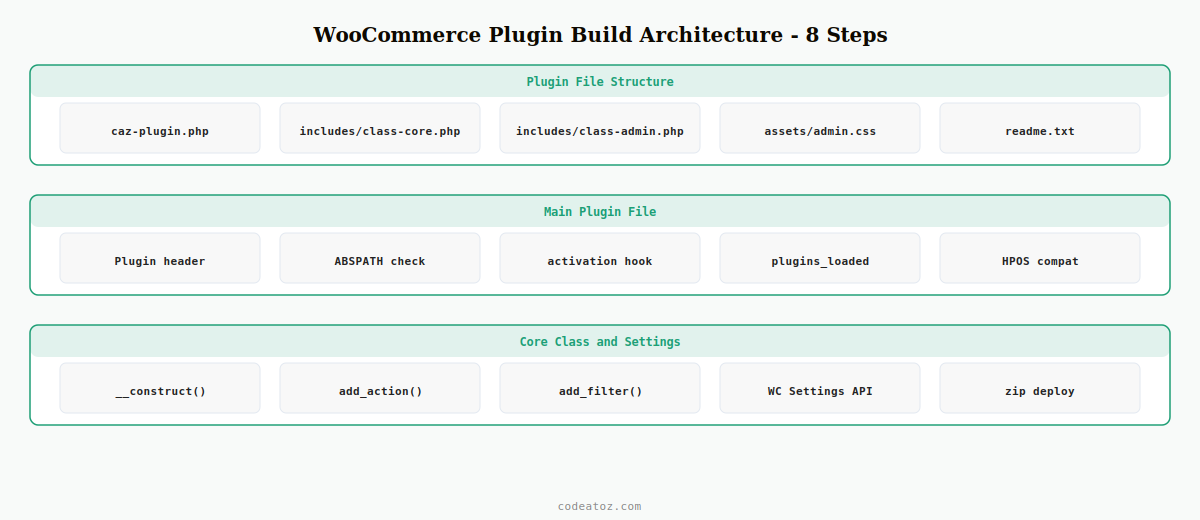
Step 1: File Structure When You Build a WooCommerce Plugin
Before writing a single line of PHP, set up the correct directory structure. A well-structured directory makes it easier to build a WooCommerce plugin that scales cleanly as features are added.
wp-content/plugins/caz-order-notes/
├── caz-order-notes.php       ← main plugin file (entry point)
├── includes/
│   ├── class-notes.php           ← core logic
│   └── class-admin.php           ← admin UI
├── assets/
│   ├── admin.css
│   └── admin.js
└── readme.txt                 ← required for WP.org
Step 2: Plugin Header and WooCommerce Dependency Check
The main plugin file is the entry point. Every time you build a WooCommerce plugin you need two things in this file: a valid plugin header that WordPress recognises, and a check that WooCommerce is active before loading any of your code.
<?php
/**
 * Plugin Name:       CAZ Order Notes
 * Plugin URI:        https://codeatoz.com
 * Description:       Adds automated internal notes to WooCommerce orders.
 * Version:           1.0.0
 * Requires at least: 6.0
 * Requires PHP:      8.0
 * Author:            CodeAtoZ
 * Author URI:        https://codeatoz.com
 * License:           GPL-2.0+
 * WC requires at least: 7.0
 * WC tested up to:      9.0
 */

if ( ! defined( 'ABSPATH' ) ) exit;

// Block activation if WooCommerce is not active
register_activation_hook( __FILE__, function() {
    if ( ! class_exists( 'WooCommerce' ) ) {
        deactivate_plugins( plugin_basename( __FILE__ ) );
        wp_die( 'This plugin requires WooCommerce to be installed and active.' );
    }
} );

// Load plugin only when WooCommerce is confirmed active
add_action( 'plugins_loaded', function() {
    if ( ! class_exists( 'WooCommerce' ) ) return;
    require_once plugin_dir_path( __FILE__ ) . 'includes/class-notes.php';
    require_once plugin_dir_path( __FILE__ ) . 'includes/class-admin.php';
    new CAZ_Order_Notes();
    new CAZ_Order_Notes_Admin();
} );
Step 3: Core Class — The Right Way to Build a WooCommerce Plugin Logic Layer
Every time you build a WooCommerce plugin, wrap your logic in a class. This prevents naming collisions with other plugins, enables dependency injection, and makes unit testing possible. Use PHP 8 constructor property promotion for cleaner code.
<?php

class CAZ_Order_Notes {

    public function __construct() {
        add_action( 'woocommerce_order_status_completed', [ $this, 'add_completion_note' ], 10, 2 );
        add_action( 'woocommerce_payment_complete', [ $this, 'add_payment_note' ] );
    }

    public function add_completion_note( int $order_id, WC_Order $order ): void {
        $order->add_order_note( sprintf(
            'Order completed. Customer: %s. Items: %d.',
            $order->get_billing_first_name() . ' ' . $order->get_billing_last_name(),
            $order->get_item_count()
        ) );
    }

    public function add_payment_note( int $order_id ): void {
        $order = wc_get_order( $order_id );
        if ( ! $order ) return;
        $order->add_order_note( 'Payment confirmed via ' . $order->get_payment_method_title() . '.' );
    }
}
Step 4: Admin Settings Using the WooCommerce Settings API
When you build a WooCommerce plugin with a settings page, always use the WooCommerce Settings API rather than the native WordPress Settings API. This integrates your settings directly into WooCommerce → Settings, keeping the experience consistent and leveraging WooCommerce’s built-in save and sanitisation handling.
add_filter( 'woocommerce_get_sections_products', fn( $s ) => $s + [ 'caz_notes' => 'Order Notes' ] );

add_filter( 'woocommerce_get_settings_products', function( $settings, $section ) {
    if ( 'caz_notes' !== $section ) return $settings;
    return [
        [ 'title' => 'CAZ Order Notes', 'type' => 'title', 'id' => 'caz_notes_title' ],
        [ 'title' => 'Enable automated notes', 'type' => 'checkbox', 'id' => 'caz_notes_enabled', 'default' => 'yes' ],
        [ 'title' => 'Note prefix', 'type' => 'text', 'id' => 'caz_notes_prefix', 'default' => '' ],
        [ 'type' => 'sectionend', 'id' => 'caz_notes_end' ],
    ];
}, 10, 2 );
Step 5: HPOS Compatibility — Essential When You Build a WooCommerce Plugin for Orders
High Performance Order Storage (HPOS) stores orders in custom database tables rather than WordPress post meta. If your plugin reads or writes order data — and most do — you must declare compatibility or WooCommerce will show a warning and may deactivate your plugin. This is now a required step whenever you build a WooCommerce plugin that touches orders.
add_action( 'before_woocommerce_init', function() {
    if ( class_exists( AutomatticWooCommerceUtilitiesFeaturesUtil::class ) ) {
        AutomatticWooCommerceUtilitiesFeaturesUtil::declare_compatibility(
            'custom_order_tables', __FILE__, true
        );
    }
} );
The HPOS documentation on the WooCommerce developer site covers all scenarios including CRUD operations and backwards compatibility. The WordPress Plugin Developer Handbook covers the foundational requirements for any plugin.
Step 6: Enqueue Assets Correctly When You Build a WooCommerce Plugin
Only load CSS and JavaScript on pages where your plugin actually needs them. Enqueuing on every page adds unnecessary weight to your store’s frontend — a common mistake when developers first build a WooCommerce plugin.
add_action( 'admin_enqueue_scripts', function( $hook ) {
    // Only load on WooCommerce order screens
    if ( ! in_array( $hook, [ 'post.php', 'post-new.php', 'woocommerce_page_wc-orders' ] ) ) return;
    wp_enqueue_style(
        'caz-order-notes-admin',
        plugin_dir_url( __FILE__ ) . 'assets/admin.css',
        [],
        '1.0.0'
    );
} );
Step 7: readme.txt — Required When You Build a WooCommerce Plugin for WordPress.org
A valid readme.txt is mandatory for WordPress.org submission. Include the WooCommerce compatibility headers — they allow WooCommerce to show version compatibility information in the admin plugins list.
=== CAZ Order Notes ===
Contributors: codeatoz
Tags: woocommerce, orders, notes, automation
Requires at least: 6.0
Tested up to: 6.7
Stable tag: 1.0.0
License: GPLv2 or later

Adds automated internal notes to WooCommerce orders on status change.

== Description ==
Full description here. Explain what your plugin does, who it is for,
and what problems it solves.

== Installation ==
1. Upload plugin folder to /wp-content/plugins/
2. Activate through Plugins menu
3. Configure under WooCommerce > Settings > Products > Order Notes

== Changelog ==
= 1.0.0 =
* Initial release
Step 8: Package and Deploy Your WooCommerce Plugin
Once you build a WooCommerce plugin and test it on a staging environment with WP_DEBUG enabled, package it for distribution. The installable ZIP is what you upload via WP Admin → Plugins → Add New, or submit to WordPress.org SVN.
- Run
zip -r caz-order-notes.zip caz-order-notes/from your plugins directory - Test on a clean WordPress + WooCommerce install before distributing
- Enable
WP_DEBUGandWP_DEBUG_LOGduring testing to catch silent errors - Submit to WordPress.org for public distribution — review takes 1-4 weeks
✓ You have now built a complete, upgrade-safe WooCommerce plugin — with proper class structure, HPOS compatibility, WooCommerce settings integration, and production-ready packaging. Every plugin CodeAtoZ ships follows this exact pattern.
For the hooks used inside your plugin, see our WooCommerce hooks reference. To extend what you build here with REST API endpoints, see our WooCommerce custom REST API endpoint guide.
Frequently Asked Questions — Build a WooCommerce Plugin
What do I need to build a WooCommerce plugin from scratch?
To build a WooCommerce plugin from scratch you need a PHP file with a valid plugin header, a check that WooCommerce is active before loading code, a class-based structure for your logic, and an HPOS compatibility declaration if your plugin interacts with orders. PHP 8.0+ and WooCommerce 7.0+ are the minimum requirements.
Should I use a class or functions when I build a WooCommerce plugin?
Always use a class. When you build a WooCommerce plugin using classes, you prevent function naming conflicts with other plugins, enable proper dependency injection, and make the code testable. Procedural functions in the global namespace are a significant risk when multiple plugins are active on the same site.
What is HPOS and why must I declare compatibility when I build a WooCommerce plugin?
HPOS (High Performance Order Storage) stores orders in custom database tables rather than post meta. Any time you build a WooCommerce plugin that reads or writes order data, you must call FeaturesUtil::declare_compatibility() or WooCommerce shows a compatibility warning in the admin and may prevent your plugin from activating.
How do I add settings to WooCommerce when I build a WooCommerce plugin?
Use the woocommerce_get_sections_ and woocommerce_get_settings_ filters to register a custom section inside an existing WooCommerce settings tab. WooCommerce handles the save, sanitisation, and display automatically — this is the cleanest approach when you build a WooCommerce plugin with configurable options.
Can I submit a WooCommerce plugin I build to WordPress.org?
Yes — you can submit any WooCommerce plugin you build to WordPress.org as long as it meets the plugin guidelines: GPL-compatible license, no obfuscated code, valid readme.txt, and WooCommerce compatibility headers. The review process takes 1-4 weeks for new submissions.
How do I prevent my WooCommerce plugin from loading if WooCommerce is deactivated?
Hook into plugins_loaded and check class_exists(‘WooCommerce’) before requiring any of your class files or registering any hooks. This ensures your plugin fails silently rather than throwing PHP fatal errors — a critical pattern when you build a WooCommerce plugin intended for production use.
Need a Custom WooCommerce Plugin Built?
CodeAtoZ builds production WooCommerce plugins — from simple hook integrations to complex ERP connections. Properly structured, HPOS-compatible, and upgrade-safe.




