
The Complete Magento Redis Configuration Guide 2026
Magento Redis configuration done properly — three separate databases for default cache, page cache and sessions, with the env.php settings and sizing that keep hit rate high.
Magento Redis configuration is one of those tasks that looks done once Redis responds to a ping — and is frequently wrong in ways that surface as mysterious logouts, emptied carts or a cache that never seems to help. Magento uses Redis for three distinct concerns: the default cache, the full-page cache, and customer sessions (see Adobe’s Redis configuration guide). Correct Magento Redis configuration keeps each in its own database index, sizes memory to the working set, and verifies hit rate rather than assuming it. This guide covers the settings that matter and the mistakes that cause outages.
Search intent: informational/procedural — Magento developers configuring or debugging Redis. We cover the three cache tiers, the exact env.php configuration, session handling, memory sizing, verification and pitfalls. It builds on our Magento 2 cache types and Varnish VCL guides.
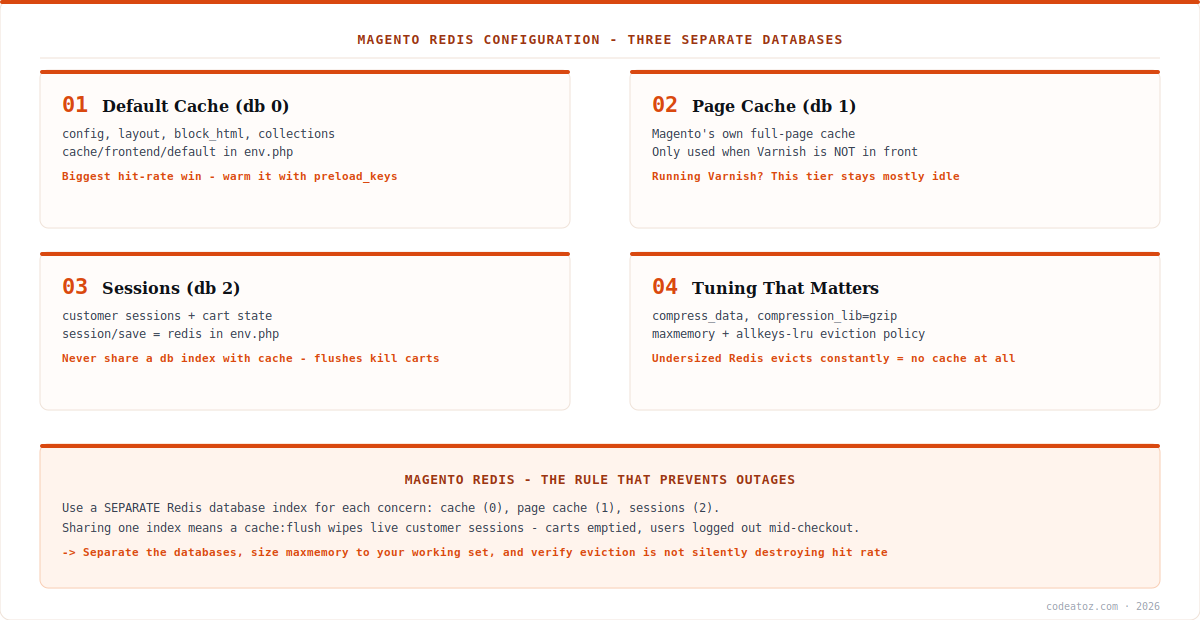
Magento Redis Configuration: The Three Tiers
Correct Magento Redis configuration starts with understanding that Magento has three separate uses for Redis, and they should never share a database index. The default cache (conventionally db 0) holds configuration, layout XML, block HTML and collection data — this is the tier that saves Magento from re-parsing configuration on every request, and it delivers the biggest hit-rate win. The page cache (db 1) holds Magento’s own full-page cache; note that if you run Varnish in front, this tier stays largely idle because Varnish handles full-page caching at the edge. The session storage (db 2) holds customer sessions and cart state, configured via Redis session storage.
The reason separation matters is not tidiness — it is that bin/magento cache:flush clears cache databases. If sessions share an index with cache, a routine cache flush logs out every customer and empties live carts, mid-checkout. This is the single most damaging Magento Redis configuration mistake, and it is entirely avoidable.
Magento Redis Configuration in env.php
The canonical place for Magento Redis configuration is app/etc/env.php. You can write it directly, but the supported route is the setup CLI, which is repeatable and safe to run from a deployment pipeline. The commands below configure all three tiers with distinct database indices.
# 1. default cache  -> db 0
bin/magento setup:config:set --cache-backend=redis
  --cache-backend-redis-server=127.0.0.1
  --cache-backend-redis-port=6379
  --cache-backend-redis-db=0
  --cache-backend-redis-compress-data=1

# 2. full-page cache -> db 1
bin/magento setup:config:set --page-cache=redis
  --page-cache-redis-server=127.0.0.1
  --page-cache-redis-port=6379
  --page-cache-redis-db=1
  --page-cache-redis-compress-data=0

# 3. sessions -> db 2  (NEVER the same index as cache)
bin/magento setup:config:set --session-save=redis
  --session-save-redis-host=127.0.0.1
  --session-save-redis-port=6379
  --session-save-redis-db=2
  --session-save-redis-log-level=3

bin/magento cache:flush
A note on compress-data: compression is worth enabling on the default cache, where values (layout XML, block HTML) are large and compress well, trading a little CPU for meaningfully less memory. It is generally left off for the page cache, where entries are already large and latency-sensitive. Sessions are small and should not be compressed. Getting these choices right is a small but real part of Magento Redis configuration.
| Tier | Suggested db | Holds | Compress? |
|---|---|---|---|
| Default cache | 0 | config, layout, block_html, collections | Yes (gzip) |
| Page cache | 1 | Magento FPC — idle if Varnish is used | No |
| Sessions | 2 | customer sessions, cart state | No |
Redis is not a substitute for Varnish. A frequent misunderstanding in Magento Redis configuration is treating the Redis page cache as full-page caching for anonymous traffic. Varnish serves cached HTML at the edge without touching PHP at all; the Redis page cache still requires a PHP request. Run Varnish for anonymous full-page caching and Redis for the default cache and sessions — they solve different problems.
Magento Redis Configuration: Sizing and Verification
Memory sizing and eviction policy are where Magento Redis configuration quietly fails. Set maxmemory to comfortably exceed your working set, and choose an eviction policy deliberately (the Redis eviction documentation explains each): allkeys-lru is a reasonable default for cache databases, but if Redis is constantly evicting because it is undersized, your hit rate collapses and you carry the overhead without the benefit. Sessions deserve particular care — evicting session keys under memory pressure means logging customers out, so many teams give sessions their own Redis instance in production rather than sharing one with cache.
Verification is straightforward and worth doing after every change. Check that keys are actually landing in the expected databases and that the hit ratio is healthy:
# keys present per database (expect 0,1,2 populated)
redis-cli INFO keyspace

# hit ratio + evictions - the two numbers that matter
redis-cli INFO stats | grep -E "keyspace_hits|keyspace_misses|evicted_keys"

# memory against your configured limit
redis-cli INFO memory | grep -E "used_memory_human|maxmemory_human"

# confirm Magento's view of the config
bin/magento config:show | grep -i redis
Interpret it simply: a healthy default-cache database shows hits vastly outnumbering misses and evicted_keys at or near zero. Rising evictions mean Redis is too small for the working set — increase maxmemory or move sessions to their own instance. If db 0 is empty after a page load, Magento Redis configuration has not actually taken effect; check env.php and flush. Our Magento team configures and monitors Redis as part of performance engagements.
What we have learned configuring Redis for Magento
Shared session and cache indices cause the worst incidents we see. A cache flush during a deploy emptying live customer carts is a genuinely damaging outage, and it traces back to one config line. We verify session storage sits on its own database index — ideally its own instance — before anything else on a new client store.
Evictions are the metric nobody watches. Teams check that Redis is “up” and stop there. We look at evicted_keys and the hit/miss ratio, because an undersized Redis silently evicting under load performs worse than no cache while looking perfectly healthy in a ping check.
Redis and Varnish get conflated constantly. We regularly meet stores with the Redis page cache configured, no Varnish, and a puzzle about why anonymous traffic is slow. Clarifying that Varnish serves HTML without invoking PHP, while Redis page cache does not, usually reframes the whole performance conversation.
Frequently Asked Questions About Magento Redis Configuration
What does Magento use Redis for?
Magento uses Redis for three distinct purposes: the default cache (configuration, layout, block HTML, collections), the full-page cache, and customer session storage. Correct Magento Redis configuration places each on its own database index, because they have different lifecycles and flushing cache must never destroy live sessions.
Should Magento sessions and cache share the same Redis database?
No — this is the most damaging Magento Redis configuration mistake. Running bin/magento cache:flush clears cache databases, so if sessions share an index, a routine flush logs out every customer and empties live carts mid-checkout. Always use a separate database index, and ideally a separate Redis instance, for sessions.
How do I configure Redis in Magento 2?
Use bin/magento setup:config:set with the cache-backend, page-cache and session-save options, giving each its own redis-db index. This writes the configuration into app/etc/env.php in a repeatable way suitable for deployment pipelines. Flush the cache afterwards and verify keys are landing in the expected databases.
Does Redis replace Varnish in Magento?
No. Varnish serves cached full-page HTML at the edge without invoking PHP at all, while Magento’s Redis page cache still requires a PHP request. They solve different problems. The recommended setup runs Varnish for anonymous full-page caching, with Magento Redis configuration handling the default cache and sessions.
How much memory should Magento’s Redis have?
Set maxmemory comfortably above your working set and monitor evicted_keys. If evictions are climbing, Redis is undersized and hit rate collapses — you carry the overhead without the benefit. Sessions are especially sensitive, since evicting session keys logs customers out, which is why many production setups give sessions a dedicated instance.
How do I check whether Magento Redis is working?
Run redis-cli INFO keyspace to confirm keys are present in the expected databases, and redis-cli INFO stats to check keyspace_hits against keyspace_misses and evicted_keys. Healthy Magento Redis configuration shows hits far exceeding misses with evictions near zero. An empty db 0 after page loads means the configuration has not taken effect.
Redis Misconfigured or Underperforming?
Our team configures Magento Redis properly — separated tiers, correct sizing, and monitored hit rates.




