
The Complete Shopify Performance Optimization Guide 2026
Shopify performance optimization that works — measure Core Web Vitals first, cut app and script bloat, trim theme Liquid and CSS/JS, and optimise images and fonts.
Shopify performance optimization has a specific shape because Shopify hosts your store — you cannot tune the server, so the wins are in what your store sends to the browser: apps, theme code, images and fonts. Effective Shopify performance optimization means measuring Core Web Vitals first, then attacking the biggest culprit (almost always app and third-party scripts), then theme bloat, then media. This guide gives the priority order that actually moves the numbers.
Search intent: informational/procedural — Shopify merchants and developers improving store speed and Core Web Vitals. We cover measuring first, the app audit, the theme layer, images and fonts, the priority order, and ongoing monitoring. It connects to our Shopify SEO and broader performance architecture guides.
Shopify Performance Optimization: Measure First
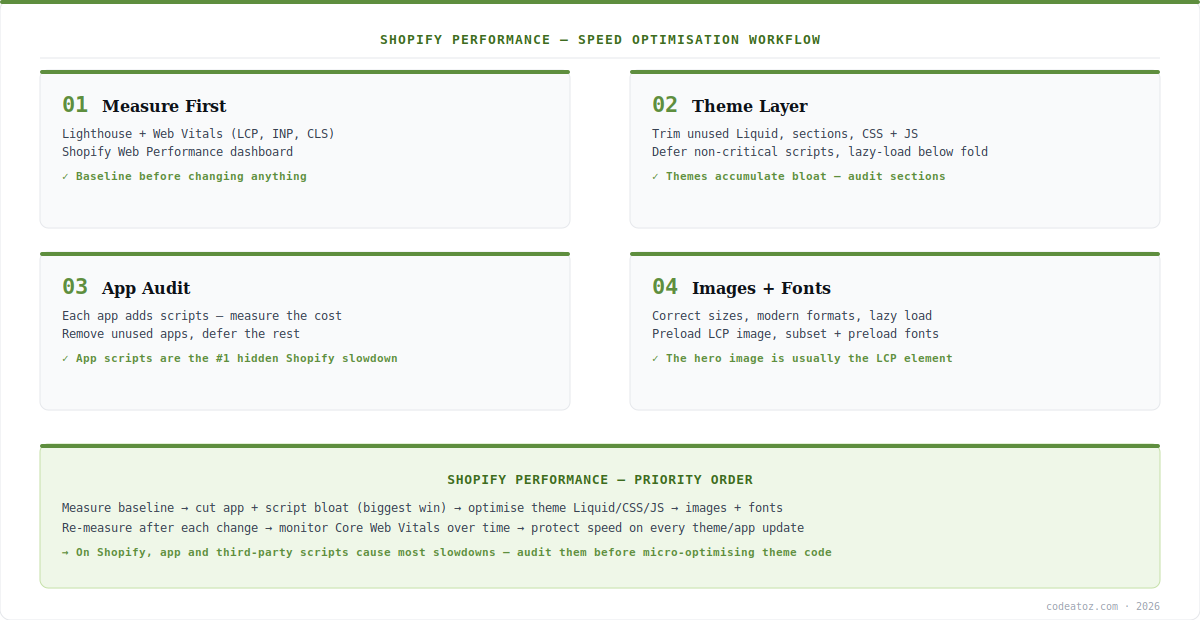
Shopify performance optimization begins with measurement, not changes. Baseline your Core Web Vitals — LCP (largest contentful paint), INP (interaction to next paint), CLS (cumulative layout shift) — with Lighthouse, PageSpeed Insights, and Shopify’s own Web Performance dashboard, which reports real-user data via the performance APIs. Without a baseline, you cannot tell whether a change helped or hurt. The discipline of Shopify performance optimization is to measure, change one thing, re-measure — because on a hosted platform with many interacting apps, intuition about what is slow is frequently wrong. Identify which metric is failing and what element causes it before touching anything.
Shopify Performance Optimization: The App Audit (Biggest Win)
The single highest-leverage move in Shopify performance optimization is the app audit. Every app you install can inject JavaScript and CSS into every page — and stores accumulate apps over years, each adding render-blocking scripts. Measure each app’s performance cost, remove apps you no longer use (their scripts often linger), and defer or async-load the rest where possible. In our experience, app and third-party script bloat causes the majority of Shopify slowdowns — far more than theme code. So Shopify performance optimization should attack apps before micro-optimising Liquid. The Shopify page speed guidance and Core Web Vitals reference frame what to target.
| Layer | What to do | Impact |
|---|---|---|
| Apps + scripts | Audit, remove unused, defer rest | Highest (usual #1 cause) |
| Theme code | Trim Liquid, sections, CSS/JS | High |
| Images | Right sizes, modern formats, lazy load | High (often the LCP) |
| Fonts | Subset, preload, limit weights | Medium |
| Monitoring | Track CWV after every change | Ongoing |
Shopify Performance Optimization: Theme, Media and Monitoring
After apps, Shopify performance optimization moves to the theme: trim unused sections and Liquid, defer non-critical JavaScript, lazy-load below-the-fold content, and remove dead CSS that themes accumulate. Then media — usually the biggest single LCP factor: serve correctly-sized images in modern formats, lazy-load below the fold, and preload the LCP hero image; subset and preload fonts and limit weights. Finally, make Shopify performance optimization continuous: monitor Core Web Vitals over time and re-check after every theme or app change, because a single new app can undo months of work. The priority order — measure, apps, theme, media, monitor — is what makes Shopify performance optimization efficient rather than a guessing game. Our performance team runs this end to end.
What we have learned doing Shopify performance optimization
Apps are almost always the answer. When a Shopify store is slow, our first move is the app audit — and it resolves the bulk of the problem far more often than theme tuning. Removing two unused apps frequently beats hours of Liquid optimisation. Start where the bloat actually is.
The LCP element is usually the hero image. Teams chase script timing while the real LCP culprit is an unoptimised, un-preloaded hero image. We identify the actual LCP element first and fix that specific image before anything else — it is the fastest single win on most stores.
Performance regresses silently with each app install. The work is never “done.” We set up Core Web Vitals monitoring so a newly added app that tanks speed is caught immediately, not three months later when rankings and conversion have already dropped.
Frequently Asked Questions About Shopify Performance Optimization
What is Shopify performance optimization?
Shopify performance optimization is improving your store’s speed and Core Web Vitals. Because Shopify hosts the platform, the wins are in what the store sends to the browser — apps and scripts, theme code, images and fonts — rather than server tuning. The effective approach measures first, then cuts app bloat, theme bloat, and media weight in priority order.
Why is my Shopify store slow?
The most common cause is app and third-party script bloat — each installed app injects JavaScript and CSS into pages, and stores accumulate them over time. Unoptimised images (often the LCP element) and theme bloat follow. Shopify performance optimization starts by auditing apps, since they cause the majority of slowdowns.
How do I measure Shopify performance?
Use Lighthouse and PageSpeed Insights for lab data and Shopify’s Web Performance dashboard for real-user Core Web Vitals (LCP, INP, CLS). Always baseline before making changes, then change one thing and re-measure. On a hosted platform with many interacting apps, measurement beats intuition for Shopify performance optimization.
Do Shopify apps slow down my store?
Yes — apps are the leading cause of Shopify slowdowns. Each can inject render-blocking JavaScript and CSS into every page, and removed apps often leave scripts behind. Auditing apps, removing unused ones, and deferring the rest is the highest-impact step in Shopify performance optimization, usually more so than theme changes.
How do I improve Core Web Vitals on Shopify?
Identify which metric fails and its cause, then fix in order: audit apps and scripts (INP and LCP), optimise and preload the LCP image, trim theme CSS/JS, and limit layout shift (CLS) with sized media. Re-measure after each change. This targeted approach is the heart of Shopify performance optimization for Core Web Vitals.
Can I optimise Shopify performance without a developer?
Partly — merchants can audit and remove unused apps, optimise image sizes, and choose a lightweight theme, which addresses much of the problem. Deeper Shopify performance optimization — deferring scripts, trimming Liquid, preloading the LCP element, font subsetting — typically benefits from developer help to do safely without breaking the store.
Need a Faster Shopify Store?
Our team runs full Shopify performance optimization — app audit, theme tuning, media and Core Web Vitals.




