
The Complete Shopware 6 Scheduled Task Guide — Cron Jobs 2026
Build reliable background jobs with Shopware 6 scheduled task — task class, handler registration, async message handlers, intervals, and the task management console.
A Shopware 6 scheduled task is the platform-native way to run background jobs on a time-based schedule — syncing data, cleaning up stale records, sending digest emails, or polling external APIs. Unlike raw cron jobs on the server, a Shopware 6 scheduled task is managed by the Shopware task runner, registered in the DI container, and visible in the admin under Scheduled Tasks. This guide covers the full implementation from task class to handler, services.xml registration, and async message queue integration.
Shopware 6 uses a two-layer background job system. The first layer is the Shopware 6 scheduled task — a time-based runner that executes at a configured interval. The second layer is the Symfony Messenger queue — asynchronous message handlers that process jobs dispatched at any point. For heavy operations, the best pattern is a Shopware 6 scheduled task that enqueues messages, with a separate MessageHandler doing the actual work. This keeps the scheduled task fast and lets the message queue scale the processing load.
Shopware 6 Scheduled Task: Creating the Task Class
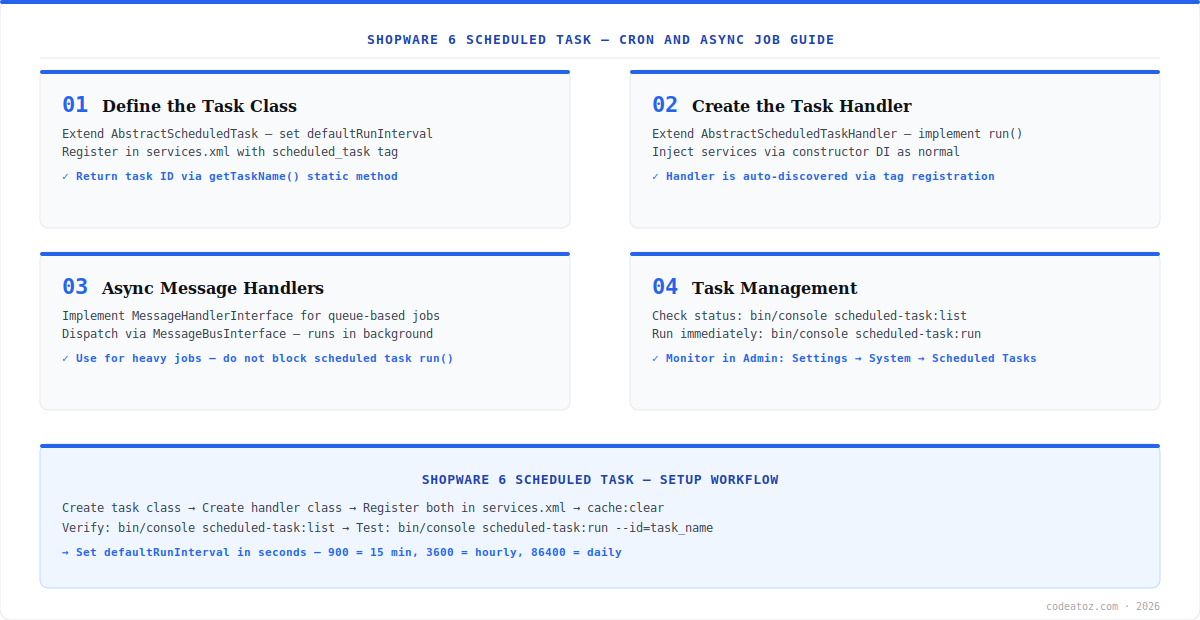
A Shopware 6 scheduled task requires two classes: the task definition and the handler. The task definition extends AbstractScheduledTask and declares the task name and default interval in seconds. Register it in services.xml with the shopware.scheduled.task tag. After running bin/console cache:clear and bin/console scheduled-task:register, the task appears in the Shopware admin under Settings → System → Scheduled Tasks. Refer to the Shopware 6 scheduled task documentation for the official implementation reference.
namespace MyPluginScheduledTask;
use ShopwareCoreFrameworkMessageQueueScheduledTaskScheduledTask;
class ProductSyncTask extends ScheduledTask {
    public static function getTaskName(): string { return "my_plugin.product_sync"; }
    public static function getDefaultInterval(): int { return 900; } // 15 minutes
}
<service id="MyPluginScheduledTaskProductSyncTask">
    <tag name="shopware.scheduled.task"/>
</service>

<service id="MyPluginScheduledTaskProductSyncTaskHandler">
    <argument type="service" id="scheduled_task.repository"/>
    <argument type="service" id="MyPluginServiceProductSyncService"/>
    <tag name="messenger.message_handler"/>
</service>Shopware 6 Scheduled Task: The Handler Class
The handler for a Shopware 6 scheduled task extends AbstractScheduledTaskHandler. Override run() with the actual logic. The handler automatically updates the task’s last run time and next execution time in the database. For operations that may take longer than a few seconds, dispatch a Symfony Messenger message from within run() instead of doing the work directly — this keeps the Shopware 6 scheduled task runner fast and non-blocking. The Messenger queue processes the heavy work asynchronously in a separate worker. Check the Shopware 6 developer documentation for the full AbstractScheduledTaskHandler API.
Never run heavy operations — external API calls, bulk database writes, file processing — directly in the Shopware 6 scheduled task handler’s run() method. If the task exceeds the PHP execution timeout, it is marked as failed and Shopware may increase the retry interval. Dispatch a Messenger message instead and let the queue worker handle the load asynchronously.
Shopware 6 Scheduled Task: Console Management
bin/console scheduled-task:list— view all registered tasks and their next run timebin/console scheduled-task:run— run all due tasks immediatelybin/console messenger:consume default— start consuming the async message queue. See the Symfony Messenger documentation for advanced queue configurationbin/console cache:clear— required after any services.xml change- Admin panel: Settings → System → Scheduled Tasks — view, enable/disable, trigger manually
- Set
SHOPWARE_HTTP_CACHE_ENABLED=0in.envduring development to see task updates immediately - Production: use Supervisor to keep
messenger:consumerunning as a daemon process
Our Shopware development team builds production plugin architectures with full scheduled task, message queue, and event subscriber integration for complex sync and automation requirements.
Frequently Asked Questions About Shopware 6 Scheduled Task
What is a Shopware 6 scheduled task?
A Shopware 6 scheduled task is a background job that runs automatically at a configured time interval — similar to a cron job but managed by Shopware’s task runner. Tasks are defined as PHP classes extending AbstractScheduledTask, registered in the DI container, and visible in the Shopware admin under Settings → System → Scheduled Tasks.
How do I create a Shopware 6 scheduled task?
Create a Shopware 6 scheduled task by defining two PHP classes: the task class extending AbstractScheduledTask (with getTaskName and getDefaultInterval methods), and the handler class extending AbstractScheduledTaskHandler (with the run() method). Register both in services.xml with the correct DI tags, then run bin/console cache:clear and bin/console scheduled-task:register.
How do I set the interval for a Shopware 6 scheduled task?
Set the interval for a Shopware 6 scheduled task by returning the number of seconds from the getDefaultInterval() static method in your task class. For example, return 900 for 15 minutes, 3600 for hourly, and 86400 for daily. Merchants can override the interval in the Shopware admin under Settings → System → Scheduled Tasks after the task is registered.
Can I run a Shopware 6 scheduled task manually?
Yes. Run a Shopware 6 scheduled task manually using bin/console scheduled-task:run from the command line, or trigger it from the Shopware admin panel under Settings → System → Scheduled Tasks. For development, use bin/console scheduled-task:run to execute all due tasks immediately without waiting for the next scheduled interval.
What is the difference between a Shopware 6 scheduled task and a Messenger message?
A Shopware 6 scheduled task runs on a time-based interval via the task runner. A Symfony Messenger message is dispatched on demand and processed asynchronously by a queue worker. The recommended pattern for heavy operations is a scheduled task that dispatches Messenger messages, with the handler doing the actual work in a separate worker process to avoid blocking the task runner.
How do I debug a failing Shopware 6 scheduled task?
Debug a failing Shopware 6 scheduled task by checking bin/console scheduled-task:list for the task status and last error, reviewing the Shopware log at var/log/prod-YYYY-MM-DD.log, and checking the admin panel under Settings → System → Scheduled Tasks. Ensure background workers are running with bin/console messenger:consume and that the DI container is cleared after any code changes.
Need a Shopware 6 Plugin with Scheduled Tasks?
Our team builds Shopware 6 plugins with full background job architecture — tasks, message queues, and event subscribers.




