
Magento 2 Product Import API — Bulk Create & Update via REST (2026)
Complete Magento 2 product import API guide — REST endpoint structure, bulk async import, custom attribute mapping, image import, CSV import model, and error handling.
The Magento 2 product import API is the correct integration point for any system that needs to create or update products programmatically — ERP systems, PIM platforms, supplier feeds, and custom migration scripts. The Magento 2 product import API supports both synchronous single-product REST calls and asynchronous bulk operations for high-volume updates. This guide covers the complete Magento 2 product import API: synchronous REST, bulk async with the async/bulk endpoint, custom attribute mapping, image import, and error handling patterns that make large-scale imports robust in production.
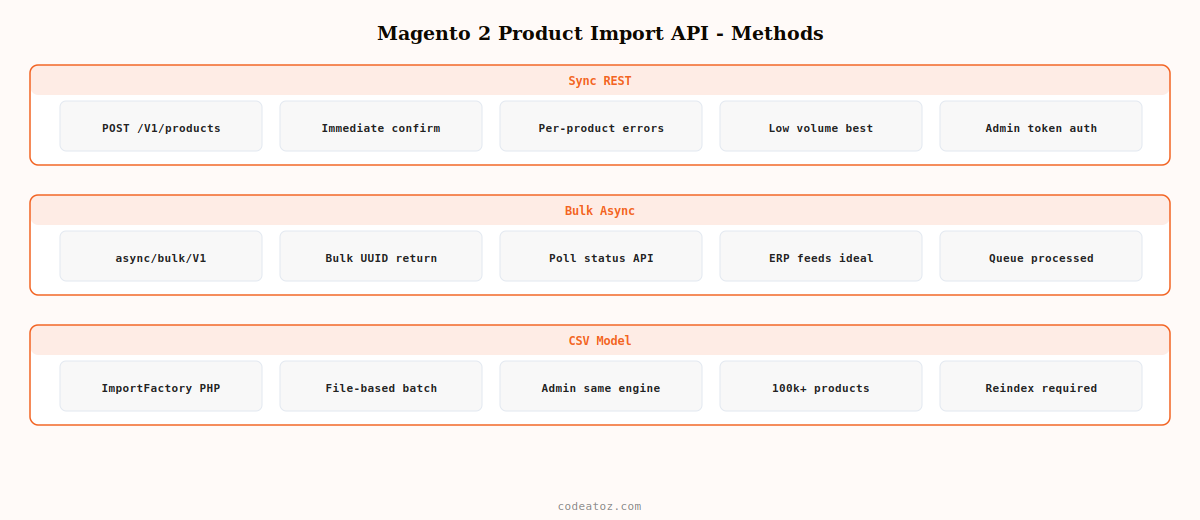
Magento 2 provides three mechanisms for product import: the REST API (best for programmatic integrations), the admin CSV import (best for one-off bulk operations), and direct database seeding (only for migrations with no running Magento instance). For live integrations with external systems, always use the Magento 2 product import API — direct database writes bypass validation, indexing, and event dispatch, producing data integrity problems that are difficult to diagnose.
Magento 2 Product Import API: Synchronous REST Create & Update
Use the synchronous Magento 2 product import API for low-volume operations where you need immediate confirmation that each product saved successfully. The POST /V1/products endpoint creates a product; PUT /V1/products/:sku updates an existing one.
# Obtain admin token for Magento 2 product import API
TOKEN=$(curl -s -X POST
  https://store.example.com/rest/V1/integration/admin/token
  -H 'Content-Type: application/json'
  -d '{"username":"admin","password":"ADMIN_PASS"}' | tr -d '"')

# Create a product via Magento 2 product import API
curl -X POST
  https://store.example.com/rest/V1/products
  -H "Authorization: Bearer $TOKEN"
  -H 'Content-Type: application/json'
  -d '{
    "product": {
      "sku":           "SKU-1001",
      "name":          "Example Product",
      "attribute_set_id": 4,
      "price":         99.99,
      "status":        1,
      "type_id":       "simple",
      "weight":        1.5,
      "extension_attributes": {
        "stock_item": {
          "qty":             100,
          "is_in_stock":     true,
          "manage_stock":    true
        }
      },
      "custom_attributes": [
        {"attribute_code": "description",      "value": "Full product description"},
        {"attribute_code": "short_description","value": "Short description"},
        {"attribute_code": "meta_title",       "value": "Example Product | Store"},
        {"attribute_code": "meta_description", "value": "Buy Example Product..."}
      ]
    }
  }'
Magento 2 Product Import API: Bulk Async for High-Volume Updates
For ERP feeds updating hundreds or thousands of products, use Magento 2’s bulk asynchronous API. The POST /async/bulk/V1/products endpoint accepts an array of product payloads, queues them via Action Scheduler, and returns a bulk operation ID. Check operation status via GET /V1/bulk/:bulkUuid/status.
# Bulk async Magento 2 product import API — accepts array of products
curl -X POST
  https://store.example.com/rest/async/bulk/V1/products
  -H "Authorization: Bearer $TOKEN"
  -H 'Content-Type: application/json'
  -d '[
    {"product": {"sku": "SKU-1001", "price": 89.99, "status": 1}},
    {"product": {"sku": "SKU-1002", "price": 149.99, "status": 1}},
    {"product": {"sku": "SKU-1003", "price": 199.99, "status": 0}}
  ]'

# Response includes bulk UUID:
# {"bulk_uuid":"abc123...","request_items":[...],"errors":false}

# Check status of bulk Magento 2 product import API operation
curl -X GET
  https://store.example.com/rest/V1/bulk/abc123/status
  -H "Authorization: Bearer $TOKEN"
Magento 2 Product Import API: Import Product Images
Images in the Magento 2 product import API are provided as base64-encoded strings in the media_gallery_entries array. Each entry specifies the image type (base, small, thumbnail), file name, and base64 content. Magento saves the image to pub/media/catalog/product automatically.
<?php
function buildImageEntry( string $filePath, bool $isBase = true ): array
{
    $content = base64_encode( file_get_contents( $filePath ) );
    $types   = $isBase ? ['image','small_image','thumbnail'] : [];

    return [
        'media_type' => 'image',
        'label'      => '',
        'position'   => 1,
        'disabled'   => false,
        'types'      => $types,
        'content'    => [
            'base64_encoded_data' => $content,
            'type'                => 'image/jpeg',
            'name'                => basename( $filePath ),
        ],
    ];
}

// Attach to product payload for Magento 2 product import API
$productPayload = [
    'product' => [
        'sku'                    => 'SKU-1001',
        'name'                   => 'Product with Image',
        'media_gallery_entries'  => [
            buildImageEntry( '/tmp/product-main.jpg', true ),
            buildImageEntry( '/tmp/product-alt.jpg',  false ),
        ],
    ],
];
⚠ Never use base64 image upload for bulk imports of 100+ products via the Magento 2 product import API. Encoding large images as base64 inflates payload size by ~33% and can cause memory exhaustion on both the client and server. For bulk image imports, pre-upload images to the Magento pub/media/import/ directory and reference them by filename in the REST payload using the file key in content instead of base64_encoded_data.
Magento 2 Product Import API: CLI Import Model
For scheduled bulk imports from supplier CSV feeds, the Magento 2 product import API CLI model is more efficient than REST for very large catalogues (10,000+ products). Use the ImportFactory and Csv source model to programmatically trigger the same import engine the admin uses.
<?php
use MagentoImportExportModelImportFactory;
use MagentoImportExportModelImportSourceCsvFactory;

class CatalogImportService
{
    public function __construct(
        private readonly ImportFactory $importFactory,
        private readonly CsvFactory    $csvFactory
    ) {}

    public function importFromCsv( string $filePath ): void
    {
        $import = $this->importFactory->create();
        $import->setData([
            'entity'           => 'catalog_product',
            'behavior'         => MagentoImportExportModelImport::BEHAVIOR_ADD_UPDATE,
            'validation_strategy' => 'validation-stop-on-errors',
            'allowed_error_count' => 10,
            '_import_multiple_value_separator' => ',',
        ]);

        $csvSource = $this->csvFactory->create(['file' => $filePath]);
        $import->setSource( $csvSource );

        // Validate before running Magento 2 product import API model
        if ( ! $import->validateData()->hasToBeTerminated() ) {
            $import->importData();
        }
    }
}
💡 After any bulk import via the Magento 2 product import API, run bin/magento indexer:reindex and bin/magento cache:clean to ensure product pages, search results, and category listings reflect the imported data. The REST API triggers indexing automatically for single-product operations, but bulk async operations queue reindexing as a background task that may lag several minutes on a busy server.
The Adobe Commerce bulk REST API documentation covers the async/bulk endpoint used in the Magento 2 product import API. The Magento 2 REST API product endpoint reference covers the full product payload schema. The Magento 2 data import documentation covers the CSV import model. See our Magento 2 custom indexer guide for handling reindexing after bulk product imports, and our Magento 2 development services for ERP integration builds.
Frequently Asked Questions — Magento 2 Product Import API
How do I import products into Magento 2 via REST API?
Obtain an admin token via POST /V1/integration/admin/token. Use POST /V1/products to create a product or PUT /V1/products/:sku to update one. Pass the product data as JSON including sku, name, attribute_set_id, price, status, type_id, stock extension attributes, and custom attributes. The Magento 2 product import API validates, saves, and indexes the product immediately for synchronous calls.
How do I bulk import products in Magento 2?
Use the async/bulk Magento 2 product import API endpoint: POST /async/bulk/V1/products. Pass an array of product objects. Magento queues each as a separate async operation and returns a bulk UUID. Check operation status via GET /V1/bulk/{uuid}/status. This approach handles hundreds of concurrent product updates without blocking the API or exhausting memory. After bulk import completes, run indexer:reindex and cache:clean.
How do I import product images via the Magento 2 product import API?
Include media_gallery_entries in the product payload. Each entry has a content object with base64_encoded_data, type (image/jpeg), and name. Set types to [image, small_image, thumbnail] for the main image. For bulk imports, pre-upload images to pub/media/import/ and reference them by filename to avoid base64 payload size inflation. Magento saves images to pub/media/catalog/product automatically.
How do I map custom attributes in the Magento 2 product import API?
Pass custom attributes in the custom_attributes array: each item has an attribute_code matching the Magento attribute code and a value. Multi-select attributes pass comma-separated option IDs. Boolean attributes pass 0 or 1. File and image attributes pass the filename after uploading to the media directory. Get attribute option IDs from GET /V1/products/attributes/{attributeCode}/options before building the Magento 2 product import API payload.
How do I handle errors in the Magento 2 product import API?
For synchronous REST, the Magento 2 product import API returns HTTP 4xx or 5xx with an error message in the response body. Log and handle these per-product. For bulk async operations, poll GET /V1/bulk/{uuid}/status and check each operation’s status field for failed or complete. Failed operations include error codes and messages. Set a retry budget and re-queue failed operations after fixing the payload issue.
Should I use the Magento 2 product import API REST or CSV import model for large catalogues?
For ongoing ERP or PIM integrations, use the Magento 2 product import API REST bulk async endpoint — it provides per-operation error reporting, works over HTTP without server access, and integrates with external systems cleanly. For one-off migrations of 100,000+ products, the programmatic CSV import model using ImportFactory is faster because it processes data in PHP memory batches without REST overhead. Both trigger indexing and cache invalidation correctly.
Need a Magento 2 ERP or PIM Integration?
CodeAtoZ builds Magento 2 product import API integrations with ERP, PIM, and supplier systems — bulk async, custom attribute mapping, image sync, and error alerting.




